


The easiest, most definitive way to tell if a YouTube channel is monetized is by looking for specific creator features. Spot a 'Join' button for channel memberships or a Super Thanks option under their videos? That's your answer.
These features are only available to channels accepted into the YouTube Partner Program (YPP), making them a dead giveaway for monetization.
Why Checking YouTube Monetization Status Matters
Figuring out if a channel is monetized is more than just satisfying curiosity—it’s a vital piece of business intelligence for any creator serious about growth. For your own channel, it’s everything. Getting into the YouTube Partner Program (YPP) is your official green light to start earning from ads, channel memberships, Super Chats, and YouTube Premium revenue.
Knowing your status helps you forecast earnings and, just as importantly, lets you quickly spot and fix any problems that might suddenly stop the money from coming in.
But what about checking other people's channels? The reasons are just as strategic.
- Competitive Analysis: Seeing if other creators in your niche are making money can be a huge validation for your own content strategy. It tells you there's a paying audience for what you're doing.
- Partnership Opportunities: Before you reach out for a collaboration or sponsorship deal, confirming a channel is monetized signals they have an engaged audience and are serious about their work.
- Learning and Inspiration: When you identify which channels are successfully monetized, you can study what they're doing right—from their video formats to how they engage with their community.
This single skill provides a much clearer picture of the creator economy and exactly where you fit in. If you're looking to build a sustainable career on the platform, it's foundational knowledge. Dive deeper into these kinds of insights over on our creator strategies blog.
The Financial Engine Behind Monetization
The push to get monetized is powered by YouTube's massive financial ecosystem. The numbers are almost hard to believe. YouTube's ad revenue soared to $36.1 billion in a single year, a huge 14.6% increase from the year before.
This incredible figure, backed by over 2.85 billion monthly active users, represents a massive pool of potential earnings for creators who meet the YPP requirements. You can learn more about YouTube's powerful statistics and what they mean for you.
For creators, checking your monetization isn't just about seeing a dollar sign. It’s about confirming that your hard work has connected with an audience in a way that YouTube officially recognizes and rewards. This validation is often as important as the first dollar earned.
Confirming Monetization on Your Own Channel
If you want to know for sure whether your own channel is monetized, you have to go straight to the source: YouTube Studio. Forget the guesswork and third-party tools. This is where YouTube gives you the official, undeniable verdict on your status in the YouTube Partner Program (YPP).
Knowing where to look is half the battle. It's not just about finding a single green icon; it’s about understanding the whole picture of your channel's financial health.
The Earn Tab: Your Monetization Hub
The first and most important stop is the Earn tab in YouTube Studio. Think of this as your command center for everything related to making money on the platform. What you see here changes completely depending on where you are in your creator journey.
- Before You're Eligible: If you haven't met the requirements yet, this page is your progress tracker. It will show your current subscriber count and public watch hours, counting up toward those big YPP milestones. It’s a great motivator.
- Once You've Applied: After you hit "apply," this screen will update to show that your application is "In Review." This tells you you're in the queue and waiting for YouTube's team to take a look.
- After Approval: The moment you're accepted, the Earn tab transforms. It becomes your dashboard for managing ad settings, Super Thanks, channel memberships, and all the other ways you can earn.
This progression marks the clear shift from being just a creator to running a business on the platform.
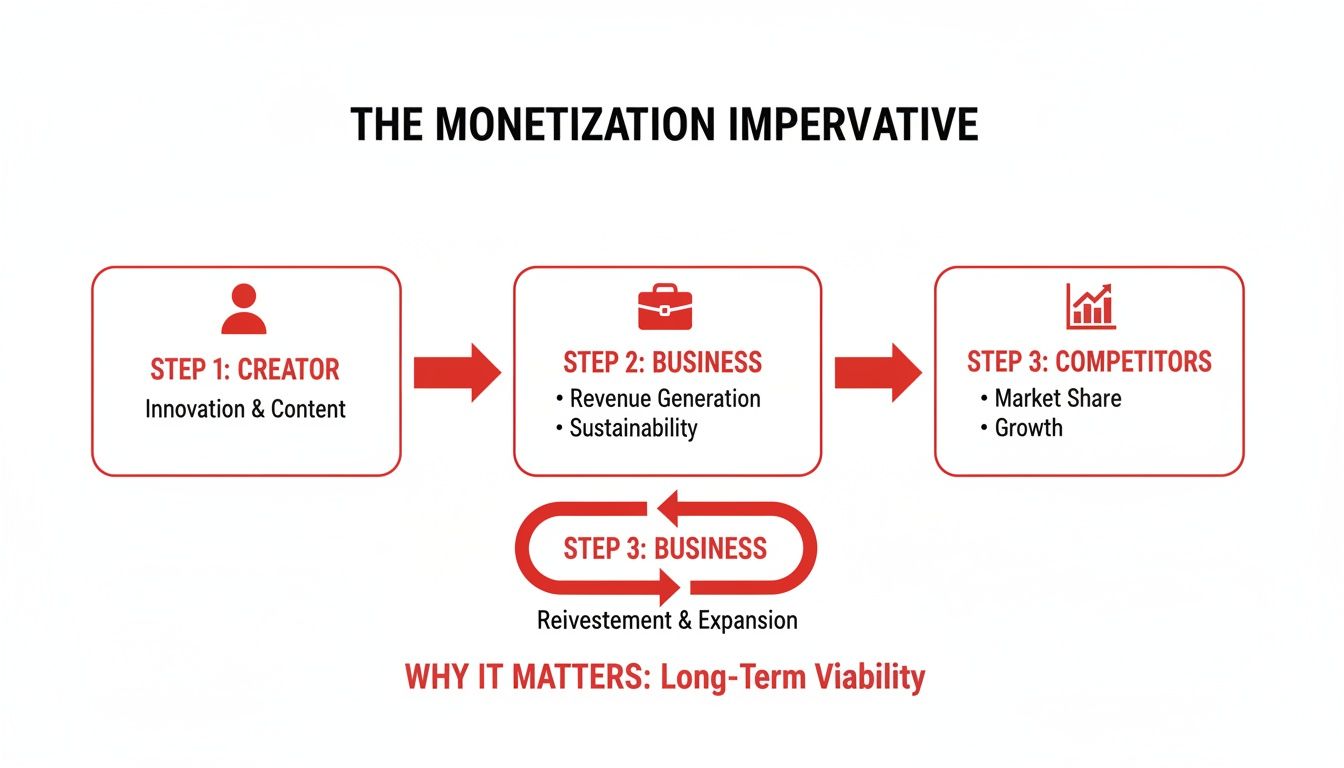
As the flowchart shows, monetization is the key to turning your creative work into a real business, allowing you to analyze competitors and reinvest in your growth.
Diving into Your Revenue Analytics
Once you're in the YPP, the next place to confirm everything is working is your analytics. Head over to YouTube Studio > Analytics > Revenue. If your channel is actively earning from ads, this is where you'll see the proof in the numbers.
If this tab is blank or doesn't exist, it's a clear sign your channel isn't generating ad income yet. But if you see charts and data detailing your RPM (Revenue Per Mille) and CPM (Cost Per Mille), you have hard evidence of monetization.
For example, you might see your RPM is $5.00, which means you're earning roughly $5 for every 1,000 views. This data isn't just confirmation; it’s a powerful tool for figuring out which videos are the most valuable to advertisers.
Pro Tip: Don't forget about AdSense! A common mistake new creators make is having an issue with their AdSense account, like a payment hold or an identity verification problem. Always log in to AdSense directly and check for any alerts. An issue there can block all your payments, even if YouTube Studio looks fine.
Checking AdSense and Video-Level Monetization
A healthy YPP status and growing revenue are great, but there are two final checkpoints. First, as mentioned, your connected Google AdSense account must be active and error-free. Any holds or problems there will stop your money cold.
Second, you need to check monetization on a video-by-video basis. This is where you can spot individual problems.
- In YouTube Studio, go to the Content tab.
- Look for the "Monetization" column.
- A green dollar sign icon ($) means the video is fully monetized and earning.
- A yellow icon means limited ads are running, while a red icon means it's not monetized at all, usually due to a copyright claim or a policy issue.
This detailed view helps you find specific videos with problems so you can request a review or fix the issue to get them earning again. By running through all these checks, you'll have a complete and accurate picture of your channel's monetization status.
How to Tell if Other Channels Are Monetized

Ever found yourself wondering if a competitor or a channel you admire is actually earning money from their videos? While YouTube doesn't just hand out a public "monetized" badge, you can definitely play detective and look for some tell-tale clues. Learning how to check the monetization status of other channels is a great way to gather intel for your own strategy.
The most obvious sign, of course, is seeing ads. But there's a catch. YouTube can and does run ads on non-monetized content, pocketing 100% of that revenue themselves. So, just because you see a single pre-roll ad doesn't mean the creator is getting paid.
A much better way to gauge this is by watching several videos from the same channel. If you consistently encounter pre-roll ads, mid-roll interruptions, and display ads, the odds are very high that the channel is in the YouTube Partner Program (YPP) and earning from that content.
Look for YPP-Exclusive Features
Beyond just ads, the real "smoking guns" are the features that YouTube only gives to monetized creators. If you spot any of these, you can be certain the channel is in the YPP.
When you're on a channel's homepage or watching a video, keep an eye out for these specific buttons:
- The "Join" Button: This allows viewers to sign up for paid channel memberships, unlocking special perks. If you see a "Join" button right next to "Subscribe," it's a dead giveaway. The channel is 100% monetized.
- Super Thanks: Look below the video player, right around the "Like" and "Share" buttons. If there's a "Thanks" button (it has a heart and a dollar sign), viewers can send a direct tip to the creator. This is another feature reserved exclusively for YPP members.
- Merch Shelf: Many monetized channels connect their official merchandise stores, which appear as a "Store" tab on their page or as a product shelf directly beneath their videos. This integration is another YPP-only benefit.
Finding any one of these is definitive proof. It means the creator has not only met the requirements but has also activated YouTube's core earning tools.
Using Third-Party Tools for Estimates
So, what if you want to get a ballpark idea of how much a channel might be making? That’s where third-party analytics sites like SocialBlade enter the picture. These platforms scrape public data to provide estimated monthly and yearly earnings for pretty much any channel out there.
It's crucial to take these numbers with a massive grain of salt. The earnings are wildly speculative estimates. They are calculated using a very broad CPM range (cost per thousand views), which can swing dramatically depending on a channel's niche, audience demographics, and video topics.
For instance, you might see an estimate that a channel earns between $1,000 and $16,000 a month. That's a huge gap! But even with that massive range, it tells you the channel is operating on a completely different scale than one estimated to earn less than a hundred dollars.
When you're trying to figure out if another channel is monetized, you're really just looking for a collection of clues. Some are more reliable than others. This table breaks down what to look for and how much you can trust each signal.
Monetization Indicators for External Channels
| Indicator | What to Look For | Reliability Level |
|---|---|---|
| Ads | Pre-roll, mid-roll, or banner ads on multiple videos. | Medium. YouTube sometimes runs ads on non-YPP channels. |
| "Join" Button | A button next to "Subscribe" for channel memberships. | High. This is a YPP-exclusive feature. |
| Super Thanks | A "Thanks" button below the video for viewer tips. | High. Another guaranteed sign of monetization. |
| SocialBlade | Website showing estimated earnings and stats. | Low. The numbers are broad estimates, not precise data. |
Ultimately, combining these methods will give you the clearest picture. Always start by looking for the slam-dunk indicators like a "Join" button or Super Thanks. From there, you can turn to third-party tools to get a rough (but never exact) sense of a channel's financial performance.
Troubleshooting Common Monetization Hurdles
Hitting a monetization roadblock feels awful, but trust me, it's a rite of passage for many creators. Nearly every problem has a solution. When you check your status and get bad news, the key is to stay calm, figure out what's really going on, and follow a clear plan to fix it.
One of the most common issues you'll run into is that dreaded yellow dollar sign. Seeing that little yellow icon next to your video in the YouTube Studio "Content" tab means it's been flagged for “limited ad suitability.”
This doesn't mean your entire channel is demonetized. It just means that specific video isn't considered advertiser-friendly, so it will earn very little, if any, ad revenue.
The Yellow Icon and Asking for a Human Review
When that yellow icon appears, your first move should be to honestly compare your video's content against YouTube's advertiser-friendly guidelines. Be critical. Sometimes, the automated system gets it wrong, especially if you're covering sensitive topics in a news or educational style.
If you’re confident the system made a mistake, you can request a human review.
- Eligibility: You can usually request a review for videos that get a decent amount of traffic soon after you publish them.
- The Process: It's simple. Just click the yellow icon in your Studio, and you should see a prompt to request that a real person take a look.
- Outcome: A human reviewer will watch your video and make the final call, which usually takes a few days. If they agree with your assessment, the icon flips to green, and you're back in business.
Here's a common myth I want to bust: one yellow icon won't put your whole channel in jeopardy. It's a video-specific issue. But, if you're getting yellow icons all the time, it's a big red flag that your content strategy might be clashing with YouTube's ad policies, and that can cause bigger problems later on.
AdSense Errors and Getting Kicked Out of the YPP
Another classic headache is a problem with your AdSense connection. Your YouTube channel has to be linked to one—and only one—active AdSense account. If you get an email about a duplicate account or a payment hold, you have to sort that out directly in your AdSense dashboard to get paid.
In more serious situations, a channel can be removed from the YouTube Partner Program (YPP) entirely for policy violations. This is a huge setback, but you have a 21-day window to appeal the decision.
Your appeal needs to be a short, clear video explaining why you think YouTube made a mistake. Point to specific examples in your content that prove you follow the rules. A well-made appeal can get your monetization reinstated.
For creators who want to skip the grind of meeting the initial requirements, there's another path. Some people choose to get a pre-approved account from a trusted provider. An aged YouTube channel can get you earning much faster, but you have to make sure it’s the right fit for your long-term goals.
By understanding how to deal with these issues—from a simple ad limitation to a full program removal—you'll be much better prepared to handle whatever YouTube throws at you.
What to Do After You Check Your Status

Alright, so you’ve checked your channel's monetization status. That's the easy part. The real work starts now—turning that knowledge into a smart plan that actually grows your channel and your bank account.
What you do next depends entirely on what you found. Whether you're not yet eligible, just got rejected, or are already monetized, each path requires a completely different strategy.
Not Yet in the YPP
If you're still grinding to meet the YouTube Partner Program (YPP) requirements, you need to have tunnel vision. Forget about all the fancy monetization features for now and focus on the only two things that get you in the door: subscribers and watch hours.
My advice? Create content that people can't help but binge. Think multi-part series or tightly themed playlists that keep viewers clicking to the next video. That's how you'll rack up watch time. And don't forget to end every single video with a clear, direct call-to-action asking people to subscribe.
Rejected from the YPP
Getting that rejection email stings, I know. But it’s not a dead end. YouTube will tell you why you were denied, and you should treat that feedback like a personalized instruction manual on what to fix.
The most common culprits I see are:
- Reused Content: This is a big one. You can't just re-upload clips from other sources without adding significant original commentary, educational value, or a new perspective.
- Repetitious Content: If your videos feel like they were made on an assembly line with a template, YouTube will notice. Each video needs to offer something distinct.
- Community Guideline Strikes: Any active strikes on your channel are an automatic "no" from the YPP review team.
Go through your channel with a fine-toothed comb. Address the specific issues YouTube pointed out, which might mean deleting or heavily editing problematic videos. Before you reapply, make sure your channel clearly offers something unique.
For creators who feel stuck in a loop of rejections or just want to skip the grind, some look into pre-approved channels. You can find ready-to-go options that already meet all the program's requirements at places like https://monetizedprofiles.com/products/monetized-youtube-channel.
Fully Monetized and Ready to Optimize
Congratulations! You made it into the YPP. Now it's time to shift from getting in to maximizing what you earn. The key is to build multiple income streams right on the platform so you aren't living and dying by ad revenue alone.
Don't just rely on ads. Activating features like Channel Memberships, Super Thanks, and the Merch Shelf can create a more predictable revenue stream that isn't entirely dependent on fluctuating ad rates. These tools also deepen your community connection.
Also, don't overlook your cut of YouTube Premium revenue. This is a separate income stream from the platform's 125 million subscribers—a number that shot up 25% in just one year. As a partner, you get a slice of that subscription pie, which adds a nice, stable layer to your earnings.
Once you know where you stand, you can start exploring specific content formats to open up even more income streams. For instance, this practical guide on how to monetize YouTube Shorts is a great resource.
No matter your status, the most important thing is to take clear, decisive action.
Answering Your Top Monetization Questions
When you're trying to figure out YouTube monetization, a few common questions always seem to pop up. Whether you're just starting or you've been at this for a while, getting straight answers is key. Let's tackle some of the most frequent queries we hear.
A big one is: "Why am I seeing ads on a channel that isn't even in the YouTube Partner Program (YPP)?" It's a bit confusing, but YouTube's policy actually lets them place ads on any video on the platform. If the creator isn't monetized, YouTube simply keeps 100% of that ad money. So, just because you see an ad, it doesn't automatically mean the channel owner is getting paid.
Can I See How Much Another Channel Makes?
In a word, no. A channel’s specific earnings are private, locked away in the creator's YouTube Studio. Tools like SocialBlade might throw out some huge, impressive numbers, but take them with a huge grain of salt. They're often wildly inaccurate.
Here's why those third-party estimates are little more than a guess:
- Where viewers are from: Ad rates for someone watching in the United States are drastically different from someone watching in India. The tools don't know this breakdown.
- The video's topic: A video on real estate investing will have a much higher ad rate (CPM) than a prank video.
- Other income streams: The estimates completely ignore money from memberships, Super Thanks, merchandise shelves, or brand deals.
Think of those numbers as a fun but unreliable ballpark figure, not a true measure of a channel's financial success.
How Long Does the Monetization Review Actually Take?
So you've hit the YPP requirements and sent in your application. Now what? Officially, YouTube says to expect a decision in about one month. But in reality, it's all over the place.
I’ve seen creators get approved in just a couple of days, usually when their channel is squeaky clean and consistently follows all the guidelines. On the flip side, some creators end up waiting longer, especially if their content needs a closer look from a human reviewer to check for compliance. The best thing you can do is keep an eye on the "Earn" tab in YouTube Studio for real-time updates.
Don't forget that different video formats have their own rules. If you're all-in on short-form video, it's worth reading a detailed explanation of YouTube Shorts monetization requirements to understand how that specific path works.
Tired of waiting to meet the YPP requirements? MonetizedProfiles offers fully approved YouTube accounts, so you can start earning from day one. Take a look at our available channels at https://monetizedprofiles.com and jumpstart your YouTube career.


