


Before you even think about slotting a video idea into a calendar, you need a strategy. This is the make-or-break step that separates the faceless channels that take off from the ones that just… don't. Think of it as the foundation for your entire content operation. It ensures every single video you create has a real purpose.
Build Your Content Strategy Foundation
Jumping right into a calendar without a plan is a recipe for disaster. It's like trying to build a house without a blueprint—you might end up with something standing, but it won't be stable, and it definitely won't get you where you want to go. For faceless and automated accounts, this foundation is even more crucial because a clear, consistent purpose is what will drive your growth.
First things first: what does "success" actually mean for your channel? Are you aiming for a specific monthly revenue goal? Is it all about hitting 100,000 subscribers in six months? Or maybe you're trying to push a certain amount of traffic to your website.
Without clear, measurable goals, you're just making content for the sake of it. It’s no surprise that creators who use a structured content calendar see up to a 70% increase in success when they lock in their goals from day one. In fact, one automation agency was able to generate 50 qualified leads a month just by getting strategic with their planning, focusing on dates, purpose, and target channels.
Define Your Core Content Pillars
With your goals in hand, it's time to define your content pillars. These are the main topics or themes your channel will revolve around. They act like guardrails, keeping your content focused and helping you become the go-to source in your niche.
Let's say you're running a faceless finance channel. Your pillars might look something like this:
- Budgeting Basics for absolute beginners.
- Passive Income Ideas for the side hustle crowd.
- Investing Strategies for building long-term wealth.
These pillars become your creative compass, guiding your video ideas and making sure every piece of content is exactly what your audience signed up for. If you want to keep those pillars full of fresh topics, you'll need to master how to brainstorm and generate great ideas.
A solid content pillar strategy does more than just keep you organized. It creates a predictable, valuable experience for your viewers, which is exactly how you turn casual watchers into a loyal community.
Align Pillars with Audience Intent
The final piece of the puzzle is connecting your pillars to what people are actually searching for. This means doing a little digging into keyword trends and really understanding the questions and problems your target audience has.
Every video should solve a problem or answer a specific question. When your content lines up perfectly with what your audience needs, you create a powerful engine for sustainable growth. For more deep dives on building a content strategy that actually works, check out our other guides on the https://monetizedprofiles.com/blog.
Design Your Calendar and Production Workflow
Okay, you've laid the strategic groundwork. Now it's time to build the command center for your entire content operation. This isn't just about scheduling posts; it's about creating a living, breathing document that translates your big-picture strategy into a clear, day-to-day action plan. A well-designed content calendar is the secret to a smooth, predictable, and goal-oriented production process.
You don't need to overcomplicate things with expensive software right away. Seriously, a basic spreadsheet in Google Sheets or a visual board in a tool like Trello can be incredibly effective. The real magic is in creating a template that captures all the critical details you need to take an idea from a spark of inspiration to a published piece of content. If you're looking for a solid starting point, this guide on how to build your church's social media content calendar offers some great practical advice, regardless of your niche.
This whole process flows logically—from your high-level goals down to the specific keywords you'll target.
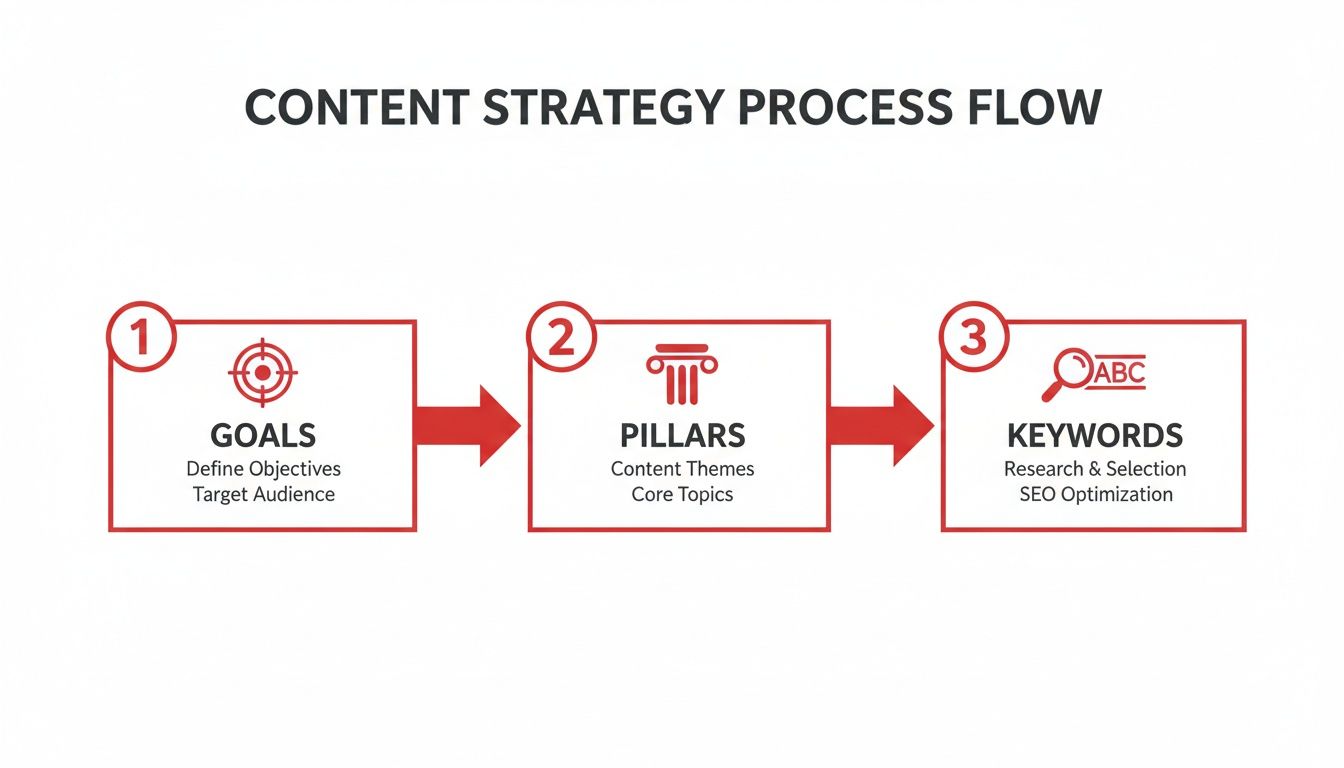
As you can see, a solid keyword strategy isn't something you just pull out of thin air. It’s the natural outcome of knowing your goals and defining your content pillars first.
Key Fields for Your Calendar Template
Any automated channel that succeeds long-term runs on a calendar that tracks much more than just a posting date. Your template needs to be a complete dashboard for every single piece of content you produce.
To build a really robust system, you need a few non-negotiable fields. I've found these are the ones that make the biggest difference in keeping things organized and effective.
Essential Content Calendar Fields
| Field Name | Purpose and Example |
|---|---|
| Post Date | The exact day and time content goes live. Example: 10/28/2024, 9:00 AM EST |
| Platform | The specific channel the content is designed for. Example: TikTok, YouTube Shorts, IG Reels |
| Content Pillar | The core topic or theme this video supports. Example: Financial Literacy Basics |
| Video Hook | The crucial first 3-5 seconds of your script. Example: "Stop making this one money mistake..." |
| Call-to-Action (CTA) | The specific action you want viewers to take next. Example: "Follow for daily tips" or "Link in bio for the full guide" |
| Production Status | A simple workflow tracker. Example: Idea -> Scripting -> Editing -> Scheduled |
| Key Metrics | The post-publication data you'll track. Example: Views, Watch Time, Shares, Saves |
Having this level of detail transforms your calendar from a simple schedule into a powerful workflow management tool. It gives you a bird's-eye view of your entire production pipeline, helping you spot bottlenecks and ensuring every video is fully optimized before it ever sees the light of day.
Tailoring Your Calendar to Your Channel
Here’s the best part: this is your calendar. You get to build it around your specific needs and workflow. The information a high-volume TikTok channel needs is worlds away from what a long-form YouTube channel requires.
Think about it. A "faceless" motivational clips channel on TikTok might have extra fields for Trending Audio and Visual Concept. The whole game is speed—cranking out multiple videos a day to catch trends. If you're just getting started, you can even fast-track your progress with a pre-approved monetized TikTok account to start earning right away.
On the other hand, a monetized YouTube automation channel has a much longer and more deliberate production cycle. For that, you’d probably add columns like
Script Stage,Voiceover Status, andThumbnail Designto track the more complex, SEO-focused workflow.
At the end of the day, the calendar should serve you, not the other way around. Start with these essential fields, and don't be afraid to add or remove columns as you figure out what information truly helps you keep your content engine humming.
Nail Your Content Cadence and Scheduling
Alright, you've got a solid calendar template. Now comes the real test: turning that plan into a living, breathing content machine. This is where execution takes over, and you start building the consistent posting rhythm that both algorithms and your audience will love. A perfect plan is useless if it just sits in a spreadsheet.
If there's one secret weapon for staying ahead of the game, it's content batching. Seriously. Instead of frantically trying to create something new every single day, you set aside dedicated blocks of time to film, edit, and prep an entire week’s or even a month's worth of content at once. This lets you get into a creative groove and frees up the rest of your time for other crucial tasks.
Find the Right Rhythm for Each Platform
Here’s a hard truth: you can't just copy and paste your posting strategy across all platforms. What kills it on TikTok will feel like spam on YouTube, and a YouTube strategy will be way too slow for the fast-paced world of Reels. You have to adapt. Consistency is the key to growth, but it has to be the right kind of consistency for each platform.
For instance, a high-growth TikTok strategy almost always involves a higher posting volume to jump on trends and see what hooks stick. But for a monetized YouTube channel, the name of the game is quality and evergreen SEO, so a slower, more deliberate schedule often wins.
Let’s get practical. Here are some starting points I've seen work well for automated and faceless accounts:
- TikTok: Aim for 1-3 posts per day. This gives you enough runway to experiment with different sounds, formats, and ideas without burning out.
- YouTube (Long-Form): Start with 1-2 solid, well-produced videos per week. This is a sustainable pace that gives each video enough time to get picked up by the algorithm.
- YouTube Shorts / IG Reels: Posting 3-5 times per week is a great sweet spot. It keeps you active and relevant in the short-form feed without the daily grind of TikTok.
Think of these as your baseline. Your own analytics will eventually show you exactly what your audience craves and when they want it.
See Your Entire Workflow at a Glance
One of the biggest headaches in content creation is losing track of what’s been filmed, what's being edited, and what’s actually ready to go live. A simple, color-coded status system in your calendar solves this problem instantly. It gives you a bird's-eye view of your entire production pipeline and helps you spot bottlenecks before they completely derail your schedule.
It's no surprise that over 60% of creators report feeling burned out, and a chaotic workflow is often the culprit. A visual status system is your best defense, turning a messy process into something clear and manageable.
Try adding a status tag system like this to your calendar:
- Blue: Idea/Concept
- Orange: Scripting/Research
- Yellow: Editing/In Review
- Green: Ready to Publish/Scheduled
This simple visual cue makes it incredibly easy to see if you have enough "green" content locked and loaded for the coming week or if you need to spend more time on the "orange" phase. It's a true game-changer for hitting deadlines without the constant stress.
Remember, inconsistency can be brutal—some creators see their audience retention drop by up to 40% in a single month. While mega-brands might churn out 48 to 72 posts per week, a realistic goal for most of us is 3-5 quality posts weekly per platform to maintain steady, sustainable growth. For a deeper dive into the data, the team at SkedSocial.com has a great breakdown on building a social media calendar.
Choose the Right Tools for Your Automation Stack
A well-organized spreadsheet is a great starting point, but the right scheduling tools are what really make an automated or faceless channel run like a well-oiled machine. This isn't about chasing the most expensive software with a million features. It’s about finding a platform that smooths out the bumps in your workflow and gives you back your time.
You're essentially looking at two paths: stick with the free, built-in schedulers on platforms like YouTube and TikTok, or level up with a dedicated third-party tool.
Native Schedulers vs Third-Party Platforms
When you're just getting your feet wet, the native schedulers are a fantastic, no-cost option. You can line up videos weeks in advance with YouTube Studio, and TikTok’s Business Suite lets you schedule content up to 10 days out. They get the job done, they're reliable, and you don't have to leave the platform to use them.
The cracks start to show once you scale up. Juggling multiple channels or a high volume of content means you're constantly hopping between browser tabs just to get everything scheduled. That’s time you could be spending on actually creating.
This is where platforms like Hootsuite, Buffer, or Sprout Social really shine. Their biggest selling point is the unified dashboard—one central hub to manage, schedule, and analyze everything. For faceless creators, the killer feature is often bulk scheduling, which lets you upload and schedule a whole batch of videos from a single spreadsheet.
Choosing the right tool isn't just about convenience; it's a strategic decision. The time you save with bulk scheduling and unified analytics is time you can reinvest into optimizing your content strategy and scaling your business.
Key Features for Automation and Faceless Creators
As you look at different tools, it's easy to get sidetracked by flashy features you'll never touch. For this specific type of content creation, your focus should be razor-sharp.
Content Scheduling Tool Comparison
To help you decide, let's break down how native schedulers stack up against popular third-party tools in the areas that matter most for an automated workflow.
| Feature | Native Schedulers (YouTube/TikTok) | Third-Party Tools (Hootsuite/Buffer) |
|---|---|---|
| Bulk Scheduling | Mostly non-existent; you have to schedule each post one by one. | A core feature; upload dozens of posts from a single file. A huge time-saver. |
| Unified Dashboard | No. Each platform lives in its own world with a separate interface. | Yes. Manage all your channels (TikTok, YouTube, etc.) from one central hub. |
| Integrated Analytics | Provides deep data, but you can only see it for that specific platform. | Offers cross-platform analytics to easily compare performance side-by-side. |
| AI Content Tools | Very basic, if any. YouTube has some AI-powered topic insights. | Often includes advanced AI for generating ideas, captions, and hashtags. |
So, what’s the verdict? If you're managing one or two channels, the native tools will serve you just fine for a while. But if your goal is to build a true content engine that runs with minimal daily effort, investing in a third-party platform with powerful automation is going to pay for itself many times over.
Analyze Performance to Optimize Your Strategy
Your content calendar shouldn't be a static document you create once and then ignore. The real power comes from treating it as a living, breathing tool that evolves with your channel. This is where you close the loop—using actual performance data to decide what you’ll create next.
Without this step, you're essentially just guessing. You’re throwing content out there and just hoping something resonates. By regularly looking at your analytics, you move from guesswork to making strategic decisions that consistently grow your automated or faceless channel.
Define Your Key Performance Indicators
Every platform has its own algorithm and its own signals for what makes content "good." To really understand what's working, you need to look beyond vanity metrics like follower counts. Instead, focus on the Key Performance Indicators (KPIs) that show you what the audience actually enjoys and what the algorithm wants to see more of.
For the main platforms, here's what truly matters:
- TikTok: The two metrics that move the needle are Average Watch Time and Shares. A long watch time proves your video is holding attention, which is a massive signal to the algorithm. Shares are even better—they show your content is so valuable that people are actively recommending it.
- YouTube: Here, it’s all about Click-Through Rate (CTR) and Audience Retention. A high CTR means your thumbnails and titles are doing their job and grabbing eyeballs. High retention proves you're delivering on the promise of that title, keeping viewers hooked.
Focusing on these specific KPIs gives you a much clearer picture of what’s actually connecting with people.
Establish a Consistent Review Process
Collecting data is only half the battle; you have to actually use it. The secret is building a simple, repeatable review habit. You don't need to spend hours drowning in spreadsheets. A quick, focused check-in once a week or every two weeks is often enough to spot important trends.
Your goal is simple: figure out what worked, what flopped, and—most importantly—why. Was it a killer hook? A different editing style? The topic itself? Digging into these questions is how you get better.
When you do your review, add a "Notes" column to your content calendar. Jot down quick insights for your best and worst-performing posts. For instance, you might write: "The 'Passive Income Myths' video got 2x the usual shares. The audience clearly likes the myth-busting format. Need to do more of these."
This small habit turns your past efforts into a blueprint for future wins. It ensures that every new piece of content you create is smarter than the last, building a channel that grows consistently instead of just churning out videos.
Answering Your Top Content Calendar Questions
Even with the best-laid plans, you're bound to have questions once you start putting a content calendar into practice. Let's dig into some of the most common issues I see creators run into. Getting these details right can make all the difference in keeping your workflow humming along.
One of the biggest concerns? Flexibility. People hear "calendar" and think rigid, but what happens when a massive trend blows up on TikTok overnight? The trick is to build that flexibility right into your plan from day one. You'll want to schedule your core, evergreen content ahead of time, but always leave a couple of open slots each week. This lets you pounce on timely, reactive videos without derailing your entire strategy. It's the perfect mix of consistency and relevance.
How Far Out Should I Plan My Content?
For most creators, especially if you're running automated or faceless channels, planning two to four weeks in advance is the sweet spot. This gives you a comfortable buffer to get your content batched and ready, but you're not planning so far ahead that your ideas start to feel dated. A monthly planning session is great for big-picture themes, but a quick weekly check-in keeps you nimble enough to react to what's happening now.
A system I've seen work really well looks like this:
- Monthly Theme Planning: Map out the main topics or series you want to cover for the month ahead.
- Weekly Production Batching: Set aside time to film and edit a full week's worth of videos in one go.
- Daily/Weekly Scheduling: Get your finished posts uploaded and scheduled a few days to a week out.
This layered approach gives you a solid foundation without making you feel trapped.
Your calendar isn't meant to be a set of rules carved in stone. Think of it more like a dynamic roadmap. The point isn't to follow it to the letter, but to have a guide that keeps you pointed in the right direction, even when you need to take a few detours.
What Happens If I Run Out of Ideas?
Ah, the classic fear of every creator. The good news is, your content calendar is your single best weapon against burnout. When you've already defined your content pillars, you always have a well to draw from.
Feeling stuck? Just go back to one of your pillars and start asking simple questions. What's a common myth in this area? What’s a quick tip for a total beginner? What's a more advanced trick for the pros?
I also swear by creating a dedicated "Idea Bank" tab right in my calendar spreadsheet. Anytime an idea hits you—maybe you saw a competitor's video, read a great comment, or just had a random thought in the shower—dump it in there. When it's time to plan your next batch of content, you’ll have a whole list of ideas waiting for you. Your content well will never run dry.
Ready to fast-track your content creation journey? At MonetizedProfiles, we provide monetization-approved accounts that let you start earning from day one. Skip the grind and focus on creating amazing content with our fully approved TikTok and YouTube channels.


