


Ever wondered how much a YouTube channel really makes? If it's your own, the answer is just a few clicks away in YouTube Studio Analytics. But figuring out what another creator earns? That takes a bit of detective work and some educated guesswork.
Your Guide to Checking YouTube Earnings
This guide walks you through both sides of the coin: getting the hard numbers for your own channel and making smart estimates for others. Whether you're a creator tracking your growth, a marketer vetting potential partners, or just a curious fan, understanding the money behind the content is powerful.
For creators, this isn't just about watching the dollars roll in. It's about seeing which videos are actually paying the bills. For marketers, a solid earnings estimate is key to figuring out if a collaboration is worth the investment. The process for each is completely different—one is about precision, the other is all about estimation.
A Quick Snapshot of Your Options
Before we get into the nitty-gritty, let's look at the main ways to find these numbers. Each tool or technique has its place, and they come with wildly different levels of accuracy.
- For Your Own Channel: The only way to get 100% accurate numbers is to go straight to the source: the Analytics tab inside your YouTube Studio. This is your personal dashboard, with every cent from ads, memberships, and Super Chats accounted for.
- For Other Channels: This is always an estimate. Tools like SocialBlade give you a massive (and often inaccurate) range, while doing some quick math can give you a ballpark figure. Think of these as a starting point for analysis, not gospel.
The big difference comes down to access. As a creator, you see your own financial data directly from YouTube. Everyone else has to piece together clues from public information, like view counts. Keeping that in mind is crucial for setting realistic expectations.
The table below gives you a clear comparison of the methods, what they're good for, and how accurate you can expect them to be.
Methods for Checking YouTube Earnings at a Glance
This table compares the primary methods for checking YouTube earnings, outlining their accuracy, primary use case, and necessary tools.
| Method | Primary Use | Accuracy | Required Tools |
|---|---|---|---|
| YouTube Studio | Checking your own channel's exact earnings | 100% Accurate | Your YouTube account |
| Third-Party Tools | Estimating other channels' potential earnings | Low to Medium (Provides wide ranges) | SocialBlade, VidIQ, etc. |
| Manual Formulas | Quick, rough estimates for any channel | Low (Highly dependent on assumptions) | Calculator, public view counts |
This is the perfect starting point to understand your options, whether you're digging into your own growth or sizing up the competition. For more insights on building a successful online presence, check out the resources on our MonetizedProfiles blog.
Finding Your True Earnings in YouTube Studio
Forget the third-party calculators for a minute. If you want to know exactly what your own channel is making, there’s only one place to look: your YouTube Studio dashboard. This is the ground truth, your financial command center where every single cent is tracked with 100% accuracy.
While other tools make educated guesses based on public data like view counts, YouTube Studio pulls from your private, real-time financial data. It accounts for every single revenue stream you've enabled—ads, memberships, you name it—giving you the real number, not just a ballpark estimate.
Getting to Your Revenue Reports
First things first, you'll need to log into your YouTube account and pop over to YouTube Studio. Once you land on your main dashboard, look for the Analytics tab on the left-hand menu. This is where all the magic happens.
Inside Analytics, you’ll see a few tabs running along the top. The one we care about right now is Revenue. Give that a click, and you’ll be taken straight to the heart of your channel's financial performance.
This is where you'll see your estimated revenue, track how it changes over time, and get a detailed breakdown of precisely how you're making money.
The Metrics That Really Matter: RPM vs. CPM
Once you're in the Revenue tab, you'll see a few key terms thrown around. It’s crucial to know what they mean, especially the big three: Estimated Revenue, RPM, and CPM.
-
Estimated Revenue: This is the number you’re probably looking for—your take-home pay before taxes. It's your total estimated earnings from all sources after YouTube takes its cut.
-
RPM (Revenue Per Mille): This is a goldmine metric. It shows your total revenue per 1,000 views, and the key word there is total. It bundles everything together—ads, YouTube Premium, Supers, memberships—to give you a real-world picture of what 1,000 views are actually worth to you.
-
CPM (Cost Per Mille): This one just focuses on ads. It tells you how much advertisers paid for 1,000 ad impressions before YouTube’s share is taken out. Your CPM will almost always be higher than your RPM because it’s a pre-cut, ad-only figure.
Here’s a simple way to think about it: CPM is what advertisers pay the system. RPM is what you actually earn in your pocket per 1,000 views. If you want to understand your channel’s real monetization power, keep your eyes on the RPM.
Digging Into Your Income Streams
Your total revenue isn't just one big number; it’s a mix of different income sources. YouTube Studio does a fantastic job of breaking this down for you. Right there in the Revenue tab, you'll see where the money is coming from:
- Watch Page Ads: The classic ad revenue from your standard, long-form videos.
- Shorts Feed Ads: Your slice of the pie from ads shown between Shorts.
- Memberships: That sweet, recurring monthly income from your most loyal fans.
- Supers: One-time tips and donations from viewers through Super Chat, Super Stickers, and Super Thanks.
Looking at this breakdown can lead to some serious "aha!" moments. For example, you might discover that while your ad revenue is solid, a small group of 50 dedicated members actually brings in 20% of your total monthly income.
That’s a powerful insight. It tells you that nurturing that community with exclusive perks could be a huge growth lever, maybe even more so than just chasing views for ad revenue.
By making a habit of checking these reports, you stop just looking at a number and start truly understanding the financial engine of your channel. This is how you spot trends, find what’s working, and uncover your biggest opportunities for growth.
How to Estimate What Other Channels Earn
Ever wondered what your favorite creator really makes? While you can't peek into another channel's private YouTube Studio, you can get a surprisingly good idea of their earnings with the right tools and a little bit of detective work.
Think of it less as finding an exact dollar amount and more as making a smart, educated guess. It's a crucial skill for marketers vetting influencers, creators sizing up the competition, or anyone just plain curious about the business of YouTube.
The easiest place to start is with third-party estimation tools. These platforms grab all the public data they can find—subscriber counts, video views, engagement—and run it through their own algorithms to spit out an earnings estimate. They're simple to use, but they come with one huge catch you need to understand.
This simple diagram shows the direct path a creator takes to see their own earnings—the very data these external tools are trying to guess.
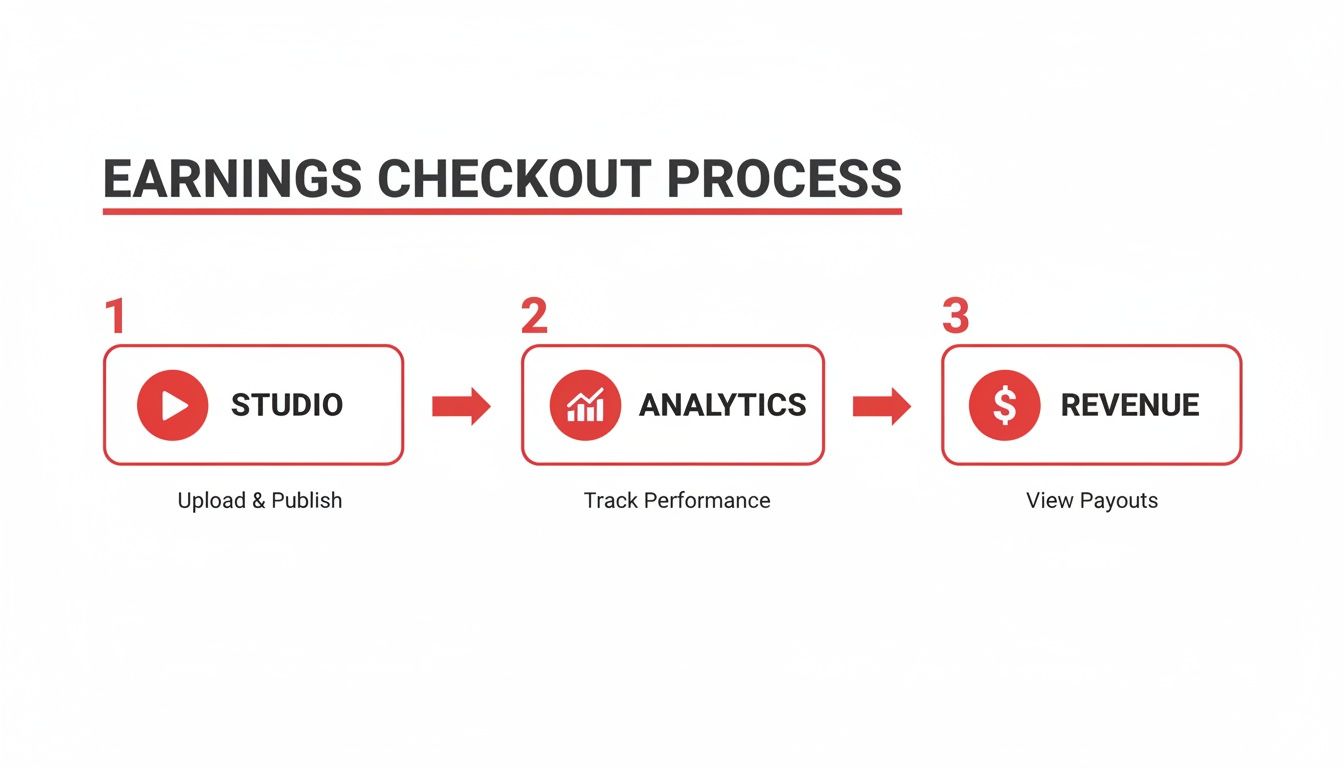
The image drives home why external estimates are just that—estimates. Only the channel owner has access to the real numbers.
Using Popular Estimation Tools
A few well-known platforms can give you a quick earnings estimate. The big players are SocialBlade, NoxInfluencer, and the analytics features built right into browser extensions like VidIQ and TubeBuddy.
Using them is straightforward: just plug in a channel's name or URL. The tool will generate a dashboard packed with data, including subscriber growth, recent video performance, and—most importantly—a projected monthly and yearly earnings range.
Here's the most critical thing to remember: pay attention to the incredibly wide earnings range. A tool might say a channel earns between $2,000 and $32,000 a month. That’s not a bug. It's a reflection of all the crucial variables the tool can't see.
The low end of that range assumes a rock-bottom RPM (Revenue Per Mille), common in niches like gaming compilations or for channels with audiences in countries with low ad spend. The high end assumes a premium RPM, which you'd see in finance or business content targeting viewers in the US or UK. Your job is to use what you know about the channel to figure out where they most likely fall on that spectrum.
Why the Estimates Are So Broad
Those massive ranges boil down to a few key factors that are completely invisible to outside tools. Understanding them is the secret to refining any estimate you see.
- Content Niche: This is the big one. A finance channel reviewing investment apps will always have a much higher RPM than a channel that just posts funny cat videos. Advertisers pay top dollar to get their products in front of people ready to spend money.
- Audience Location: A view from someone in the United States is worth way more to an advertiser than a view from many other parts of the world. If a channel's content is in English and clearly targets a US audience, its earnings will naturally lean toward the higher end of any estimate.
- Video Length and Ad Placement: Videos over eight minutes long can have mid-roll ads, which can seriously boost a video's revenue. While tools can see how long a video is, they have no idea if the creator is stuffing it with ads or just using one or two.
This is exactly why you can't just take an estimate at face value. A smart analyst uses the tool's range as a starting point, then applies their own knowledge to narrow it down to a much more realistic figure.
The Quick Math: A Manual Estimation Formula
If you prefer a more hands-on approach or just want a back-of-the-napkin calculation, you can use a simple formula. This method puts you in control of the single most important variable: the RPM.
The formula is: (Total Monthly Views / 1,000) x Estimated RPM = Estimated Monthly Earnings
First, find the channel's total views over the last 30 days. You can usually find this on their SocialBlade page, or just manually add up the views on the videos they've posted in the past month.
Next comes the art: estimating their RPM. Based on the channel's niche, video style, and likely audience, pick a realistic number. As a general rule of thumb, most creators in the YouTube Partner Program earn somewhere between $2.50 to $7.50 per 1,000 views after YouTube takes its 45% cut.
Let’s run through a quick example. Picture a tech review channel that pulled in 3 million views last month.
- Divide views by 1,000: 3,000,000 / 1,000 = 3,000
- Estimate the RPM: Tech is a high-value niche. Let's use a solid but conservative RPM of $8.
- Calculate: 3,000 x $8 = $24,000 (estimated monthly ad revenue)
This manual calculation gives you a single number instead of a huge range, but its accuracy hangs entirely on your RPM guess. By combining both the tool-based ranges and your own manual math, you can get a much more confident and nuanced picture of what another channel is really earning.
For creators who want to skip the grind of starting from zero, investing in a pre-approved channel can be a savvy shortcut. You might find it useful to check out the benefits of an aged YouTube channel that's already set up for monetization.
Why YouTube Earnings Vary So Much
Ever wonder why a finance channel and a gaming channel with the same one million monthly views might have wildly different paychecks? It’s a common question, and the answer is simple: when it comes to YouTube, not all views are created equal.
If you really want to understand a channel's earning potential, looking at the view count is just scratching the surface. The real money is in the details—who’s watching, what they’re watching, and where they’re from. These factors can turn two seemingly identical channels into completely different financial stories.

The Power of the Niche
The single biggest driver of a channel's earnings is its niche. It all comes down to what advertisers are willing to pay to get in front of a specific audience.
Think about it from an advertiser's perspective. If you're selling high-end investment software, you'd happily pay a premium to run ads on a channel that reviews financial tools. Every single viewer is a potential customer. That same advertiser would pay pennies on the dollar to show that ad on a prank channel, where the audience is far less targeted.
- High-CPM Niches: These are topics like personal finance, technology, real estate, and business. The audience has money to spend and they're often actively looking for solutions.
- Low-CPM Niches: This bucket usually includes gaming, comedy, prank videos, and general entertainment. The audience is massive but much broader and less commercially valuable to most brands.
This is precisely why a channel about credit cards can earn 10x more per view than one dedicated to Minecraft compilations. The value isn't just in the eyeballs, but in the commercial intent of the audience.
Where Your Audience Lives
Geography is another huge piece of the puzzle. Advertisers in developed economies like the United States, Australia, and the United Kingdom simply have bigger marketing budgets and pay more for ad impressions.
A view from a user in the US is worth significantly more than a view from someone in a country with lower average ad spend. If a channel’s content primarily attracts viewers from these top-tier ad regions, its overall revenue will be much higher, even if it has the same total view count as a channel with a more globally scattered audience.
This geographic difference is one of the biggest reasons why generic estimation tools provide such broad earnings ranges. They can't pinpoint a channel's audience demographics, so they have to account for both the highest and lowest possible RPM scenarios.
Video Format and Length Matter
How a video is structured has a direct impact on its earning potential. One of the most important thresholds to know is the eight-minute mark. Any video longer than eight minutes becomes eligible for mid-roll ads—those little commercial breaks you see in the middle of longer content.
Creators with this feature can manually insert multiple ad breaks, which can dramatically boost a video's total revenue. A 20-minute deep-dive with three mid-roll ads will almost always earn more than a seven-minute vlog with just a pre-roll ad, assuming the viewership is the same. This creates a powerful incentive for creators to make longer, more engaging content.
The Influence of Seasonality
Finally, you can't ignore the calendar. YouTube earnings follow predictable seasonal trends, mostly driven by when advertisers open their wallets. The most profitable time for nearly every creator is the fourth quarter (Q4), from October to December.
During the holiday season, companies pour money into advertising for Black Friday, Christmas, and end-of-year sales. This surge in demand drives up ad rates (CPMs) across the board, giving creators a nice revenue bump. On the flip side, the first quarter (Q1) is often the slowest as ad budgets reset after the holiday frenzy. Smart creators know this and plan their content calendar around these predictable peaks and valleys.
This complex mix of factors is why earnings on YouTube are so heavily concentrated at the top. Top creators like MrBeast are estimated to earn over $80 million per year, while a small creator might only make a few hundred dollars from AdSense. To get a better sense of what's possible, you can check out breakdowns of the highest-earning YouTubers. It’s a powerful reminder that success isn't just about getting views, but about getting the right kind of views.
Beyond Ads: How Creators and Marketers Can Use Earnings Data
When you look up a YouTube channel's earnings, the AdSense number is just the tip of the iceberg. For serious creators and smart marketers, that figure isn't the finish line—it's the starting block for building a real business or launching a killer campaign.
Ad revenue is what most people see, but for established channels, it’s rarely the biggest piece of the pie. Relying only on YouTube's ad payouts is like building a house on a single pillar. It's incredibly risky. All it takes is one algorithm tweak or an "advertiser-unfriendly" flag to see your income tank overnight. That’s why top creators treat AdSense as the foundation, not the whole house.

Real growth comes from diversifying. These other income streams can eventually dwarf what you make from ads alone.
Smart Strategies for Creators
To build a creator business that lasts, you need to own your revenue streams. That means getting out of the passive ad-income mindset and creating value that your audience is happy to pay for directly.
-
Brand Sponsorships: Once you have a loyal audience, brands will pay to get in front of them. You can use your earnings data and audience demographics as a resume to pitch collaborations. A single sponsored video can often bring in more than an entire month of AdSense revenue.
-
Affiliate Marketing: This is one of the easiest income streams to get started with. Just recommend products you genuinely use, drop affiliate links in your descriptions, and you'll earn a commission on every sale. It might start small, but those commissions add up to a surprisingly steady income over time.
-
Selling Your Own Products: This is the endgame for many creators. Whether it's merch, digital courses, e-books, or physical products, selling directly to your audience gives you total control. Think of Cassey Ho from Blogilates, who spun her fitness channel into a huge activewear empire.
Want a shortcut? Starting with an account that's already approved for monetization can be a massive advantage. You can check out options for a monetized YouTube channel to skip the long waiting game and start implementing these strategies right away.
Actionable Insights for Marketers
For marketers, knowing how to estimate a channel's earnings is a huge competitive advantage. It turns influencer marketing from a guessing game into a data-driven strategy.
When you can accurately estimate a channel's ad revenue, you gain incredible leverage. You can identify undervalued creators, negotiate fairer rates, and set campaign expectations based on solid financial context, not just vanity metrics like subscriber counts.
This data simply empowers you to make smarter calls with your marketing budget.
-
Find Undervalued Channels: You might find a channel with a smaller subscriber count but a super-valuable audience in a premium niche. If their estimated ad revenue is high for their size, you’ve probably found a hidden gem for a partnership.
-
Vet Influencers Effectively: Before you cut a check, run the numbers. If a creator's asking price for a sponsorship is 20x their estimated monthly ad earnings, that's a red flag. This simple check helps you avoid overpaying and makes sure your investment is solid.
-
Set Realistic Campaign Goals: Use earnings estimates to get a feel for a channel's commercial success. It helps you forecast potential ROI and manage what your stakeholders expect to see.
For anyone—creator or marketer—who needs to go deeper than the standard reports, it might be worth learning how to build a custom social media analytics dashboard. This lets you pull in YouTube earnings and mash them up with other data for even clearer insights. At the end of the day, whether you're building your own brand or investing in someone else's, earnings data is the roadmap to making smarter, more profitable decisions.
Common Questions About YouTube Earnings
Once you start digging into how YouTube money works, you'll find the same questions pop up again and again. Let's run through a few of the most common ones to clear things up and help you get a better handle on the financial side of things.
A big one is always about those third-party earnings calculators. Can you really trust the numbers you see on sites like SocialBlade? The short answer is no, not for specifics. They offer a fun, ballpark estimate, but they're blind to the most important details that actually drive a channel's income—like where the audience is from, the video's topic, and the kinds of ads being run.
Think of these tools as a compass, not a GPS. They're great for seeing general trends in a channel's growth or decline, but they can't give you a precise financial location. Use them as a starting point for your research, not the final answer.
This naturally leads to the next big question: why can't we just see what other channels are making?
Privacy and Its Role in Earnings Data
The reason you can't get an exact breakdown of another channel's earnings boils down to one word: privacy. A creator's revenue is personal financial data. It's protected by YouTube's own policies and general privacy laws.
YouTube Studio is a creator's private dashboard, and it's entirely their decision whether to share that information. This is why we have to rely on estimation. It forces you to put on your detective hat and piece together a financial picture using public clues like view counts and subscriber growth. It's a system that protects creators and keeps their business details private.
How Can a Creator Genuinely Increase Their RPM?
Since RPM (Revenue Per Mille) is the metric that dictates how much you earn per 1,000 views, creators are always asking how to push that number higher. The good news is, you have a lot more control over it than you might think. Improving your RPM is an active strategy, not just dumb luck.
Here are a few proven ways to do it:
- Go After High-Value Topics: Content about finance, technology, or business tends to attract advertisers with deeper pockets. This directly translates to a higher RPM for you.
- Target "Tier 1" Audiences: If your videos appeal to viewers in countries like the United States, United Kingdom, Canada, or Australia, you'll earn more per view simply because ad rates are higher in those regions.
- Make Longer Videos (Strategically): Once a video passes the eight-minute mark, you can place mid-roll ads. A few well-placed ad breaks can dramatically increase a video's earnings without ruining the viewing experience.
- Lean Into Shorts: While the RPM for Shorts is typically lower than for long-form content, it's a completely separate revenue stream. It's smart to understand the official YouTube Shorts monetization requirements to build it into your overall content plan.
By focusing on these areas, you can actively increase the value of every single view and build a more predictable, powerful income source from your channel.


