


Before you even attempt a YouTube channel earnings check, you have to get one thing straight: view count is just a tiny part of the story. The real money lies in a mix of your content niche, where your audience is from, and a few key metrics that advertisers care about. I've seen two channels with the exact same number of views have incomes that are worlds apart.
Understanding What Your Channel Can Really Earn
One of the biggest mistakes I see new creators make is chasing big view numbers without knowing how monetization actually works. The starting line for earning anything on YouTube is getting into the YouTube Partner Program (YPP), and there are specific requirements you have to hit just to apply.
Once you’re in the YPP, the game changes. Your focus needs to shift from just getting views to getting valuable views. This is where Revenue Per Mille (RPM) becomes your north star.
Decoding RPM and CPM
It's super common to mix these two up, but they paint very different pictures of how your channel is doing financially. Let's clear it up.
-
CPM (Cost Per Mille): This is what advertisers are willing to pay for every 1,000 ad impressions on your videos. Think of it as a sign of how valuable your audience is to them, but it’s not the money that lands in your pocket.
-
RPM (Revenue Per Mille): This is your actual revenue (after YouTube takes its 45% cut) for every 1,000 video views. This is the metric that matters most because it wraps up all your income—ads, memberships, Super Chats—and shows you what you're really making.
A high CPM is nice to see, but a high RPM is what actually pays the bills. Your entire strategy should revolve around boosting your RPM, which means making content that’s valuable to viewers and the advertisers who want to reach them.
For instance, a video breaking down stock market trends will naturally attract high-paying advertisers from the finance world. This leads to a higher CPM and, ultimately, a much healthier RPM for you.
Why Your Niche Defines Your Paycheck
In the world of advertising, not all content is created equal. Your channel's topic—your niche—is hands down the biggest factor determining how much you can make. A channel about personal finance or software reviews will almost always earn more per view than a channel with gaming clips or personal vlogs.
It all boils down to advertiser intent. A company selling expensive project management software will pay a premium to run ads on a business productivity channel. A brand selling potato chips? Not so much on a prank video channel.
This chart really drives home how dramatic the RPM difference can be from one niche to another.
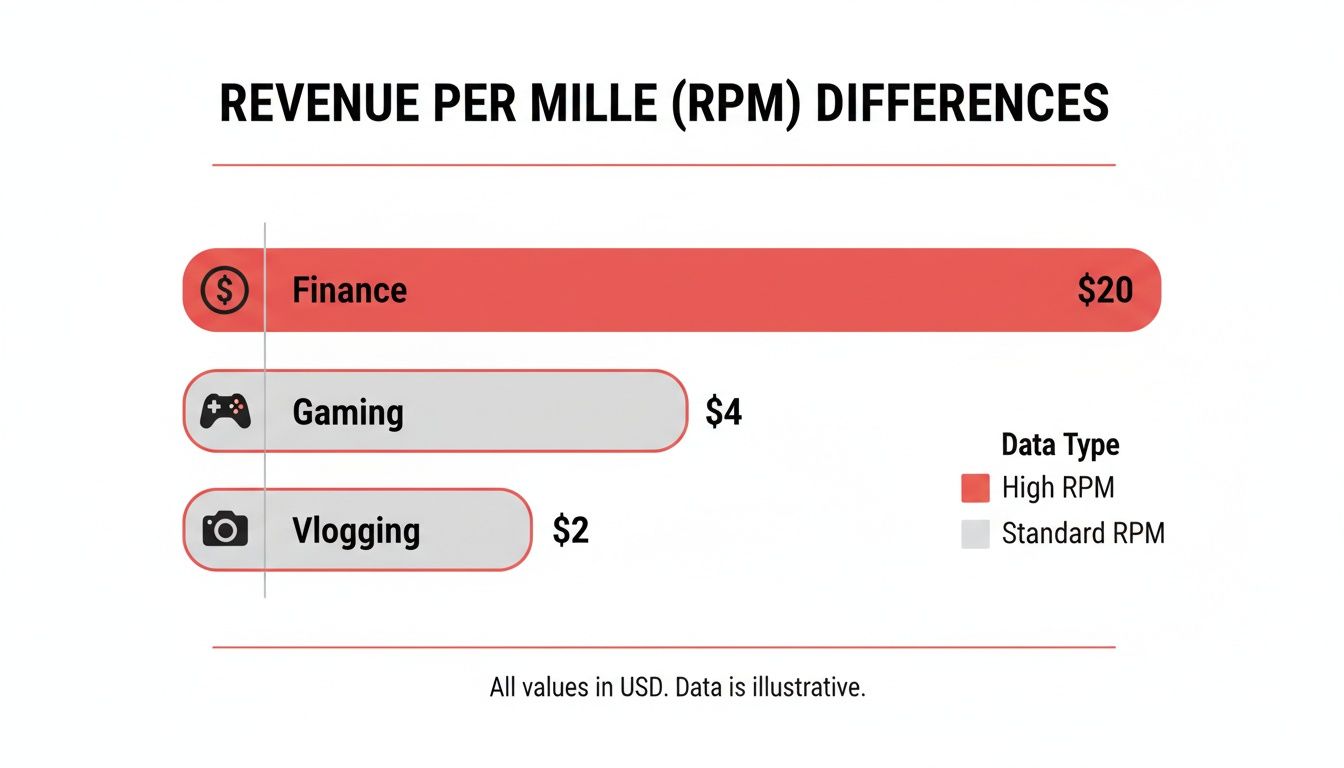
As you can see, a finance creator could earn ten times more than a vlogger for the exact same number of views. It's a massive difference.
To give you a clearer picture, this table breaks down the earning potential across several popular niches.
Estimated Earnings by Niche per 1 Million Views
This table illustrates the significant earning variations across different content categories based on their typical RPM ranges.
| Content Niche | Typical RPM Range | Estimated Earnings per 1M Views |
|---|---|---|
| Personal Finance & Investing | $15 - $50 | $15,000 - $50,000 |
| Technology & Software Reviews | $10 - $30 | $10,000 - $30,000 |
| Business & Marketing | $8 - $25 | $8,000 - $25,000 |
| Gaming | $2 - $8 | $2,000 - $8,000 |
| Vlogging & Lifestyle | $1 - $5 | $1,000 - $5,000 |
| Comedy & Entertainment | $0.50 - $4 | $500 - $4,000 |
As the data shows, choosing a high-value niche can dramatically accelerate your earnings.
This principle doesn't just stop at ad revenue. Understanding realistic affiliate marketing earnings is just as important for seeing the full picture. High-value niches often have far more lucrative affiliate and sponsorship deals, making that earnings gap even wider. Knowing this from the start is key to setting expectations before you ever look at the numbers.
Checking Your Own Earnings in YouTube Studio
While those third-party estimators can give you a ballpark figure, the only place to get the real, hard numbers for your own channel is straight from the source: YouTube Studio. If you're in the YouTube Partner Program, this is your command center. It's the definitive record of your financial performance.
Forget the guesswork. This is where you find the official data. Honestly, learning to navigate this dashboard is one of the most important skills you can develop for understanding—and growing—your channel's revenue.

The main Analytics dashboard gives you that quick, at-a-glance view of your estimated revenue, right alongside key metrics like views and watch time. It’s the perfect starting point for a financial deep dive.
Navigating to the Revenue Tab
Your journey into the numbers starts in the Analytics section of YouTube Studio. Once you click in, you’ll see a few tabs running along the top: Overview, Content, Audience, and Revenue. The one we care about right now is, you guessed it, the Revenue tab.
This part of the studio is built to give you a complete breakdown of how your channel actually makes money. It's so much more than a single number; think of it as an interactive report that tells the full story of your monetization.
Here, you'll find your total estimated revenue for a specific time period. You can easily adjust this from the last 28 days to the entire lifetime of your channel. While that big number is the first thing you'll see, the real gold is buried a little deeper.
Breaking Down Your Revenue Streams
Scroll down a bit, and you'll find a card detailing your revenue sources. This is crucial. It shows you exactly where your money is coming from, and it's almost never just one thing.
Your income is likely split across a few different sources:
- Ad Revenue: This is usually the biggest piece of the pie. It's what you've earned from all the display, overlay, and video ads running on your content.
- Channel Memberships: If you have paid memberships set up, this is where you track that awesome recurring income from your biggest supporters.
- Supers: This bucket includes Super Chat, Super Stickers, and Super Thanks—all direct payments from viewers during live streams or on your regular video uploads.
- Shopping: For creators using affiliate features or connected to a store, this tracks earnings from product commissions and sales.
Paying attention to this breakdown helps you spot what's really working. For instance, if your "Supers" revenue is surprisingly high, that’s a massive signal to do more live streams and directly engage with that generous part of your audience.
Key Takeaway: Your estimated earnings in YouTube Studio are a powerful guide, but they aren't final. This figure updates in near real-time. Your official, finalized earnings for the month get transferred to your AdSense account later, after YouTube has processed all the data and filtered out things like invalid ad clicks.
Pinpointing Your Top-Earning Videos
One of my favorite tools in the Revenue tab is the "Top-earning content" report. This list shows you exactly which of your videos have brought in the most cash over a set period. This isn't just fun trivia; it's a content strategy roadmap.
Look for patterns. Do your most profitable videos share a common topic, format, or length? Once you identify what works, you can start creating more content that's likely to perform just as well financially. It’s not always about the view count—a video with fewer views but a much higher RPM can be a quiet powerhouse.
Understanding RPM and CPM in Your Data
Within the advanced analytics, you can also track your RPM (Revenue Per Mille) and Playback-based CPM. As we've covered, RPM is your total earnings per 1,000 views, making it the single most important metric for judging your channel's profitability.
Watching your RPM trend over time is how you know if your strategic changes are actually working. Did you start making longer videos to fit in more mid-roll ads? Did you pivot to a niche that attracts higher-paying advertisers? Your RPM will tell you if those moves paid off.
On average, a channel might see about $18 per 1,000 ad views, which could theoretically scale to $18,000 for one million views. But that’s a huge "if." The reality is that most creators land somewhere in the $1 to $10 RPM range, depending heavily on their niche and audience. This huge variance means there’s a massive opportunity to grow your income just by focusing on content that attracts better ads and more engaged viewers. You can find more insights on YouTube stats and what they mean for creators in practice.
How to Estimate Earnings for Any YouTube Channel
So, you've got a handle on your own channel's finances in YouTube Studio, but what about everyone else? It’s natural to be curious. Maybe you're sizing up the competition in your niche or just wondering how a creator you admire is doing. This is where you can do a different kind of YouTube channel earnings check—one that relies on public data and a bit of educated guesswork.
The go-to tool for this is almost always Social Blade. These kinds of platforms work by scraping publicly available stats—things like view counts, subscriber growth, and how often a channel uploads—and then plugging those numbers into a general formula. They apply a broad RPM range to come up with a ballpark estimate of monthly and yearly income for pretty much any channel out there.

While this gives you a starting point, you have to understand the massive limitations. The numbers you see aren't facts. They're a wide-ranging guess based on an industry-average RPM that could be wildly off the mark for any specific channel.
The Problem with Public Data
The biggest issue with these calculators is what they can't see. All the really important financial data is locked away inside a creator's private analytics. These tools have zero access to the metrics that truly drive a channel's income.
Here's just some of what these estimators miss:
- Actual RPM and CPM: They have no idea if a channel's RPM is $2 or $20. As we've seen, this one number can mean a tenfold difference in earnings for the exact same view count.
- Viewer Demographics: They can't see where the audience is located. A channel with mostly US-based viewers will earn way more than one with viewers in a lower-RPM region.
- Affiliate Income: There’s no way to track revenue from affiliate links in video descriptions. For many creators, this is a huge chunk of their income.
- Sponsorships and Brand Deals: A single lucrative brand deal can easily double a creator's monthly income, but that all happens off-platform, making it completely invisible to any calculator.
- Merchandise and Product Sales: Selling merch, courses, or other products is another massive blind spot.
Because of these gaps, the earnings range these tools spit out is often so broad it's almost useless for any precise analysis. You might see an estimate like $500 to $8,000 a month. That’s not exactly helpful if you need an accurate financial picture.
Using Earnings Calculators the Right Way
So, are these tools completely pointless? Not at all. You just have to use them for what they're good for: directional research and competitive analysis, not as a factual bank statement.
Think of them as a way to get a feel for a channel's relative health and growth. Instead of fixating on the dollar amount, pay attention to the other data points they offer.
Pro Tip: Use these tools to track trends, not to find a definitive number. Is a competitor's subscriber growth speeding up? Are their daily views trending upward after they changed their strategy? Those are the insights that are far more valuable than a flawed earnings estimate.
Here’s how to put these tools to work strategically:
- Analyze Growth Patterns: Check out the subscriber and view graphs over time. A steady upward climb shows a healthy channel with a solid content plan. Sudden spikes could point to a viral video worth analyzing.
- Benchmark Against Competitors: Compare your channel's public stats (views, subs) against others in your niche. This is great for setting realistic growth targets and spotting the channels that are really crushing it.
- Identify Potential Collaborators: Tracking the growth of other creators in your space helps you spot rising stars who might be perfect for a collaboration before they get too big.
The key is to treat the revenue numbers as a loose signal of potential, and then filter that through what you already know about the channel's niche. If you're looking at a finance channel, you can safely assume their actual earnings are toward the higher end of the estimated range. For a gaming or vlog channel, they’re probably closer to the bottom.
Ultimately, a third-party YouTube channel earnings check is an imperfect science. It’s like peeking through a keyhole—you get a glimpse, but you never see the whole room. Use it for high-level insights, but always take the final numbers with a healthy dose of skepticism.
Why Some Channels Earn More Than Others
Ever wondered why one creator with a million views makes $20,000, while another with the exact same view count barely scrapes by with $1,000? It’s a question that pops up all the time when you start digging into YouTube channel earnings. The answer isn't about luck—it's about strategy and understanding a fundamental truth: not all views are created equal.
The real value of a view comes down to who’s watching, what they’re watching, and even when they're watching it. All these factors get rolled into one crucial metric: your RPM (Revenue Per Mille). This number tells you what you're earning for every thousand views, and it's the key to unlocking your channel's true financial potential.
The Power of Viewer Location
Where your audience lives is one of the biggest factors in your earning power, yet it's something many creators overlook. Advertisers pay completely different rates depending on the country they're targeting. An audience in a country with high consumer spending is simply worth more to them.
For instance, viewers in places like the United States, United Kingdom, Canada, and Australia are sitting in the most valuable seats. Brands in these "Tier-1" countries have massive marketing budgets and are willing to pay a premium to reach those eyeballs. If your content resonates there, your RPM will be significantly higher.
On the flip side, you could have a huge audience in a region with lower ad spending and still see a tiny RPM. This is exactly how a creator with 100,000 US-based viewers can easily out-earn someone with a million viewers from a less competitive ad market.
Your Niche Is Your Financial Destiny
If there's one thing that will make or break your earnings, it's your niche. The topic you choose to create content about is probably the single most important decision you'll make. Advertisers are hyper-focused on reaching specific customers, and they'll pay top dollar to get their ads in front of the right people.
Just think about it. An advertiser selling a $3,000 financial planning course has a lot more to spend on ads than a company selling a $3 candy bar. This is why some niches are absolute goldmines.
- High-Value Niches: Topics like personal finance, investing, software tutorials, real estate, and business strategy are magnets for high-paying advertisers. It's not uncommon to see RPMs of $15, $20, or even more in these areas.
- Lower-Value Niches: Content based on general entertainment, gaming clips, pranks, or personal vlogs usually attracts advertisers with cheaper consumer products. Here, RPMs often hover in the $1 to $5 range.
YouTube's creator economy is a massive ecosystem, with a projected $85 billion in payouts over three years. While top earners can make millions, the vast majority of creators see their income dictated by their niche's RPM, which can swing from as low as $1 to over $20. You can see the full breakdown of these creator economy statistics on affinco.com.
The Eight-Minute Mark and Video Length
How long you make your videos has a direct impact on your ad revenue. While YouTube can stick ads at the beginning and end of any monetized video, a special threshold unlocks much more earning potential: the eight-minute mark.
Once your video crosses eight minutes, you get the ability to place mid-roll ads—basically, commercial breaks you can insert throughout your video. A 15-minute video might have three or four ad spots instead of just one or two. More ads mean more chances to earn from every single view.
Now, this isn't an excuse to pad your videos with fluff. But if your content naturally works well in a longer format, pushing past that eight-minute barrier is a simple yet powerful way to boost your revenue.
The Impact of Seasonality and Ad Spend
Finally, the time of year can have a huge effect on your channel's bottom line. Advertiser budgets aren't a flat line; they spike and dip with the seasons, especially around major shopping holidays.
The most famous example is the fourth quarter (Q4), from October to December. Brands pour money into ads for Black Friday, Cyber Monday, and Christmas. This massive demand for ad space drives up rates for everyone, and it's when most creators see their biggest paychecks of the year.
In contrast, the start of the year (Q1), especially January, is notoriously slow. Ad budgets have just been reset, and spending is at its lowest point. Knowing this cycle helps you manage your expectations and plan your content. You can save your biggest video ideas for the high-spend seasons to really maximize your income.
Alternatively, some creators bypass the initial grind by acquiring an established channel. If that's a strategy you're considering, you can explore options for an aged YouTube channel to get a head start.
Practical Ways to Increase Your YouTube Earnings
So, you've figured out how to check your channel's earnings. Now for the fun part: making those numbers go up. It's a common trap to think that more views are the only answer, but the smartest creators know it's about making every view more valuable. Let's look at a few proven strategies to actually boost your income.

Many YouTubers get stuck chasing views, but that's only half the battle. The real goal is to increase the value of each view you get.
Target High-CPM Keywords and Audiences
The most straightforward way to earn more from ads is to make content that high-paying advertisers want to be associated with. This all starts with keyword research. You can use various tools to see which topics have a higher Cost Per Mille (CPM).
Put yourself in an advertiser's shoes. Niches like personal finance, real estate, software tutorials, and business strategy naturally command bigger ad budgets. Weaving these high-value keywords into your titles, descriptions, and the actual content of your videos signals to YouTube's ad system that your content is prime real estate.
It’s also smart to create content for audiences in "Tier-1" countries—think the United States, the UK, Canada, and Australia. Advertisers pay more to reach viewers in these regions, which directly bumps up your RPM.
Master the Eight-Minute Rule
Here's one of the most direct ways to juice your ad revenue: make your videos longer than eight minutes. This is the golden threshold that unlocks mid-roll ads, which are commercial breaks you can place during your video.
Think about it. A seven-minute video gets one ad at the beginning. A 10-minute video can have two or three ad breaks. That simple change can easily double or even triple the ad revenue from a single video, all without a single extra view.
This doesn't mean you should pad your videos with fluff just to hit the mark. Viewer experience is still king. But if a topic can naturally support a deeper dive, pushing it past eight minutes is a no-brainer for your bottom line.
Diversify Beyond AdSense Revenue
Relying 100% on YouTube ads is like building your house on shaky ground. An algorithm shift or an unexpected demonetization can evaporate your income overnight. The most successful creators treat their channel like a real business by building multiple income streams. A big part of this is understanding what makes a video go viral, which can pour gasoline on all your revenue sources at once.
Here are a few powerful alternatives to AdSense:
- Affiliate Marketing: This is usually the easiest place to start. You simply recommend products you genuinely use and get a commission when someone buys through your link. It feels authentic to your audience and can become a serious revenue stream.
- Selling Your Own Products: This is where you take full control. You can create branded merchandise, sell digital products like e-books or templates, or build your own online courses. The profit margins are all yours.
- Brand Sponsorships: As your audience grows, brands will start reaching out to pay you for featuring them. A single sponsored video can often earn you far more than AdSense would in an entire month.
Jumpstart Your Earnings with a Ready-Made Channel
Let's be real: building a channel from zero to monetization can be a long, hard grind. Meeting the YouTube Partner Program requirements can easily take months, if not years. But there is a shortcut.
Some entrepreneurs and creators choose to bypass the waiting game altogether by purchasing an established channel. This gives you an immediate path to monetization. If that sounds interesting, you can look into acquiring a monetized YouTube channel that's ready to earn from day one. This strategy lets you skip the line and focus on what you do best: creating great content.
Frequently Asked Questions About YouTube Earnings
Once you start doing a regular YouTube channel earnings check, you'll quickly realize it's a bit of a maze. The whole system has a lot of moving parts. Let's break down some of the most common questions creators have about how their money is actually made.
How Accurate Are Online YouTube Earnings Calculators?
Think of online calculators as a compass, not a GPS. They're great for getting a general direction but they won't give you pinpoint accuracy. Tools like Social Blade give you a massive estimated range because they're working with public data—like view counts—and have no clue about the channel's private RPM, audience demographics, or any direct sponsorship deals.
It's not uncommon for a finance channel to earn 10 to 20 times more than a gaming channel with the exact same number of views. That’s a massive variable these tools just can't account for. So, use them to gauge a competitor's growth trajectory, but don't mistake their estimates for a bank statement.
Why Does YouTube Studio Revenue Differ From My AdSense Payment?
Seeing a discrepancy between YouTube Studio and your final AdSense payout is totally normal, so don't panic. Studio gives you a real-time estimate of your earnings as they come in. It’s a running tally.
The official, finalized amount isn't calculated until the end of the month. Your AdSense payment is that finalized number, which comes after YouTube has deducted things like invalid ad clicks or performed other routine policy checks. Just think of Studio as your daily progress report and AdSense as your official, finalized paycheck.
Does View Count Directly Determine My Income?
Absolutely not. Chasing views alone is a rookie mistake. The metric that truly matters is your RPM (Revenue Per Mille), which is the amount you earn for every 1,000 views. This number is the real story, and it’s influenced by a few critical factors.
Here’s what really drives your RPM:
- Monetized Playbacks: Not every view has an ad. You only earn from the ones that do.
- Viewer Location: Advertisers pay a premium for audiences in high-spending countries like the US. A view from there is worth much more than a view from a region with lower ad spend.
- Video Topic: Your niche is everything. A video about software or personal finance will almost always have a higher RPM than a general entertainment or vlog video.
- Video Length: If your video is over eight minutes long, you can place mid-roll ads, which can significantly boost its earning potential.
A single video with 100,000 high-value views can easily out-earn another with 1 million low-value views.
Key Takeaway: Stop focusing on the raw number of views and start focusing on the quality of those views. A smaller, highly engaged audience in the right niche is often far more profitable.
What Are the Main Ways to Make Money on YouTube?
For most creators, the journey starts with the YouTube Partner Program (YPP). Getting accepted unlocks YouTube's built-in monetization tools like ad revenue, channel memberships, Super Chats, and Super Thanks.
But the creators who build real, sustainable businesses don't stop there. They diversify. For a deeper dive into building a full-fledged creator business, you can find a ton of great strategies on our creator economy blog. The smartest creators combine their YPP income with multiple other streams—things like affiliate marketing, selling their own merchandise, landing brand sponsorships, or even creating digital courses for their audience.
At MonetizedProfiles, we specialize in providing creators with monetization-approved social media accounts, allowing you to bypass the initial grind and start earning from day one. Explore our ready-to-earn YouTube channels today.


