


Ever wonder what it really takes for YouTube to count a view? It's not as simple as someone just clicking on your video. The platform has a specific rule in place to separate genuine interest from accidental clicks or passing glances.
At its core, a view is only counted after a user watches at least 30 seconds of your video. This is the bedrock principle YouTube uses to validate that a real person is actually engaged with what you've created.
What Actually Counts as a View on YouTube

Think of YouTube's view-counting process like a quality control checkpoint. Not every impression that comes down the line gets a stamp of approval. For a view to be considered legitimate, it needs to show clear intent from a real human being—not a bot, and not someone who clicked by mistake and left instantly.
This is where the platform’s time-based rules come into play, and they differ depending on the video format.
The Critical 30-Second Rule
For your standard, long-form videos, 30 seconds is the magic number. A viewer has to stick around for at least that long for their watch to be added to your official view count. This has been a key part of YouTube's system for years, and it was put in place to filter out low-quality traffic.
So, if someone clicks your thumbnail, watches for 10 or 15 seconds, and then bounces, that interaction won't move the needle on your public view count. It's all about rewarding content that can grab and hold a viewer's attention from the very beginning.
How Shorts Views Are Different
YouTube Shorts, on the other hand, play by a different set of rules. Given their snackable, fast-paced nature, the time requirement is much shorter. A view on a Short is typically counted after just a few seconds of watch time.
This makes perfect sense when you consider how people consume Shorts—by swiping quickly through a feed. The lower threshold reflects this unique viewing behavior.
A view isn't just a number. It's a powerful signal to the YouTube algorithm that your content connected with a real person. Getting a handle on how to earn these validated views is the first major step toward growing a successful channel.
At the end of the day, whether it’s a 30-second watch on a long-form video or a quick glance at a Short, each valid view tells YouTube your content is worth showing to more people. This is especially critical if you're trying to monetize, as it directly influences both your earnings and how the algorithm promotes your videos. You can learn more about the specifics in our guide on how YouTube counts views.
Views vs. Monetized Playbacks: What's the Difference?
When you start digging into your YouTube earnings, you'll quickly realize that not all views are created equal. This is one of the most important distinctions to grasp. A "view" tells you how many people watched your video, but a "monetized playback" is what actually puts money in your pocket.
Think of it like owning a popular coffee shop. Hundreds of people might walk by your window every day—those are your views. But only the people who come inside and actually buy a coffee are generating revenue. A monetized playback is the YouTube equivalent of a paying customer.
For a view to become a monetized playback, an ad has to be shown to the viewer. It's totally normal for a big chunk of your total views to not be monetized. Let's break down why that happens so you can set realistic expectations for your channel's income.
Why Some Views Don't Get Ads
So, what causes this gap between total views and monetized playbacks? It usually comes down to a few common culprits.
Here’s a quick rundown of the main reasons a view might not have an ad attached:
- Ad Blockers: This is a big one, especially if your audience is tech-savvy. A viewer using an ad blocker will watch your video, but YouTube can't show them an ad. No ad, no money.
- Viewer Location: Advertisers are picky about who sees their ads. If someone is watching from a country where there aren't many active ad campaigns, there simply might not be an ad to show them.
- Content Suitability: Not all videos are considered "advertiser-friendly." If your content touches on sensitive topics, YouTube's system might limit or completely disable ads on that video, even if your channel is fully monetized.
- Ad Inventory: Sometimes, it's just bad timing. There might not be a perfect ad available from an advertiser to match that specific viewer at that exact moment.
The view count on your video shows your reach. The monetized playback number in your YouTube Analytics shows your revenue. To really understand your channel's financial health, you need to focus on the latter.
At the end of the day, you want to grow both your total views and the percentage of those views that get monetized. This means making great content while also understanding how the ad system works. To get your channel set up for success, check out our guide on how to get monetized on YouTube. It walks you through all the requirements for joining the YouTube Partner Program so you can start earning.
How to Calculate Your Potential YouTube Earnings
Alright, let's get down to the numbers. Now that you know not every view is a monetized view, how does that actually translate into money in your pocket?
Figuring out your potential earnings isn't about looking at your total view count. It’s about understanding the specific views that make you money and the metrics that drive your revenue.
This simple flowchart breaks down how a regular view has to jump through a few hoops before it can be counted as a monetized playback that actually generates income.
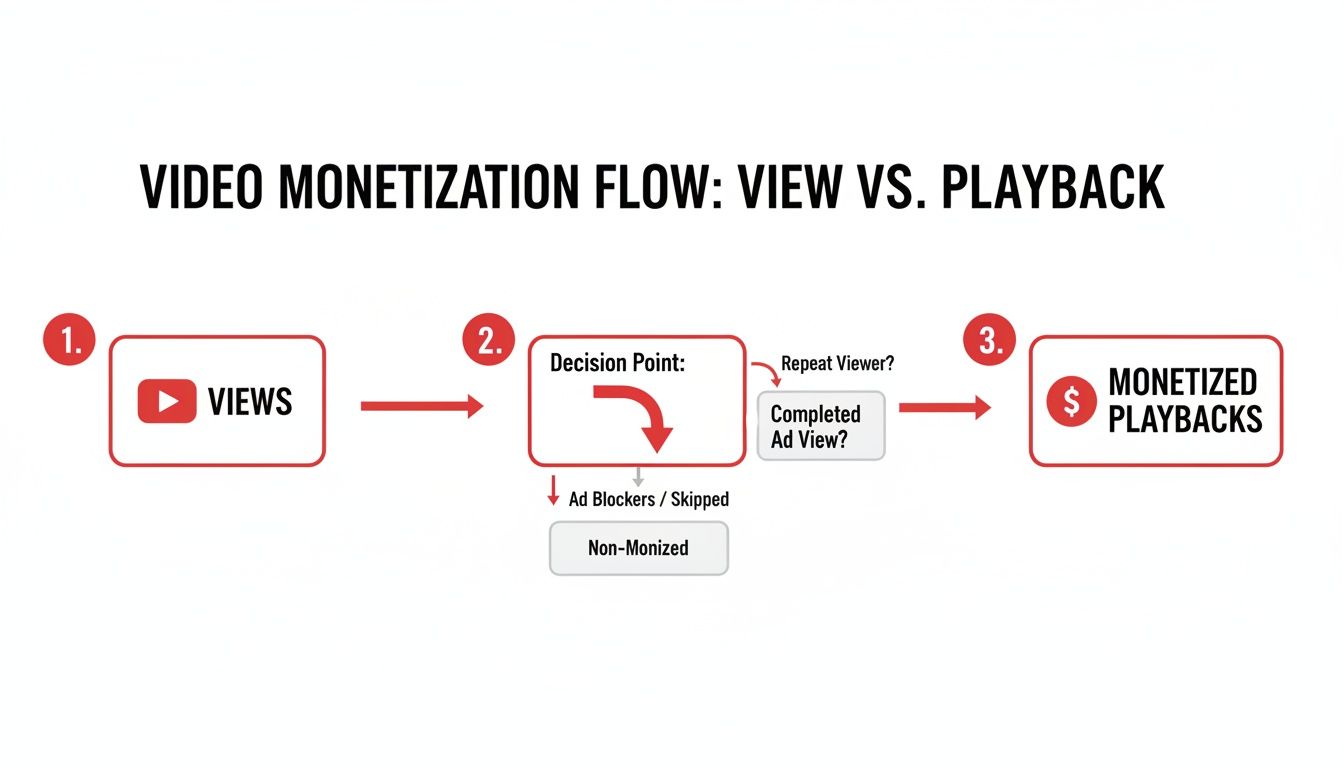
As you can see, only a slice of your total views will have an ad successfully shown and completed. Those are the golden ones—the monetized playbacks.
Focus on RPM, Not CPM
When you start digging into YouTube analytics, you'll constantly see two terms: CPM and RPM. They sound almost the same, but they tell you completely different things about your channel's health.
- CPM (Cost Per Mille): This is what advertisers pay for 1,000 ad impressions on YouTube videos. Think of this as the advertiser's side of the equation. It doesn't factor in YouTube's cut of the revenue.
- RPM (Revenue Per Mille): This is your Revenue Per 1,000 views after YouTube takes its share. This is the number that truly matters to you as a creator because it shows what you actually earn for every 1,000 views your videos get.
A simple way to think about it is that CPM is the sticker price for an ad, while RPM is the cash you actually put in your wallet. If you want to get a better handle on this, you can learn more about what RPM means for your YouTube channel and why it's the most critical metric for tracking your income.
The Core Earnings Formula
Ready for some simple math? To get a solid estimate of your earnings, the formula is surprisingly straightforward. All you need are your total monetized views and your channel's RPM.
Estimated Earnings = (Total Monetized Views / 1,000) * RPM
This formula cuts through the noise and connects the views that actually had ads on them directly to your bottom line. It’s the clearest way to see how a video is performing financially.
Putting the Formula into Practice
Let's walk through a couple of real-world scenarios. It's important to remember that RPM can be drastically different from one niche to another because advertisers will pay a premium to get in front of specific audiences.
Example 1: A Gaming Channel
Imagine you post a new gaming video and it hits 100,000 views. After checking your analytics, you see that only 60,000 of those were actual monetized playbacks. If your channel's typical RPM is $4, here's the math:
- (60,000 Monetized Views / 1,000) * $4 RPM = $240
Example 2: A Finance Channel
Now, let's take a finance channel that also gets 100,000 views with the same 60,000 monetized playbacks. The finance niche is a hot market for advertisers, so this channel has a much higher RPM of $18.
- (60,000 Monetized Views / 1,000) * $18 RPM = $1,080
See the difference? The exact same number of monetized views can earn wildly different amounts of money. This is precisely why understanding your niche's average RPM is so critical for setting realistic financial goals for your channel.
Estimated RPM by Popular YouTube Niche
To give you a better idea of where your channel might stand, here’s a quick look at some typical RPM ranges across popular YouTube categories. Keep in mind these are just estimates—your actual numbers can shift based on your audience's location, age, and even the time of year.
| Niche | Average RPM Range (USD) | Key Audience Demographics |
|---|---|---|
| Finance & Investing | $12 - $40 | Adults 25-55, high-income earners, business professionals |
| Tech Reviews | $8 - $25 | Tech enthusiasts, early adopters, professionals aged 18-45 |
| Gaming | $2 - $8 | Primarily males aged 13-34, students, and young adults |
| Lifestyle & Vlogging | $2 - $10 | Broad audience, often skews female, various age groups |
| DIY & Home | $5 - $15 | Homeowners, hobbyists, adults aged 30+, interested in projects |
This table should help you benchmark your own channel and see how different content topics attract different levels of advertiser spending. Your niche plays one of the biggest roles in your earning potential.
Why Your YouTube Analytics Might Fluctuate
It’s a feeling every creator has had. You hit refresh on your YouTube Studio dashboard, and your view count is stuck. Or even worse, it’s gone down. This isn't a bug in the system; it’s actually YouTube’s view validation process doing its job behind the scenes.
Think of it like a bouncer at a popular club. They aren't just letting anyone in; they're checking IDs to make sure everyone who enters is legitimate. In the same way, YouTube doesn't just blindly add every click to your total. It carefully vets each one to make sure it came from a real person who actually meant to watch.
The Fight Against Invalid Traffic
This whole process is designed to filter out what YouTube calls invalid traffic (IVT). And no, this isn't just about shadowy bots trying to game the system. IVT covers a whole range of views that aren't from genuine, interested humans.
YouTube’s system is constantly scanning for patterns that look a bit fishy. Some of the most common red flags include:
- Automated Clicks: Views coming from scripts or bots programmed to repeatedly watch a video.
- Forced Views: Traffic that comes from deceptive links or ads that trick people into watching.
- Accidental Plays: Think of videos embedded on a website that start playing automatically. If the person just scrolls past, YouTube doesn't want to count that as a real view.
Seeing a few views removed doesn't mean you're in trouble. It's just YouTube cleaning house to protect the value of the platform for everyone—especially creators. It ensures advertisers trust the numbers, which is good for your bottom line.
By weeding out all this noise, YouTube makes sure that the playing field is level and that real engagement gets rewarded. It’s what gives advertisers the confidence to spend money on your channel.
How YouTube Audits and Adjusts Views
This validation isn't a one-and-done thing; it's always running. Right after you publish a video, the number you see is more of a preliminary, real-time estimate. But in the background, the algorithms are already hard at work analyzing where those views are coming from.
YouTube's system is more than just a simple counter; it's a sophisticated algorithm built to spot fraud. It's so effective that it can identify and remove up to 20-30% of suspicious traffic, looking for things like unnatural view spikes or a flood of views with almost zero watch time. You can get more insights into how YouTube processes this massive amount of data over at seo.ai.
This is exactly why your view count might freeze for a few hours or even drop a bit. The system is just catching up and removing anything that doesn't pass the "real viewer" test. It can be a little jarring to see, but this is a necessary step to give you a final, verified number that truly reflects your audience.
Strategies to Increase Your Monetizable Views
Knowing how to crunch the numbers and estimate your earnings is one thing. Actually growing the number of views that put money in your pocket is a whole different ballgame. This isn't just about chasing viral fame; it's about building a smart, sustainable strategy that attracts the kind of engagement advertisers love.
If you really want to boost your monetizable views, you need to get three things right. It all starts with creating fantastic content, then moves into optimizing it so people can find it, and finally, wraps up with keeping your audience hooked. Nail these three areas, and you'll be well on your way.
Crafting Content That Demands Attention
At the end of the day, every single monetizable view starts with a video someone genuinely wants to watch. You have to grab their attention right away and hold it long enough for an ad to run and for YouTube's system to count it as a legitimate view.
That's why a killer hook in the first 5-10 seconds is non-negotiable. You have to give people a powerful reason to stay past that crucial 30-second mark. Maybe it's a bold question, a shocking fact, or a quick flash of the most exciting moment to come.
Your goal is simple: make the first minute of your video so engaging that leaving isn't an option. High audience retention is a powerful signal to the YouTube algorithm that your content is valuable, leading to more recommendations and, consequently, more views.
Storytelling is your secret weapon here. Even if you're making a how-to tutorial, a simple beginning, middle, and end structure makes a huge difference. A solid narrative keeps people watching, which means more chances for ads to be served.
Optimizing Your Videos for Discovery
You could create the best video in the world, but if nobody finds it, it doesn't matter. This is where a little video Search Engine Optimization (SEO) becomes your best friend. Good optimization helps your videos pop up in search results and on the recommended sidebar, driving real, organic traffic from people who are actually interested in what you have to say.
So, what does that look like in practice?
- Keyword Research: Figure out what your audience is actually typing into the search bar. Use a tool to find terms that people are looking for but that aren't overly competitive.
- Compelling Titles: Your title needs to do two jobs: include your main keyword and make someone curious enough to click. It has to be both descriptive and intriguing.
- Detailed Descriptions: Don't neglect the description box! Use it to add context, work in your keywords naturally, and drop in timestamps or relevant links.
- Strategic Tagging: Tags aren't as powerful as they used to be, but they still help YouTube understand what your video is about. Add a few relevant ones to help the algorithm categorize your content.
The final piece of this puzzle—and it's a big one—is your thumbnail. Think of it as the billboard for your video. A clean, eye-catching thumbnail that honestly represents your content can massively boost your click-through rate (CTR), funneling more viewers your way. To dive deeper into making your videos work for you, check out these YouTube advertising best practices.
Got Questions About YouTube Views and Money?
Even after you get the hang of the formulas and how YouTube checks views, a few specific questions always seem to come up. Creators are constantly trying to figure out how to calculate YouTube views and earnings, so let's clear up some of the most common ones you'll run into.
Think of this as your quick-reference guide for those little "what-if" scenarios that can drive you crazy. Nailing down these details will help you make better sense of your analytics and keep your expectations realistic.
Does Re-Watching a Video Count as Another View?
Yes, it does... with a catch. YouTube's system is pretty sharp and can tell when someone genuinely re-watches a video. If a fan truly enjoys your content and comes back to watch it a few times over a couple of days, those views will almost certainly be added to your total.
But don't try to cheat the system. YouTube is built to sniff out fake views. If you just sit there hammering the refresh button, the algorithm will flag that as invalid traffic in no time. After a few quick repeats from the same IP address, it'll just stop counting. The real goal is to make content so good that people want to watch it again, not to find clever ways to inflate your numbers.
How Long Does It Take for Views to Finalize?
You have to be patient, as there's always a bit of a lag. The "real-time" view count you see right after publishing is really just a quick estimate. It usually takes 48 to 72 hours for YouTube to fully process everything, run its checks, and filter out any junk views.
The same goes for your money. The estimated revenue you see in YouTube Studio typically updates after about two days. Your finalized earnings for a given month won't show up in your AdSense account until sometime between the 7th and 12th of the next month.
Don't freak out if you see your view count stall or even drop a little in the first day or two. That's totally normal. It just means YouTube's validation process is working to make sure your final count is accurate.
Do Views From Embedded Videos Count?
Absolutely! When you embed a video on your blog, a website, or a social media post, those views are counted just like any other. As long as someone watches for the required 30 seconds, it adds to your total. Better yet, these views can also be monetized if you've enabled that option.
One small thing to be aware of: the ad "fill rate" on embedded videos can sometimes be a bit lower than on YouTube itself. This just means fewer ads might be shown, which could nudge the video's overall RPM down a bit compared to views happening directly on YouTube.com.
Why Is My RPM So Low Even with Tons of Views?
This is a classic head-scratcher for a lot of creators. Getting a massive number of views doesn't automatically mean you'll have a high RPM. How much advertisers are willing to pay depends on a whole bunch of factors, and your view count is just one piece of the puzzle.
Here’s what really moves the needle:
- Audience Location: Advertisers pay top dollar to reach viewers in countries with high consumer spending, like the United States, Canada, and the UK. If your audience is mostly from regions with lower ad budgets, your RPM will be lower.
- Content Niche: As we saw earlier, some topics are just more valuable to advertisers. A video about personal finance or software will almost always have a higher RPM than one about gaming or lifestyle vlogs.
- Time of Year: Ad spending goes in cycles. It always spikes in the last three months of the year (Q4) for the holidays and usually takes a nosedive in the first few months (Q1) right after.
So, you could have a video go viral and pull in millions of views but still end up with a pretty modest RPM if your audience and topic don't line up with what high-paying advertisers are looking for.
Ready to skip the grind and start earning from day one? MonetizedProfiles offers fully approved YouTube channels that are already monetized. Jumpstart your creator journey and focus on what you do best—creating amazing content. Explore our available YouTube channels and begin your path to success today.


