


Tossing a popular song into your YouTube video can feel tempting, but it’s a gamble you’ll almost always lose. The moment you upload, you're stepping into the ring with Content ID, YouTube's powerful automated system. This isn't a maybe; it's a near certainty.
The Reality of Copyright Music on YouTube
So, you've found the perfect chart-topping track to give your video that extra punch. The problem is, using it without permission is a direct path to a copyright claim.
Forget what you've heard about a "30-second rule" or that background music falls under "fair use." These are persistent myths that offer zero protection. Content ID is a relentless bot that scans every upload, comparing your audio to a massive database of copyrighted material. It doesn't care if you only used a 5-second clip; it will find it.
The Scale of Automated Claims
To put this in perspective, Content ID issued a mind-boggling 826 million copyright claims in just the first half of 2023. That's how active this system is.
But here’s a crucial detail: most of these claims aren't meant to punish you with a channel strike. In fact, around 90% of the time, rights holders—especially the big music labels—opt to monetize your video instead of taking it down. Your video stays up, but every cent of ad revenue it earns goes straight to them.
Here's what that claim will look like when it lands in your YouTube Studio dashboard.
Notice the key phrases: your channel is "Not affected," but your video becomes "Ineligible for monetization." The system is telling you straight up that the copyright owner is now collecting the ad money from your work.
Common Outcomes of a Copyright Claim
When Content ID flags your video, the outcome depends entirely on the policy set by the copyright owner. It's not a one-size-fits-all penalty.
Here's a quick look at what usually happens when Content ID flags copyrighted music in your video.
| Potential Outcome | What It Means For Your Channel | Commonality |
|---|---|---|
| Monetization Claim | The rights holder runs ads on your video and keeps all the revenue. | Very Common |
| Video Blocked | Your video becomes unviewable, either worldwide or in specific countries. | Less Common |
| Audio Muted | The copyrighted portion of your audio is silenced. | Less Common |
| Tracking Only | The owner just watches your video's analytics without affecting it. | Rare for Music |
Ultimately, each of these outcomes means you lose control over your own content and, more importantly, your income.
The real problem for creators is the loss of control and income. A copyright claim means your hard work is now making money for someone else. It completely undermines your ability to build a sustainable channel.
For anyone serious about making a living on YouTube, bleeding ad revenue isn't an option. It's why many creators trying to fast-track their career eventually choose to buy a monetized YouTube channel, letting them secure an income stream from the very start. At the end of the day, dealing with copyright isn't just about avoiding strikes—it’s about protecting your bottom line.
Check the Music Policy Before You Hit Upload
The smartest thing you can do before using a commercial song is to figure out the rules ahead of time. Seriously, checking a track’s usage policy before you even start editing can be the difference between a video that makes you money and one that gets you a copyright claim.
Thankfully, YouTube gives us a tool that takes all the guesswork out of this: the YouTube Music Policies directory.
This isn't some third-party guess-o-meter; it's YouTube's own searchable database. It tells you exactly what the copyright owners have decided will happen if you use their song in your video. A quick search here can save you hours of wasted editing time and a ton of headaches down the road.
How to Use the Music Policies Directory
Finding and using the directory is dead simple. Just head over to the Music Policies page inside your YouTube Studio. You'll find a search bar where you can plug in a song title or artist.
This is what it looks like in action when you look up a popular track:
The results instantly lay out the ground rules for that specific song. This kind of transparency is exactly what you need to protect your channel and your revenue.
What the Policy Results Actually Mean
Once you search for a song, you'll see one of a few different outcomes. Getting familiar with these terms is crucial, as they'll dictate what you can and can't do.
Here’s a quick breakdown of the most common policies you'll run into:
- Viewable worldwide: Good news! Your video won't be blocked anywhere if you use this music.
- Ads may appear: This is the big one for monetization. It means the copyright owner will run ads on your video and collect 100% of the revenue. You get nothing.
- Ad revenue is shared with the music owner: This is the best-case scenario, but it's pretty rare. If you're in the YouTube Partner Program, you'll split the ad revenue with the rights holder. These tracks are usually part of the newer Creator Music program.
- Blocked in some countries: This is a major red flag. Your video will be unavailable in certain parts of the world, which can really stunt your video's reach.
- Blocked worldwide: The ultimate no-go. Use this song, and your video will be blocked everywhere. Nobody will see it.
For example, a track from an up-and-coming indie band might be set to "Ads may appear." Your video stays live, but you're giving up the monetization. On the other hand, a huge hit from a superstar like Taylor Swift might be "Blocked worldwide," meaning your video is dead on arrival.
The Music Policies tool is more than just a way to dodge copyright strikes—it's a strategic resource. It lets you weigh whether the creative boost from using a specific song is worth giving up the ad revenue.
If you’re making a personal passion project and couldn't care less about the money, a song with an "Ads may appear" policy is probably fine. But if your channel is your business, you'll either need to find tracks that allow revenue sharing or look for royalty-free alternatives.
Taking 30 seconds to do this check can save you countless headaches and potentially thousands of dollars. If you're looking for more strategies on growing and protecting your channel, our team regularly posts new guides on the MonetizedProfiles blog at https://monetizedprofiles.com/blog.
What to Do When You Get a Content ID Claim
That little "Copyright claim" notification in your YouTube Studio can definitely make your stomach drop. It feels accusatory, like you’ve broken a major rule, but the first thing to remember is: don't panic. A Content ID claim is not a copyright strike. It’s an automated flag, and you absolutely have options.
First, you need to play detective. Head over to your YouTube Studio, click on the "Content" tab, and find the video that got flagged. YouTube will lay it all out for you: who made the claim (like Sony Music Entertainment), what specific piece of content was identified (the song title), and the impact on your video. Most of the time, it will just say "Ineligible for monetization."
This is purely an information-gathering step. All the claim means is that the copyright owner is now collecting the ad revenue from that specific video. Your channel isn't in trouble, but your wallet might be a little lighter from that upload.
Evaluating Your Options
Okay, so you have the facts. Now what? You’re not just stuck with their decision.
Your simplest option is to just accept it. If the music was just some background filler and not critical to the video, letting the rights holder take the revenue might be the easiest path. The video stays up, your channel is fine, and you can move on.
But what if you know you have the right to use that music? Or what if you believe the system made a mistake? This is where you can—and should—take action. The key is to only dispute a claim when you have a solid, legitimate reason to back it up.
Think of it this way: a Content ID claim is a financial issue, not a disciplinary one. The system is just a tool for copyright owners to manage their property. Your job is to figure out if their claim on your video is actually valid.
Before you even get a claim, it helps to think through your music choices. This flowchart is a great mental model for using music legally from the start, and it's the same logic you'll use when deciding whether to fight a claim you've already received.
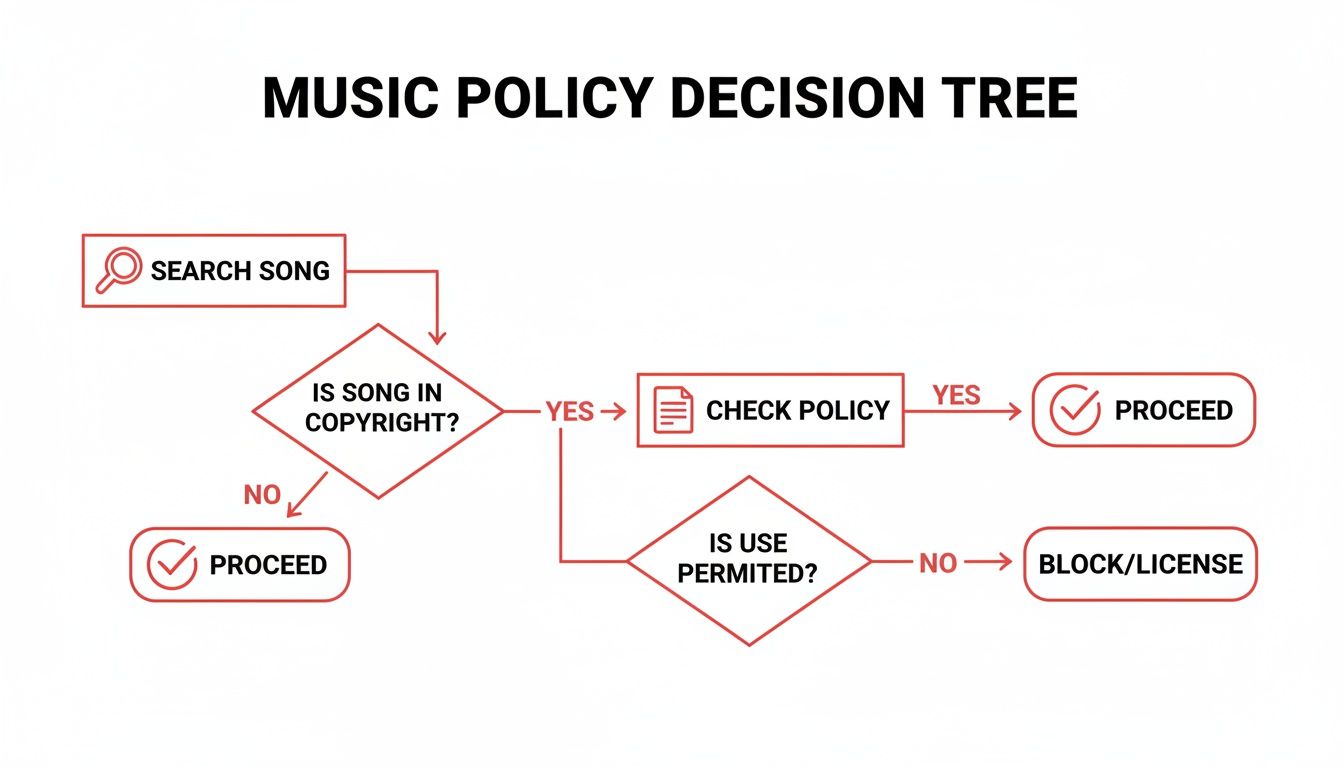
As you can see, checking the song's policy before you use it can save you a world of headache later.
How to Dispute a Copyright Claim
If you've looked everything over and are confident the claim is wrong, it's time to file a dispute. You can do this right inside YouTube Studio. It’s a formal process, but it’s straightforward.
So, what are considered valid reasons for a dispute? Here are the most common ones:
- You have a license: You paid for the track from a service like Epidemic Sound or Artlist, and their system made an error. This happens.
- It's public domain: The music is old enough that its copyright has expired, making it free for everyone.
- You got permission: You personally reached out to the artist or their label and have an email or contract giving you the green light.
- Fair Use: You used a short clip for something like a review, commentary, or parody. Tread very carefully here—fair use is a complex legal defense, not a blanket permission slip.
When you file, YouTube will ask you to explain your reasoning. Keep it clear, concise, and professional.
Writing an Effective Dispute Message
You don't need to hire a lawyer to write your dispute message. You just need to be clear and provide the facts.
Here's a simple, effective template you can adapt if you have a license from a music library:
"Hello,
I am disputing this claim because I have a valid license to use this audio track in my YouTube video. I acquired the license from [Name of Licensing Service] on [Date].
Here are the details for your reference:
License Certificate ID: [Your License Number]
Song Title: [Song Name]
Artist: [Artist Name]
My license grants me the full rights to use and monetize this music on YouTube. I kindly request that you review this information and release the claim on my video.
Thank you."
Providing concrete proof, like a license ID, is the fastest way to get a claim released. It gives the claimant's team exactly what they need to verify your rights and close the case.
If this all feels a bit much, or if you're dealing with more complicated copyright issues that are putting your channel's monetization at risk, don't be afraid to ask for help. If you have specific questions about where your channel stands, feel free to contact the MonetizedProfiles team for some guidance. It's always better to get clarity than to guess and risk your channel's health.
Taking the Plunge: How to Legally License Music for Your Videos
If you’re tired of walking on eggshells with Content ID, sharing your ad revenue, or just want full creative control, it's time to talk about licensing. This is the professional route, the one that gives you complete peace of mind and protects your ability to monetize.
When you license a track, you're essentially buying a permission slip to use it in your video. It’s a straightforward transaction that eliminates all the guesswork.
A quick note on a common point of confusion: "royalty-free" doesn't mean the music is free to use. It just means you don't have to pay ongoing royalties (a fee per view or per play) to the artist. You typically pay a one-time fee or a subscription, and you're good to go.
The Creator's Best Friend: Royalty-Free Music Platforms
For almost every creator out there, the best and most practical way to get music is through a royalty-free licensing platform. These services are basically the Netflix of music for your videos. You pay a subscription and get access to a massive library of tracks and sound effects.
The beauty of these platforms is that they handle all the complicated legal stuff for you. You just find a song you love, download it, and use it.
Here are a few of the most trusted names in the game:
- Epidemic Sound: A huge favorite among YouTubers for good reason. Their library is massive, the quality is top-notch, and their search tool makes it easy to find exactly what you need.
- Artlist: If you're going for a more cinematic or high-end feel, Artlist is fantastic. Their catalog is more curated, focusing on high-production-value tracks that are perfect for storytelling.
- Soundstripe: These guys offer great flexibility. You can go with a subscription or even license single tracks if you just need one song for a specific project.
Think of your subscription as an insurance policy. The license they give you is your proof that you have the rights to use the music. If a bogus Content ID claim ever pops up, that license is your golden ticket to getting it resolved quickly.
Comparing the Top Licensing Services
So, which one should you choose? It really boils down to your budget, the style of your content, and the license terms. They're not all the same, so taking a moment to compare is worth your time.
Here's a quick look at how the big players stack up.
Royalty-Free Music Platform Comparison
| Platform | Pricing Model | License Coverage | Best For |
|---|---|---|---|
| Epidemic Sound | Monthly/Annual Subscription | Covers your channels while subscribed. Any video published during your subscription is cleared forever. | All-around creators who need a massive variety of genres and sound effects. |
| Artlist | Annual Subscription | A universal license covers all platforms, even future ones. Your videos are cleared forever. | Cinematic storytellers and filmmakers looking for high-quality, curated music. |
| Soundstripe | Monthly/Annual Subscription | Tiered plans for personal vs. business use. Single-track licenses are also available. | Creators who want flexibility, including the option to license individual songs without a subscription. |
The most important detail to check is what happens if you cancel your subscription. The best services, like the ones above, offer a "perpetual" license. This means any video you published while you were an active subscriber is legally covered forever—even after you stop paying.
The Big Leagues: Licensing a Famous Song
"But what if I really want to use that new Taylor Swift song?"
It's possible, but be prepared for a long, expensive journey. This process is called sync licensing, and it involves getting permission directly from everyone who owns a piece of that song. It's a whole different ballgame.
You’d have to track down and negotiate with at least two parties:
- The record label, which owns the master recording (the actual version of the song you hear).
- The music publisher(s), who represent the songwriters and own the underlying composition (the notes and lyrics).
For a popular song, getting a "yes" from both sides—plus any other stakeholders—is a monumental task. The cost can easily soar into the thousands or tens of thousands of dollars for use in a single YouTube video.
This is why direct licensing is really only an option for big brands, movie studios, and TV networks with deep pockets and legal teams. For the rest of us, a royalty-free service provides the perfect mix of incredible music, legal protection, and affordability.
Let's be honest: "Fair Use" is probably the most misunderstood concept on all of YouTube. A lot of creators treat it like a get-out-of-jail-free card, thinking a 10-second clip or a "no copyright intended" disclaimer is all they need.
If only it were that simple. The reality is much murkier and relying on Fair Use is one of the riskiest things you can do for your channel's health.
At its heart, Fair Use is a legal defense, not a creator's right. It's an argument you’d have to make in a courtroom, not a box you can check when uploading.
Here’s the most important thing to burn into your memory: YouTube's Content ID system does not understand Fair Use. It's an algorithm. It scans for matching audio, finds a match, and issues a claim. It has no way of knowing your artistic intent, whether you're making a commentary, or if your use is transformative.
The Four Factors a Judge Would Actually Consider
When a real Fair Use case goes to court, a judge looks at the situation through the lens of four specific factors. There’s no magic formula; it's a balanced judgment call. Understanding them shows why most background music usage on YouTube doesn't even get close to qualifying.
-
Purpose and Character of Your Use: This is all about transformation. Did you add new meaning, critique it, or use it for parody? Or did you just drop a popular song into your travel vlog to make it more exciting? A music reviewer analyzing a specific chord progression is transformative. Using that same song as background music is not.
-
Nature of the Copyrighted Work: This factor looks at the original piece. It's generally easier to claim Fair Use with factual works (like a news clip) than with highly creative works like music. Pop songs are considered peak creative expression, which makes them incredibly difficult to defend using for free.
-
The Amount You Used: How much of the song did you use? While less is always better, there is no "safe" number of seconds. Using a tiny but incredibly recognizable riff—the "heart" of the work—can weigh against you just as heavily as using a full minute.
-
Effect on the Market: This is often the killer. Does your video hurt the copyright owner's ability to earn money from their own song? If someone can just listen to the track in your video instead of streaming it on Spotify or buying it, your Fair Use argument is likely dead in the water.
A Defense, Not a Shield
Relying on Fair Use is a huge gamble. You're betting that you can win a potential legal battle against a rights holder who likely has a lot more resources than you do. For 99% of creators, that’s a fight you never want to have.
Even in clear-cut cases like parody, automated systems get it wrong all the time. Research after the EU's Article 17 rollout revealed that takedown rates for parodies—a genre that leans heavily on Fair Use—could be as high as 15.5%. As you can find out by reading more about copyright moderation on Wolters Kluwer Legal Blogs, this just goes to show how poorly the defense holds up against automated flags.
The bottom line is that Fair Use is a courtroom argument, not a YouTube setting. Your video will get claimed, demonetized, or even taken down long before you ever get a chance to plead your case.
If you're serious about building a sustainable channel, the risk is just too great. It's far smarter to get the right licenses or stick to royalty-free music. That way, you're building your business on solid ground, not on a risky legal defense.
Your Top Music Copyright Questions Answered
Trying to understand music copyright on YouTube often feels like navigating a maze of half-truths and bad advice. Let's cut through the noise and get straight to the facts on the questions I hear most often from creators.
"Can I Use a Song if I Just Give Credit?"
Let's bust the biggest myth right out of the gate: No. Simply crediting the artist in your video description does absolutely nothing to protect you from a copyright claim.
It's a nice thought, but copyright law is built on permission and licenses, not polite shout-outs. You need to remember that YouTube’s Content ID system is a bot. It scans audio; it doesn't read your description to see if you were being nice. If it hears a song it recognizes, it flags your video, period.
"What’s the Difference Between a Copyright Claim and a Strike?"
This one is absolutely critical for keeping your channel safe. A Content ID claim is usually automated and is all about the money. The copyright owner can decide to run ads on your video and take the revenue. It's a pain, for sure, but it doesn't really harm your channel's standing with YouTube.
A copyright strike, however, is a whole different beast. This is a formal, legal takedown request filed by the rights holder, and it’s serious.
- Just one strike can restrict your channel's features, like your ability to livestream.
- Getting three strikes can get your entire channel permanently deleted.
The easiest way to think about it is that claims are about monetization, while strikes are about your channel's very existence.
The key takeaway is that a claim affects a single video's revenue, but a strike is a formal penalty against your entire channel. Understanding this difference helps you prioritize how you respond to notifications from YouTube.
"Is There a Safe Number of Seconds I Can Use?"
The whole "10-second rule" or "30-second rule" idea is completely false. There is no safe duration for using copyrighted music without permission.
Honestly, even a tiny, recognizable snippet can be enough for Content ID to find it and slap you with a claim. The only legal concept that even considers the length of a clip is "fair use," and that's judged on how you've transformed the work, not on a stopwatch. Using a short clip to make a specific point in a review is one thing; using it as background music is something else entirely.
"What Happens if I Use Music from YouTube Shorts?"
This is a newer point of confusion. The music you find in the YouTube Shorts audio library is licensed only for use on the Shorts platform. That license is tied directly to the Shorts format.
If you make a Short with a popular track, then download that video and re-upload it as a regular, long-form video, that license is now void. The same thing happens if you rip the audio for a separate video edit. In either case, you're almost guaranteed to get a copyright claim because you’ve used the music outside of its intended, licensed environment.
Beyond the nitty-gritty of music copyright, many creators wonder about getting legal guidance in general. For a deeper dive into whether AI can be a reliable source, it's worth reading up on topics like if Can AI tools provide reliable legal advice?. Just remember that while tools can be helpful, they're no substitute for a real legal professional when things get complicated.
Ready to grow your channel without the copyright headaches? MonetizedProfiles offers fully monetized YouTube accounts that let you start earning from day one. Skip the grind and focus on creating amazing content. Check out our available accounts at https://monetizedprofiles.com.


