


Using text to speech for videos is a game-changer. It lets you create professional-sounding narration in minutes without hassling with expensive mics or tedious recording sessions. It’s hands-down the fastest way to get a clear, consistent voiceover for your content, seriously cutting down your production time.
Why AI Voices Are a Secret Weapon for Video Creators

Think about scaling your video output without ever saying a word into a microphone. That’s the exact advantage text-to-speech (TTS) offers, especially for faceless creators on YouTube and TikTok. This isn't just another tool; it’s a foundational piece of a smart content automation strategy.
TTS technology tackles two of the biggest roadblocks in video production head-on: time and money. Forget about hiring voice actors or spending hours recording and re-recording your own audio. You can generate a perfect voiceover in the time it takes to brew a pot of coffee.
This speed means you can publish content way more often, which is exactly what the algorithms on these platforms love to see.
Accelerate Your Content Engine
If you're serious about building a real income stream, consistency is the name of the game. AI narration completely removes the voice recording bottleneck, letting you build a true content engine.
All your creative energy can go into what actually moves the needle—writing great scripts and finding killer visuals—while the AI handles the talking.
This efficiency is a massive advantage on fast-moving platforms. A new trend pops? You have to jump on it now. With TTS, you can get a high-quality, narrated video out in a few hours, not a few days. That agility is how you stay relevant and grab eyeballs before the trend dies. If you're looking for a shortcut to earning, it's worth knowing how a monetized TikTok account can give you a head start.
The real power of TTS is scalability. You can produce one video or a hundred with the exact same audio quality and consistency. That’s something that's practically impossible to do on a budget with manual voice recording.
The Growing Demand for Automated Narration
There's a reason this technology is blowing up. The ability to launch faceless channels on YouTube or TikTok without ever showing your face or using your voice is a massive draw. The global TTS market was valued at USD 3.6 billion in 2023 and is on track to hit USD 14.6 billion by 2033, according to a report from Market.us. That growth is fueled by creators like us who need an accessible, scalable way to narrate content.
This shift points to a bigger trend in content creation. AI voices are just one of the best AI tools for content creators that can completely change your workflow. By jumping on TTS now, you’re not just saving time—you’re putting your channel right at the front of a major industry movement.
How to Choose an AI Voice That Connects with Your Audience
Choosing an AI voice is so much more than a technical task—it's one of the biggest branding decisions you'll make. The right voice doesn’t just read your script. It gives your faceless channel a personality, builds a real connection with your audience, and ultimately, keeps them watching.
Think of the AI voice as your channel's virtual host. You wouldn't hire a loud, hyped-up host for a calm meditation channel, right? The same exact logic applies here. The voice you pick becomes the consistent, recognizable persona of your brand.
It's this consistency that builds that subconscious familiarity and trust. When a viewer clicks your video, they know what to expect. That reliability is key to growing a loyal subscriber base that shows up for every single upload.
First, Define Your Channel's Voice Persona
Before you even start listening to voice samples, you need a crystal-clear picture of the persona you want to project. Is your channel an authoritative teacher, a friendly guide, or a thrilling storyteller? Your answer will point you straight to the kind of voice that will click with your audience.
Here are a few real-world examples to get you thinking:
- Tech Tutorial Channel: You'll want a clear, crisp, and confident voice. People are here to learn, so clarity and authority are everything. A voice that sounds knowledgeable and direct will build instant credibility.
- History Storytelling Channel: A warmer, deeper voice with a slightly slower pace can work wonders. You're looking for a narrator who can draw the listener into the past, making history feel alive.
- Finance and Investing Channel: It's all about trust. A steady, measured, and assertive tone conveys expertise and helps viewers feel confident in your insights on complex money topics.
- Gaming Commentary Channel: Energy is the name of the game. An expressive, upbeat, and even playful voice is perfect for matching the high-octane action on screen and keeping viewers entertained.
The point isn't just to find a "good" voice; it's about finding the right voice for your specific niche and content style.
Your goal is a perfect match between your content and the narrator's personality. When the voice feels authentic to the topic, viewers are far more likely to stick around and listen to what you have to say.
The opportunity here is massive. The TTS market was valued at USD 4.55 billion in 2024 and is projected to explode to USD 37.55 billion by 2032. This growth is being fueled by creators just like you, with ultra-realistic neural voices already commanding an 83% market share.
For those using pre-approved accounts from MonetizedProfiles, you can jump on this trend immediately, using high-quality TTS videos to earn from day one. In fact, studies show that expressive AI narration can retain viewers 25% longer and boost video completion rates by 35%—critical signals for the YouTube algorithm. For a closer look at the data, you can explore the full text-to-speech market report here.
Test and Refine Your Voice Selection
Never just pick the first voice you like and run with it. Most quality TTS platforms (ElevenLabs, Murf.ai, etc.) give you a huge library of options with different ages, genders, and accents. Your job is to audition them like you're casting for a lead role.
Start by creating a short test script from one of your videos—around 100 words is perfect. Make sure it captures the typical tone and vocabulary of your channel.
Now, generate that script using your top three to five voice candidates. Listen to them back-to-back, but don't just listen for basic clarity. Go deeper and ask yourself:
- Does the voice match the emotional tone of my content?
- Is the pacing natural, or does it feel robotic and rushed?
- Can I hear subtle inflections that make it sound more human?
Seriously, close your eyes and just listen. Does this voice sound like an expert you'd trust on this topic? It's also a great idea to get a second opinion from a friend, as they might catch something you missed. Once you lock in your choice, stick with it. That consistency is your secret weapon for building a memorable brand.
Crafting a Script That Makes AI Voices Sound Human
Here's the biggest mistake I see creators make with text to speech for videos: they treat the script like a blog post. You can have the most sophisticated AI voice on the market, but if you feed it a script written for someone to read, it's going to sound robotic. Every. Single. Time.
The secret to a natural-sounding voiceover doesn't start with tweaking software settings. It starts with the words you put on the page.
Think about how you talk. You use shorter sentences. Simpler words. You pause. You don't speak in dense, winding paragraphs filled with complex jargon. To get a human-like delivery, your script needs to reflect that natural, conversational rhythm.
This means you have to chop up those long sentences. Instead of writing, "The historical significance of this event, which has been debated by scholars for decades, is multifaceted and complex," break it down. Try this instead: "This event was historically significant. In fact, scholars have debated it for decades. And the reasons why? They're complex." See the difference? The second version gives the AI clean, digestible chunks to work with, leading to a far more natural cadence.
Writing for the Ear, Not the Eye
To make an AI voice truly shine, you have to stop writing for the eye and start writing for the ear. It’s all about using simple, direct language and a tone that feels like you're talking to one person, not an audience. The goal is a script that just flows when spoken.
A fantastic way to check your work is to read your script out loud. Does it feel clunky? Do you find yourself stumbling over certain phrases? If you struggle to say it smoothly, the AI definitely will. This one simple step will help you catch awkward phrasing and rewrite it into something that sounds like a real person talking.
Here are a few practical tricks I use all the time:
- Use Contractions: Say "it's," "you're," and "that's." It’s a tiny change that immediately makes your script feel less formal and more like a real conversation.
- Ask Questions: Every now and then, throw in a question. Something like, "So, what does this mean for you?" or "Ever wonder why that is?" It breaks up the monologue and pulls the listener in.
- Write in the Active Voice: The active voice just has more punch. Instead of "The video was made by the creator," say "The creator made the video." It's a subtle shift, but it makes the delivery feel much more direct and energetic.
Nailing this process is a game-changer for anyone building a serious content pipeline. For more deep dives on scaling your video production and monetization, check out the resources over on the MonetizedProfiles blog.
Mastering Punctuation for Pacing
When you're scripting for an AI, punctuation is your best friend. Commas, periods, and question marks aren't just for grammar—they're direct commands that tell the AI how to pace its delivery. A comma creates a slight breath. A period signals a full stop, letting a point really land.
Think of punctuation as the director's notes for your AI voice actor. A period is "cut," a comma is "breathe," and a new paragraph is "pause for effect." Use them deliberately to guide the performance.
Don't be afraid to use super short paragraphs, even single-sentence ones. In a written article, this might look odd, but in a TTS script, each paragraph break tells the AI to take a slightly longer, more deliberate pause. It's perfect for building a little dramatic tension or letting a key idea sink in before you move on.
Get Ultimate Control with SSML
For those who really want to get under the hood, many high-end text-to-speech tools support Speech Synthesis Markup Language (SSML). Think of it as a simple code that lets you embed commands right into your script to micromanage the AI's performance.
With SSML, you move beyond basic punctuation and start fine-tuning the delivery on a granular level. It’s like having a remote control for the AI's voice.
Here’s a taste of what you can do with it:
-
Insert Custom Pauses: You can tell the AI exactly how long to pause, right down to the millisecond. This is incredible for timing your narration perfectly to a visual reveal in your video. For example,
<break time="700ms"/>inserts a clean 0.7-second pause. - Change Pitch and Rate: Need to add emphasis or convey a different emotion on a single word or phrase? SSML lets you adjust the pitch and speed without changing the entire voice setting.
- Control Word Emphasis: You can even use SSML to place stress on a specific word, making your key points stand out. This is huge for guiding the listener's attention and making the whole thing feel more dynamic.
Learning just a few basic SSML tags can take your AI narration from pretty good to practically indistinguishable from a human. It's a powerful technique for anyone serious about creating professional-quality text to speech for videos.
Syncing Audio and Visuals for a Seamless Viewer Experience
A great-sounding AI voice is just the start. Its real magic happens when it's perfectly in sync with your visuals. That connection—what people see matching what they hear—is often the dividing line between a video that looks professional and one that feels clunky and amateur. Getting the sync right is the final polish that makes your text to speech for videos truly work.
When everything lines up, the viewer doesn't even notice the effort. It just feels right. A graphic popping up on screen the exact moment it's mentioned in the voiceover creates a strong mental link, making your message stick.
This is more than just dragging an audio file under a video track. It’s about creating a rhythm where the narration guides the viewer’s attention and the visuals bring the words to life.
Let the Narration Drive the Visual Pacing
Here's a pro tip: let the audio lead the dance. Don't try to cram your voiceover into a pre-cut video sequence. Instead, build your visuals around the finished narration. This simple shift in workflow makes your pacing feel deliberate and natural, not forced.
Start by dropping your finalized TTS audio file into your video editor's timeline. This is your foundation. Listen through it and place markers at key phrases, moments of emphasis, or important stats. These audio cues are now your roadmap for every visual change.
For instance, if the narrator says, "The market shot up by 73%," your goal is to cut to a chart or a big, bold text graphic showing "73%" at that precise moment. This is a classic editing technique that keeps the video feeling punchy and holds your viewer's attention.
Think of your voiceover as the conductor. Every visual element—every clip, graphic, and text overlay—is an instrument that needs to follow its lead. When everything is in harmony, you deliver a far more compelling experience.
Getting this right starts way before you even open your editor. You need a solid process for getting your script ready for the AI voice.
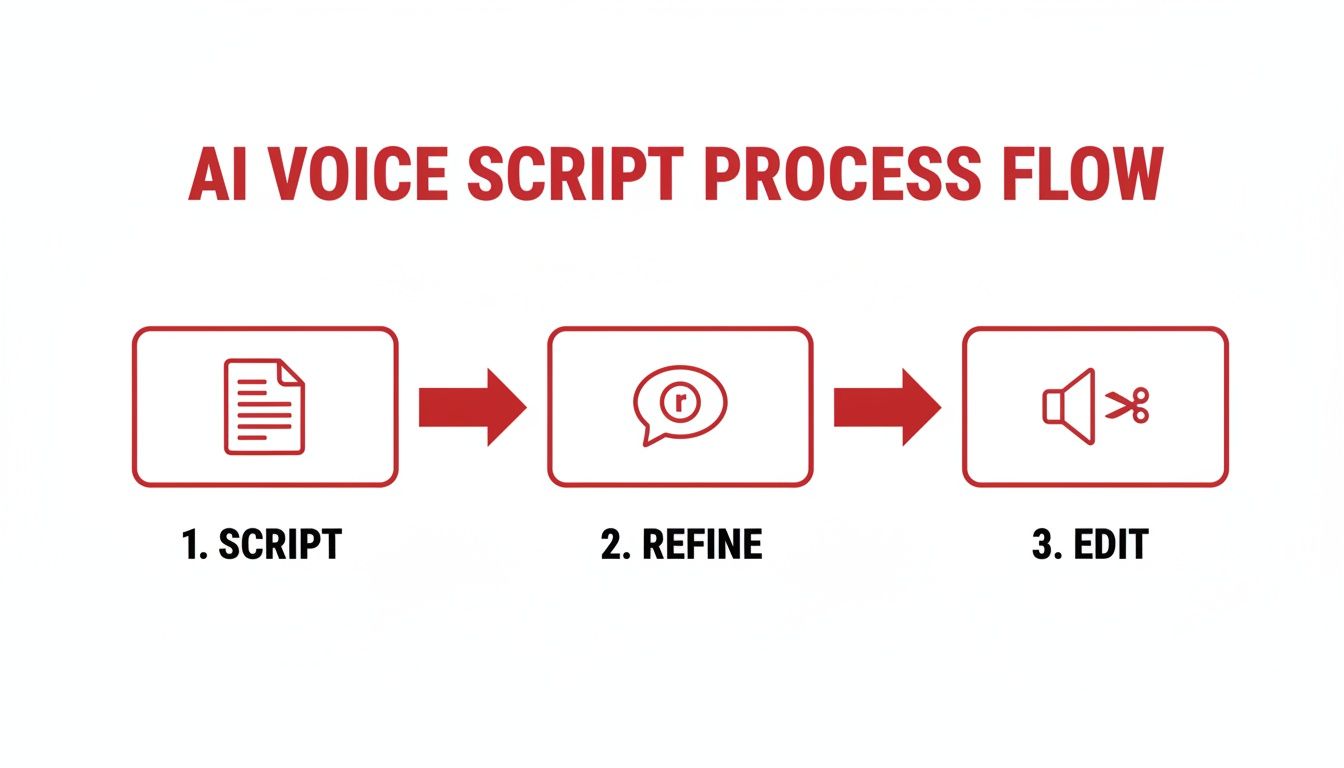
This simple flow—scripting, refining, and then editing the audio—is what creates a narration track that's clean, well-paced, and easy to sync your visuals to later on.
Why Captions Are Non-Negotiable
In a world dominated by phones, captions aren't a nice-to-have anymore. They're a must. Think about how many people scroll through TikTok or YouTube Shorts with the sound off. If you don't have captions, your entire message is lost on them.
Captions make your videos accessible to everyone, from people who are hard of hearing to someone watching on a noisy train. But beyond accessibility, they’re a massive driver of engagement.
Here’s why you can’t skip them:
- Boosts Comprehension: Reading along helps viewers lock in on your key points, even if they have the sound on.
- Improves Retention: When people see and hear your message, they're way more likely to remember it.
- Feeds the Algorithm: Mobile-first platforms know a lot of viewing is sound-off. Their algorithms often favor videos with clear captions because they perform better.
Nearly every modern video editor has an auto-captioning feature. These tools are a huge time-saver, but never trust them 100%. Always give the generated captions a quick proofread. AI can easily mishear a word or two, and a small typo can look unprofessional. A two-minute check is all it takes to ensure your captions are clean and accurate.
Staying Compliant with YouTube and TikTok Monetization Policies
Let's cut to the chase. Using an AI voice for your videos brings up one massive question: will it get you demonetized? It's a fair question, especially if you're trying to build a real business with your content.
Here’s the good news: both YouTube and TikTok are perfectly fine with monetizing videos that use text to speech for videos. But—and this is a big but—it comes with some conditions.
The platforms aren't waging a war against AI voices. They're fighting a war against low-effort, spammy content. Their entire business model depends on keeping people watching, and that means they promote videos that are original, valuable, and actually interesting. A robotic voice reading a generic script over a slideshow of stock photos? That's a one-way ticket to getting your channel flagged.
Your job is to prove your content is transformative. This just means you're adding real creative value. A great AI voice is just one ingredient in a recipe that also needs a killer script, smart editing, and unique visuals.
What Platforms Actually Consider “Low-Effort” Content
To stay in the clear, you have to know what the platforms are trying to weed out. YouTube is especially vocal about its rules against "repetitious" or "reused" content. This is the main hurdle you need to get over.
So, what usually gets slapped with the low-effort label?
- Totally Automated Content: Videos that feel like they were spit out by a machine with zero human thought or storytelling.
- Repetitive Visuals: Using the same handful of stock clips or images in every single video. We've all seen them.
- Thin Narratives: A generic script that offers nothing new. If it sounds like a Wikipedia article being read aloud, you're doing it wrong.
See the pattern here? It all comes down to a lack of human creativity. Using a premium, natural-sounding AI voice is your first and best defense against this, because it instantly makes your content sound more professional.
The core principle is originality. If your video feels like a unique creation that required thought and effort, you're on the right track. If it could be mistaken for hundreds of other auto-generated videos, you're in the danger zone.
Best Practices to Keep Your Channel Monetized
Staying on the right side of the guidelines is all about showing your work. You need to create something that is obviously transformative, where the mix of your script, visuals, and AI voice creates a brand-new experience for the viewer.
Think about it this way: the text-to-speech market is exploding for a reason. It was valued at USD 3.24 billion in 2023 and is expected to hit USD 8.80 billion by 2030. That growth is fueled by creators using these tools to make high-quality content, not junk.
Recent analysis shows that 70% of top faceless channels are now using AI voices, which correlates with a 40% higher engagement rate—largely because modern synthetic speech is just that good. If you want to dive into the data, you can read the full research on the speech-to-text market.
Here's a simple checklist to keep you safe:
- Invest in a High-Quality Voice: Forget the free, robotic voices from 2010. A premium, neural AI voice with realistic pacing and emotion makes your content feel professional and immediately separates you from the low-effort crowd.
- Write Original, Engaging Scripts: This is the most important part. Your script is where your value lies. It has to offer a unique perspective, deep analysis, or a great story that people can't get just anywhere.
- Use Dynamic and Relevant Visuals: Don't just dump narration over random stock clips. Your visuals need to match what’s being said. Use a mix of video, custom graphics, on-screen text, and anything else that keeps the viewer's eyes glued to the screen.
When you focus on these things, you stop just "making a video" and start crafting a piece of content. That distinction is everything when it comes time for a monetization review.
Platform Compliance Quick Check
Navigating the specific rules for each platform can feel tricky, but they share the same core philosophy: reward quality, and penalize spam. Here’s a quick breakdown of how to approach compliance on the major players.
| Compliance Area | YouTube Best Practice | TikTok Best Practice |
|---|---|---|
| Voice Quality | Use premium, human-like neural voices. Avoid monotonous, robotic tones that scream "automated." | High-energy, clear voices perform best. Using TikTok's native TTS voices is always a safe bet. |
| Originality | Script must be 100% original. Add unique commentary, analysis, or storytelling. Avoid paraphrasing articles. | Focus on original video concepts and creative hooks. The script can be simpler but must be unique. |
| Visuals | Use a dynamic mix of high-quality clips, images, and motion graphics. Visuals must support the narrative. | Fast-paced, visually engaging clips are key. On-screen text and captions are critical for retention. |
| Disclosure | Not explicitly required, but transparency can build trust. The focus is on the content's overall value. | No official requirement to disclose AI voice use. The platform prioritizes engaging, original video formats. |
Ultimately, both platforms want the same thing: content that people genuinely want to watch. As long as you're focused on creating that, the fact that you're using an AI voice is just a production detail.
A Real-World Example of Compliant Content
Let’s say you’re starting a faceless channel about historical events.
The low-effort, non-compliant version would be to copy/paste a Wikipedia article into a free TTS reader and play it over a slideshow of old, generic photos. It’s lazy, and YouTube will see right through it.
Now, here’s the high-value, compliant approach:
- The Script: You write an original script that tells the story from a fresh angle. Maybe you connect seemingly unrelated events or offer your own analysis on the consequences.
- The Voice: You generate the narration using a premium AI voice that has a deep, storyteller tone perfectly suited for a history documentary.
- The Visuals: You find compelling archival footage, create animated maps to show how an army moved, and use on-screen text to highlight key people and dates.
The second video is clearly transformative. It's educational, entertaining, and took real effort to put together. This is exactly the kind of stuff platforms love to monetize, and it’s a killer strategy if you want to get going with a monetized YouTube channel from day one. When you add this much value, the AI voice becomes just another tool in your toolbox.
Your Top Questions About Using Text-to-Speech for Videos
Jumping into text-to-speech for your videos can feel a bit daunting, and it's smart to have questions. Getting the right answers is what separates a struggling channel from a successful one. Let's clear up some of the most common concerns I hear from creators.
Can I Really Get Monetized on YouTube With a TTS Voice?
Yes, you absolutely can. I've seen countless channels do it successfully. YouTube's main concern isn't how the voiceover was made; it's whether your video provides real value to the viewer.
The platform cracks down on what it calls "low-effort" or "repetitious" content. An AI voice doesn't automatically put you in that category. As long as your videos offer unique commentary, a compelling story, or solid educational value, you're in the clear. The trick is to pair that AI narration with thoughtful editing, strong visuals, and a script that is 100% your own.
Think of it this way: if you just have an AI read a Wikipedia article over a slideshow of stock photos, you're going to have problems. But if you use that same AI voice to narrate your original analysis of a topic, supported by custom graphics and clips you've edited together, you're adding transformative value. That's exactly what YouTube wants.
What Are the Best TTS Tools for a Natural-Sounding Voice?
The "best" tool changes all the time, so instead of chasing brand names, I tell people to focus on the features that actually matter for creating a realistic voiceover.
You need software that gives you fine-tuned control. Here’s what I always look for:
- SSML Support: This is non-negotiable. Speech Synthesis Markup Language (SSML) lets you embed commands directly into your script to control pauses, pitch, speaking rate, and even which words get emphasized. It's a total game-changer for making a voice sound human.
- A Solid Voice Library: You need options. A good platform will have a wide range of voices, accents, and styles so you can find one that fits your channel's personality.
- Easy Customization: Being able to quickly tweak the overall pitch, speed, and volume is crucial for getting the delivery just right.
Nearly every quality TTS service offers a free trial. My advice? Use them. Take a paragraph from one of your own scripts and run it through a few different platforms. Hearing your own words is the only way to know you've found the right voice.
How Can I Make an AI Voice Sound Less Robotic?
Getting a natural, engaging performance from an AI voice really comes down to a three-part process.
First, write your script for the ear, not the eye. Use short sentences, conversational language, and a friendly tone. Read it out loud yourself—if it sounds stiff and formal, it will sound ten times more robotic when an AI reads it.
Next, you have to dive into the software's advanced settings. This is where you'll use SSML to add a slight pause after a key point for dramatic effect, or speed up the delivery during an exciting part of the story. You can manually emphasize certain words to guide your audience's attention, just like a human speaker would.
Finally, don't skip post-production. A little audio editing goes a long way. Get into your video editor and trim any awkward silences between sentences. Layer in some subtle background music and a few well-placed sound effects. This creates a much richer audio landscape and smooths over any remaining robotic edges. If you're looking for tools that combine these steps, the shortgenius platform for AI video creation is one option that integrates voice synthesis into its workflow.
Will People Click Away If They Hear an AI Voice?
Honestly, most viewers care far more about the content than the voice delivering it. If your script is fascinating, your visuals are on point, and the narration is clear, very few people will leave just because it's an AI.
Today's neural TTS voices are remarkably good. For many viewers, especially when the voice is paired with great content, it just becomes part of the channel's style. They're there for the information or entertainment you're providing.
So, stop worrying about the voice and start focusing on the total package. If you deliver an outstanding experience, your audience will stick around.
Ready to skip the grind and start earning immediately? At MonetizedProfiles, we provide monetization-approved YouTube and TikTok accounts so you can focus on creating great content from day one. Find your perfect monetized account here!


