


So, what does it actually take to get a "view" on YouTube? It's a question every creator asks, and the answer is a little more complex than just someone clicking "play."
Think of YouTube's view-counting system as a bouncer at an exclusive club. Not everyone who shows up at the door gets in. It's looking for real people who are genuinely interested, not just accidental clicks or bots trying to sneak past the velvet rope.
What Actually Counts As A YouTube View
To get past the bouncer, a watch session has to meet two key criteria: it needs to come from a real person with real intent, and it needs to last a specific amount of time. This is how YouTube separates genuine engagement from meaningless noise.
The Famous 30-Second Rule
For a standard, long-form video, the magic number is 30 seconds. A viewer has to watch your video for at least that long for it to be officially counted. It's the industry's golden rule.
Why 30 seconds? Because it's long enough to signal that someone is actually interested. They didn't just click by mistake or bail after the first two seconds. This is why you see so many creators pack the first half-minute of their videos with the most exciting hooks—they're working to get you past that critical milestone.
Key Takeaway: If a viewer leaves after 10 or 15 seconds, that watch probably won't be added to your official view count. The system is designed to weed out those fleeting, low-quality interactions.
The Importance of Viewer Intent
Time isn't the only factor. YouTube’s algorithm is also a pretty savvy detective, and it’s always asking, "Did the viewer mean to watch this?"
A view that starts with a person deliberately clicking the play button on your video page sends a powerful signal of intent. An autoplaying video that someone scrolls past without a second thought? Not so much. The system is smart enough to tell the difference.
This is a huge part of YouTube’s anti-fraud system, which is constantly on the lookout for plays that don't seem human. It actively filters out views from:
- Automated bots programmed to hit "play" over and over.
- Suspicious looping where one person refreshes the page again and again.
- Malware-infected devices that generate plays without the owner's knowledge.
How YouTube Prioritizes Organic Views
YouTube takes authenticity so seriously that for high-stakes metrics, like 24-hour music video debut records, only certain types of views make the cut. Since September 17, 2019, the platform has only counted organic views toward these official records.
So what's an organic view? It's one that comes from a genuine discovery path:
- YouTube search results
- Direct links to the video
- The YouTube homepage or "Up Next" suggestions
- Videos embedded on other websites
This change was a big deal. You can discover more insights on how these rules shape official YouTube statistics to see just how committed the platform is to genuine viewership. The message is clear: earned interest from great content will always be more valuable than manufactured hype.
To pull it all together, here’s a quick-glance summary of what makes a view legitimate in YouTube's eyes.
The Anatomy Of A Legitimate YouTube View
This table breaks down the essential criteria YouTube's system uses to validate a view. For creators, understanding these rules is the first step toward building an audience that the algorithm recognizes and rewards.
| Criteria | Does It Count? | Why It Matters For Creators |
|---|---|---|
| 30-Second Minimum | Yes (for standard videos) | This is the baseline for engagement. Your intro must hook viewers long enough to pass this mark. |
| Intentional Play | Yes | Views from autoplay or misleading embeds are often filtered out. You need viewers to choose to watch. |
| Bot or Script Traffic | No | Inflating views with fake traffic can get your video (or channel) penalized. It's not worth the risk. |
| Repeated Refreshes | No (after a few) | A few replays are fine, but excessive refreshing from one source is flagged as spam. |
| Embedded Autoplay | Maybe (often no) | If an embedded video autoplays silently in the background, it likely won't count. The user needs to interact. |
Ultimately, a view is more than a number—it’s a vote of confidence from a real person. Focusing on creating content that earns those votes organically is the only sustainable way to grow on the platform.
The Secret Journey From a Click to a Count
Ever noticed your view count on a new video stall, jump suddenly, or even dip slightly? It’s not a glitch. It's actually YouTube’s quality control system working right before your eyes. When someone clicks play, that view doesn't get counted instantly. Instead, it kicks off a surprisingly complex journey from a raw click to a fully verified view.
Think of it like depositing a check at the bank. The funds appear as "pending" before they officially clear. YouTube treats views the same way. It gathers all the initial play signals and puts them in a holding pattern for verification. This is where the platform’s powerful algorithms get to work, sorting real human viewers from all the background noise.
Stage 1: The Initial Log
The moment people start watching your video, YouTube’s servers begin logging every single play. At this early stage, everything gets logged—the good, the bad, and the downright sketchy. This initial burst of activity is what you see in your real-time analytics panel, which is why that number often looks so high at first. It’s a raw, unverified tally.
The public view counter on your video page, however, is a different story. It updates much more slowly because it’s waiting for the next step to finish. This delay is completely intentional and serves a critical purpose.
Here’s a simple look at the three-stage journey a legitimate view takes to get counted.
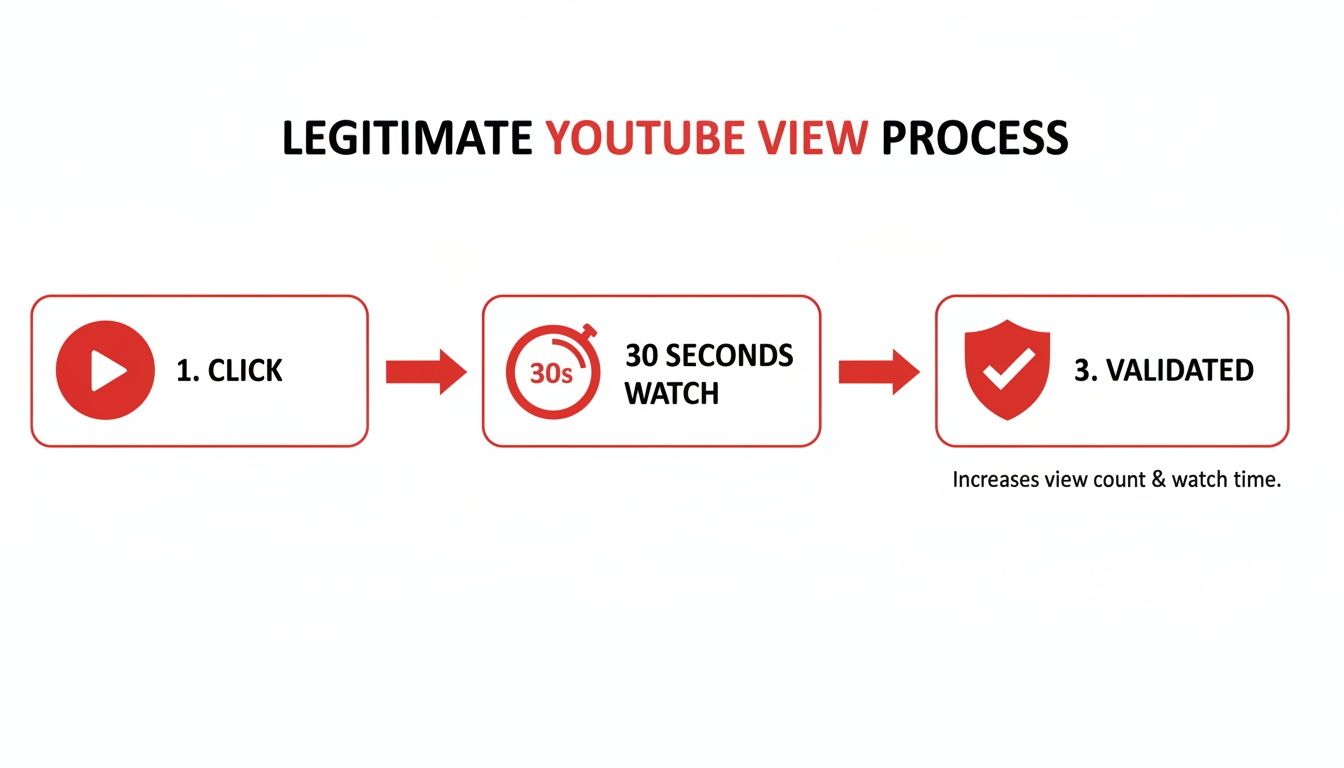
As you can see, every view has to pass through a validation filter after the initial watch time is met.
Stage 2: The Audit and Validation Phase
This is where the real magic happens. YouTube’s systems start auditing all that raw data, hunting for patterns that smell like low-quality or fake views. The algorithm’s entire job here is to protect creators from spam and ensure advertisers are paying for real human eyeballs, not bots.
During this audit, the system throws out any plays that don't meet the criteria. It's on the lookout for a few red flags:
- Repetitive Plays: Someone from the same IP address constantly refreshing the page.
- Known Bot Signatures: Traffic coming from servers or devices already flagged as part of a botnet.
- Malicious Embeds: Views from shady websites that load videos invisibly in the background.
- Short Duration Watches: People who click on the video and then leave in the first few seconds.
Why Your View Count Freezes: When a video starts going viral, it gets a massive rush of traffic. To handle this, YouTube will often freeze the public view counter temporarily. This pause gives the algorithm time to audit the flood of new plays and make sure they’re legit. Once the audit is done, the counter updates with the batch of verified views—which is why you see that big, satisfying jump.
Stage 3: The Finalized View Count
After the audit is complete, only the legitimate, high-quality views make the cut. These are the views that get added to your official, public-facing view count. This finalized number is the one that really matters for your channel’s analytics, your performance metrics, and—most importantly—your monetization.
Understanding this process explains why the numbers can seem so inconsistent at times. The fluctuations aren't a bug; they're a feature of a robust system designed to ensure every view is trustworthy. This rigorous process is exactly why authentic views from real fans are so valuable. They sail through these audits, strengthening your channel's standing with the YouTube algorithm.
How Views Work On Shorts, Live Streams, And More
YouTube isn't just one type of video anymore. With the explosion of Shorts, the marathon engagement of live streams, and the off-platform reach of embedded videos, the simple rules of view counting have had to adapt. To really build a smart content strategy, you need to know how a "view" is defined across these different formats.
The classic 30-second rule is still the gold standard for your regular, long-form videos. It’s a solid benchmark that has worked for years to measure genuine interest. But if you try to apply that to a 15-second Short, you can see why the system had to change. Each format has a different job to do, and YouTube's view-counting system reflects that.
The Unique Case Of YouTube Shorts
Shorts live in a completely different world—a fast-paced, thumb-scrolling marathon. Viewers make snap judgments, so making them wait 30 seconds for a view to count just wouldn't work. Because of this, Shorts have their own set of rules.
A view on a Short is counted as soon as someone intentionally watches it in their Shorts feed. While YouTube hasn't released the exact stopwatch time, the community understands it's a much, much shorter threshold than the old 30-second standard. The key word to focus on is "intentional."
- Intentional Watch: This means a viewer stops scrolling specifically to watch your Short. A quick flick past it in the feed doesn't count.
- No 30-Second Rule: A view registers even if the Short is only 10 seconds long, which most of them are.
- Looping Views: Even if someone is captivated and watches your Short loop five times in a row, it still only counts as one view for that session.
This system is built to reward content that grabs attention instantly. As a creator, this means the first second or two of your Short is absolutely critical—even more so than on a traditional video.
Important Note: Shorts views absolutely add to your channel's total view count and can help you hit the subscriber goal for the YouTube Partner Program. However, the watch hours from Shorts do not count toward the 4,000 public watch hours needed for monetization. Shorts have their own monetization system based on ad revenue from the Shorts feed.
Counting Views On Live Streams
Live streams are a different beast altogether. People pop in and out, so how does YouTube keep score? During the actual broadcast, the number you see is concurrent viewers—how many people are watching at that exact moment.
This live number is great for feeling the pulse of your stream. But the final, official "view count" is calculated differently. Once your stream ends and YouTube archives it as a regular video, the system crunches the numbers. The final view count you see on the video represents the total number of unique viewers who tuned in at any point. So, if someone watched for five minutes, left for an hour, and came back, they are still just one unique view in the final tally.
How Embedded Videos Get Counted
What about videos you’ve put on your own blog or website? Do those views even matter? You bet they do. A view from an embedded player is counted exactly like a view on YouTube.com, as long as it meets the same core rules.
A user has to intentionally click play, and for standard videos, they still need to watch for at least 30 seconds. Trying to game the system by having a muted video autoplay in the footer of your website won’t work. YouTube’s algorithm is smart enough to spot that kind of low-quality playback.
For creators, this is fantastic. It means your own website can be a powerful engine for driving real, monetizable views to your channel. It’s a great way to expand your content’s reach beyond the platform itself. And for those looking to hit the ground running, starting with an aged YouTube channel can provide a solid foundation, making it easier to gain traction with both your on-platform and embedded videos from day one.
Why Organic Views Are Your Channel's Superpower
Getting a handle on how YouTube counts views is one thing, but knowing which views actually build your channel is a whole different ballgame. Let's be clear: not all views are created equal in the algorithm's eyes. The ones you should be chasing are organic views—the ones you earn, not the ones you pay for.
Organic views are the lifeblood of a healthy, growing channel. They come from people who find you naturally within YouTube's world, whether that’s through a search, a recommendation on their homepage, or a suggestion in the "Up Next" sidebar. Think of it as a personal recommendation from YouTube itself.
Every organic view sends a powerful message to the algorithm: "Hey, people are actively looking for this and they like what they see." It's precisely why a video with 10,000 organic views is infinitely more valuable for your channel's future than one with 10,000 views you bought through an ad.
The Power of Authentic Engagement
When someone stumbles upon your video organically, they arrive with a real question or a genuine interest. They aren't just scrolling past an ad; they’re actively looking for what you have to offer. This simple fact leads to the kind of high-quality engagement signals the algorithm craves.
- Better Watch Time: A genuinely interested viewer will stick around longer, pushing up one of YouTube's most important metrics.
- More Interaction: They're far more likely to leave a like or a comment, telling YouTube your content is making an impact.
- Higher Subscriber Conversion: If you deliver on the promise of your title and thumbnail, that organic viewer is the perfect candidate to hit the subscribe button.
This is the secret sauce. It’s a positive feedback loop of discovery, engagement, and reward that fuels every single successful creator on the platform.
The Algorithm's #1 Goal: YouTube wants one thing above all else: to keep people watching. When your video pulls in organic views with great watch time, you're helping YouTube achieve its main objective. As a thank you, the algorithm will start showing your video to more and more people.
What About Non-Organic Views?
So where do non-organic views fit in? These are the views you get from outside sources, like paid Google Ads campaigns or a viral post on another social media platform. They have their place, but they serve a completely different purpose.
Paid ads are fantastic for a quick, targeted burst of exposure. You can put your video directly in front of a specific audience to launch a product or announce an event. The trade-off is that these viewers weren't looking for you, so the watch time and engagement are often much lower. They don't build the same kind of long-term trust with the algorithm.
For faceless creators, especially, this distinction is everything. Your entire strategy should revolve around attracting organic views. That means obsessing over SEO-friendly titles, creating irresistible thumbnails, and making content that gets recommended—because for many channels, that’s where over 70% of all views come from.
Getting your views counted is just the start; learning how to cultivate an audience that finds you organically is how you win. For a deeper dive into fostering genuine interaction, check out these best practices for social media engagement to drive true growth. And if you're looking for a way to hit the ground running, starting with an account that's already in the YouTube Partner Program can give you a leg up. Buying a monetized YouTube channel allows you to focus 100% of your energy on creating content that attracts that all-important organic audience from day one.
Common Myths About YouTube Views Debunked
There's a ton of bad advice floating around about how YouTube's view counter works. Falling for these myths can lead you down a rabbit hole of pointless strategies that do more harm than good. So, let's cut through the noise and get to the facts.
Knowing what's true and what's not is what separates the creators who build lasting channels from those chasing shortcuts to nowhere. When you have the right info, you can pour your energy into what actually grows your channel: making awesome videos people want to watch.
Myth 1: Replaying My Own Video Boosts Views
This is probably one of the oldest tricks in the book, and it's completely busted. Mashing the refresh button on your own video won’t fool YouTube's algorithm. The system is smart enough to see that all those "views" are coming from the same IP address and will quickly filter them out.
You might see the counter tick up a few times if you watch from different devices, but that's it. After a handful of plays, YouTube stops counting your views to prevent spam. This is a basic fraud-prevention measure designed to make sure view counts reflect real, genuine interest from an audience, not just a creator clicking on their own stuff.
Myth 2: Frozen View Counts Mean My Video Is Penalized
That feeling of dread when your view count gets stuck at "301+" or just stops moving is real. It’s easy to jump to the conclusion that YouTube has slapped a penalty on your video, but that's almost never what's happening. In reality, a frozen view count is often a good thing. It means your video is popular enough to trigger a manual review.
Think of it as a quality check. YouTube temporarily freezes the public counter so its systems can audit the incoming traffic, sifting out bots and low-quality plays. Once this verification process is done, the counter jumps back to life, updated with all the legit views that came in during the pause.
Myth 3: Embedded Video Views Are Worthless
This one pops up a lot: the idea that views from a video embedded on your blog or website don't count for much. That's just flat-out wrong.
A view is a view, whether it happens on YouTube.com or on your own site. As long as a real person intentionally clicks the play button and watches for the required amount of time, it counts. In fact, embedding videos is a fantastic way to reach new audiences and drive more legitimate traffic to your channel.
The Bottom Line: Don't worry about where the view happens. As long as it comes from a real person who wants to watch your content, YouTube counts it. The system rewards authentic engagement, period.
Myth 4: Deleting A Video Wipes Out Its History
If you have a video that flopped, you might be tempted to delete it to clean up your channel. While the video itself will disappear, its impact on your analytics often remains.
The views and watch time that video earned usually stay baked into your channel's lifetime totals. YouTube Analytics is built to hold onto historical data because it's valuable. Top creators obsess over this data, learning from past performance to inform future content. You can even explore the specifics of YouTube's data handling to get a sense of how this all works behind the scenes.
Frequently Asked Questions About YouTube Views
Even after you get the hang of how YouTube's view system works, you'll still run into questions. It happens to everyone. Let's dig into some of the most common things creators wonder about and get you some straight answers.
Do My Own Views Count?
This is probably one of the first questions every new creator asks. The short answer is: no, not really.
You might see the counter go up by one if you watch your own video right after uploading, but don't get excited. YouTube's system is smart enough to know it's you. It quickly recognizes repeated views coming from the same IP address and stops counting them to prevent people from artificially inflating their numbers.
So, hitting refresh on your own video all day won't help your channel grow. It’s better to spend that time creating your next great piece of content.
How Long Does It Take for Views to Appear?
Patience is key here, because views don't always show up instantly. There's a bit of a delay while YouTube verifies everything behind the scenes.
Here’s a quick timeline of what to expect:
- Real-time Analytics: You can catch a glimpse of early, unverified activity here within a few seconds or minutes of a view happening.
- Public View Counter: This is the number everyone sees on your video page. It can take a few hours to update as YouTube runs its first round of checks.
- YouTube Studio Analytics: This is the official, fully audited number. It can take up to 48 hours to show up in your main dashboard because it has been thoroughly scrubbed for any invalid traffic.
Why Is My Public View Count Different From Analytics?
It's totally normal to see one number on your public video page and a different one inside your YouTube Studio. This isn't a glitch; it's by design.
The public counter is a quick estimate, while the analytics in your Studio are the fully confirmed, official stats. YouTube's system is constantly filtering out bot traffic and low-quality plays, and those removals are reflected in your Studio data first.
Key Insight: Always trust your YouTube Studio analytics over the public view count. The Studio is your source of truth for understanding how your content is really doing.
For more deep dives into building a successful channel, feel free to explore our full library of resources on the MonetizedProfiles blog.
Do Skipped Ads Count as Views?
Nope. A view is only counted for your video, not the ad that plays before it.
Think of them as two separate events. For a view to register, the person has to finish the ad (or skip it) and then watch your actual video for the required amount of time—usually 30 seconds. The ad interaction has zero impact on your video's view count.
Ready to skip the slow grind and start earning from your content right away? MonetizedProfiles offers fully approved, organically grown YouTube channels that are ready for monetization from day one. https://monetizedprofiles.com


