


Before you can start earning money on YouTube, you first need to get into the YouTube Partner Program (YPP). The first major milestone is hitting 500 subscribers. After that, you need to achieve either 3,000 watch hours on your regular videos in the last year or get 3 million views on your Shorts in the last 90 days.
Understanding the YouTube Partner Program
Think of the YouTube Partner Program (YPP) as the official gateway to making money from your content. It’s more than just slapping ads on your videos; joining the YPP opens up a whole toolkit designed to help you turn your channel into a real business. For a lot of creators, this is the moment things get serious.
When you're starting out, a smart move is to see what's already working for others. Learning how to summarize a YouTube video is a great way to quickly break down popular content and understand what makes an audience tick. This kind of research can really help you sharpen your own strategy.
Two Paths to Eligibility
YouTube gets that creators have different strengths, which is why they offer two main ways to qualify for the YPP. The great thing is you only need to meet the criteria for one of them to get in.
For a quick breakdown, here's how the two paths compare.
YouTube Partner Program Eligibility at a Glance
| Requirement | Long-Form Video Path | YouTube Shorts Path |
|---|---|---|
| Subscribers | 1,000 | 1,000 |
| Watch Time | 4,000 public watch hours (in last 12 months) | Not required |
| Views | Not required | 10 million public Shorts views (in last 90 days) |
As you can see, you can either go all-in on longer videos and build up those watch hours, or you can focus on creating viral Shorts to rack up millions of views. Both paths lead to the same destination: monetization.
The moment you get that acceptance email from the YPP is a game-changer. It’s validation that your hard work is paying off and that you've built an audience that advertisers see value in.
This visual flow chart breaks down the core milestones for reaching monetization.
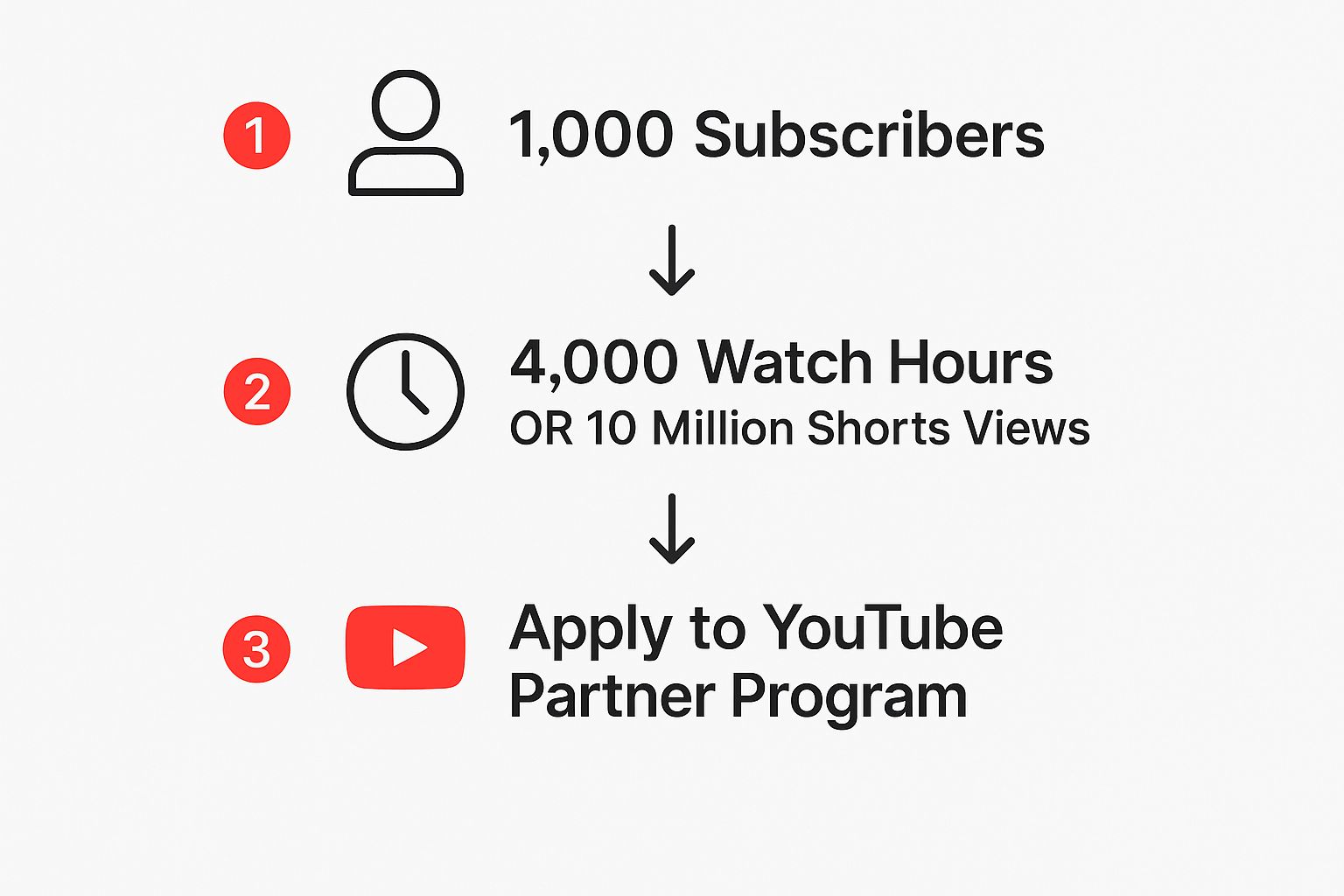
The infographic lays it out pretty clearly—two distinct but parallel routes you can take to get your channel monetized.
What Are the Official Requirements
Beyond the big numbers, there are a few other boxes you need to tick. As of 2025, the baseline requirements to unlock early YPP features are:
- Live in a country where the YPP is available.
- Have at least 500 subscribers.
- Upload at least three public videos in the last 90 days.
- Hit either 3,000 public watch hours in the past 12 months or 3 million Shorts views in the last 90 days.
You'll also need an active AdSense account linked to your channel and, most importantly, you have to play by the rules—that means following all of YouTube’s community guidelines to the letter. No shortcuts.
Hitting Your Monetization Goals: A Practical Guide
Let's be real: hitting your subscriber and watch hour goals is way more about smart strategy than it is about luck. The secret to figuring out how to get YouTube monetization is realizing these numbers aren't the goal—they're the result of the value you're giving your audience. You need a solid game plan to get people to click and, more importantly, to stick around.
Simply telling viewers to "smash that subscribe button" doesn’t cut it anymore. What you need is a clear promise. What problem are you solving? A channel dedicated to Squarespace tutorials, for instance, makes an immediate promise: watch our videos, and you’ll walk away knowing how to build a better website.
When your value is that clear, casual viewers start turning into a real community. They subscribe because they trust you'll keep delivering content that genuinely helps them.
Growing Your Subscriber Base the Right Way
Before you can build a subscriber list, you have to know who you’re talking to. It’s almost always better to be specific than to be broad. Instead of a generic "gaming" channel, what about zeroing in on "Indie Horror Game Walkthroughs"?
That kind of focus attracts a passionate audience that's far more likely to subscribe. Once you have their attention, engaging with them is your most powerful tool.
- Jump into the Comments: Make a real effort to reply to as many comments as you can, especially in the first few hours after posting. It shows you’re present and helps build that community feel.
- Use the Community Tab: Don't let the Community Tab collect dust! Use it for polls, behind-the-scenes content, or just asking questions. It keeps your audience connected between video uploads.
- Showcase Your Audience: If it fits your niche, feature great comments or user-submitted content in your videos. It’s an incredible way to make your subscribers feel like they're a part of the show.
This creates a powerful feedback loop. People who feel engaged are more likely to subscribe, comment, and share, which just feeds the cycle.
Think of each subscriber not just as a number, but as a person who has raised their hand and said, "I'm interested in what you have to say." Your job is to consistently honor that interest with quality content.
The new, lower requirements have made this journey feel much more achievable. Getting those first subscribers used to be a massive grind. But once a channel starts getting some traction, growth often picks up speed. This change helps new creators build momentum and start earning much sooner.
Getting Those Watch Hours and Shorts Views
Subscribers are all about building community, but watch hours and Shorts views are about how you structure your content. For your longer videos, the aim is to create stuff that’s so good people can't help but click on the next one.
Imagine a DIY channel creating a multi-part series on building a deck. Each video flows right into the next, making it easy for viewers to keep watching. That's how you really rack up the watch hours. If you want to get into the nitty-gritty of this, check out our guide on the fastest way to get 4000 watch hours on YouTube like a pro.
Your thumbnails and titles are everything. They have to grab attention instantly. Use high-contrast colors, expressive faces, and clean, bold text. Your title needs to spark curiosity without feeling like cheap clickbait. Think "I Built a Gaming PC on a $500 Budget" instead of "You Won't Believe This PC."
Shorts, on the other hand, are a completely different ballgame. It’s all about delivering a quick, memorable punch.
| Content Type | Long-Form Video Strategy | YouTube Shorts Strategy |
|---|---|---|
| Cooking Channel | A 15-minute deep dive into making the perfect lasagna. | A 30-second "kitchen hack" showing the easiest way to peel garlic. |
| Finance Channel | A 20-minute analysis of the stock market for the next quarter. | A 45-second clip on the single biggest mistake new investors make. |
| Fitness Channel | A 30-minute follow-along, full-body workout routine. | A 15-second demo showing the perfect push-up form. |
As you can see, Shorts are made for those quick, bite-sized tips that make viewers feel like they learned something valuable in under a minute. The key is to create content that’s so shareable it piles up views fast, pushing you toward that 3 million view goal.
Navigating YouTube's Rules for Monetization
Hitting your subscriber and watch time targets is a huge milestone. It feels like you’ve finally made it, but in reality, it’s more like getting your driver’s permit. Now you have to prove you can follow the rules of the road.
For YouTube creators, those rules are the platform's policies. Staying on the right side of them isn't just a hoop you jump through during the application process—it’s an ongoing part of keeping your channel healthy and monetized.
Your content needs to align with two key sets of rules: the Community Guidelines and the Advertiser-Friendly Content Guidelines. The first set applies to everyone on YouTube, while the second is specifically about whether your videos can make money.
Don't Overlook the Community Guidelines
The Community Guidelines are there to keep YouTube a safe place for everyone. A single violation can get you a strike, have your video removed, or even get your channel shut down for good. That can bring your monetization journey to a screeching halt.
It’s surprisingly easy to slip up by accident. A common mistake is using a catchy but misleading thumbnail to get more clicks. YouTube sees this as misleading metadata, and it's a clear policy violation. The same goes for stuffing your video description with a bunch of irrelevant keywords just to try and game the search algorithm.
"Your title, thumbnail, and description are a promise to your audience. If the video doesn't deliver on that promise, you're not just creating a bad viewer experience—you're risking a policy strike that can put your monetization in jeopardy."
Here are a few other common pitfalls to watch out for:
- Spam, Deceptive Practices, and Scams: This is a broad category. It can be anything from posting repetitive, spammy comments to linking out to sketchy websites that try to steal personal info.
- Impersonation: You can't pretend to be another person or channel. This might seem obvious, but parody and commentary channels need to be careful to make it clear what they're doing.
- External Links: This one catches a lot of people. Even if your video is perfectly fine, linking to a site that violates YouTube’s rules (like one with hate speech or graphic violence) is a serious no-no.
Before you even think about applying for the YPP, you need to have a solid grasp of the official YouTube monetisation policy. Seriously, treat it like required reading.
Cracking the Advertiser-Friendly Content Code
So, you’ve passed the Community Guidelines check. Great. But now comes the next hurdle: making content that brands actually feel comfortable placing their ads on. This is where the Advertiser-Friendly Content Guidelines come into play.
These guidelines are why you'll sometimes see that frustrating yellow dollar sign next to your video, signaling limited or no ads, instead of the green one for full monetization.
They’re a bit more subjective than the main community rules. For example, a thoughtful documentary about a tragic current event is important content, but it's probably not where a company wants to advertise its new breakfast cereal.
Here are some content types that often get flagged:
- Inappropriate Language: A lot of swearing, especially right at the beginning of a video, is a quick way to get demonetized.
- Violence and Disturbing Imagery: This is a constant challenge for true-crime or history channels. Showing graphic content without a clear educational or documentary context will almost always land you a yellow icon.
- Controversial Issues: Videos that are deliberately inflammatory, demeaning, or promote discrimination are completely off-limits for advertisers.
Let's take a commentary channel, for instance. You can absolutely use clips from other creators under Fair Use, but if your commentary turns into hateful harassment, you’ve crossed the line. The magic word here is transformative value. Are you adding fresh insight and creating something new, or are you just re-uploading someone else's content?
A gaming channel can show in-game violence, but if the video is just a montage of gore with no real skill or commentary, advertisers will steer clear. Getting monetization right means making stuff that both your audience and brands can get behind.
Getting Through the YouTube Monetization Review
https://www.youtube.com/embed/3KSgYeZ5cDg
You've done the heavy lifting. The subscribers are there, the watch hours are logged, and your channel finally has some real momentum. Now for the final hurdle: the application and review. This part isn't just about the numbers; it’s about proving your channel is a valuable part of the YouTube community.
Once you hit those magic numbers, you'll see a prompt to apply in the "Earn" tab of your YouTube Studio. The application itself is pretty simple—you'll agree to the YouTube Partner Program (YPP) terms and link up a Google AdSense account.
But before you hit "submit," pause and do a quick pre-flight check. It's crucial to look at your channel through the eyes of a human reviewer, because that’s who makes the final call. They don't just see stats; they see a creative project with a purpose.
Your Pre-Application Channel Audit
Take a step back and look at your channel as a whole. The review team is checking its overall health and authenticity. They need to see you're a creator acting in good faith, not someone just trying to game the system.
Here's a quick checklist of what to look over:
- Your Central Theme: Does your channel have a clear identity? A channel that jumps between random vlogs, gaming highlights, and cooking tutorials can look unfocused and may raise a red flag.
- Top-Performing Videos: Your most-viewed videos will be under the microscope. Make sure they represent your best work and are squeaky clean when it comes to following the rules.
- Most Recent Videos: Reviewers want to see you're still in the game, actively producing quality content that fits your channel's niche.
- Watch Time Sources: Where are all those hours coming from? If a single viral video is responsible for 90% of your watch time, you can bet they’ll inspect that video very, very carefully.
- Video Metadata: This means your titles, descriptions, and thumbnails. They all need to be an honest reflection of your content, not just a jumble of keywords designed to trick the algorithm.
Running this self-audit is one of the smartest things you can do. You can spot potential problems before a reviewer does, which seriously boosts your chances of getting approved without a hitch.
What the Reviewers Are Actually Looking For
An automated system might do the first pass, but a real person makes the final decision. These reviewers are trained to look past the surface-level stuff and dig into the context and intent of your channel. They aren't just ticking boxes; they're making sure your channel has real value.
A human reviewer’s main job is to confirm that your channel is not just compliant, but authentic. They are asking one simple question: Does this channel provide genuine value to its audience, or is it just re-uploading content from somewhere else?
They’re especially focused on policies that are tough for algorithms to judge, like "Reused Content" and "Repetitious Content." For instance, if your channel is nothing but movie clips strung together with no new commentary or edits, you’re almost guaranteed to get rejected for reused content.
The magic word is transformative. Are you adding something new? That could be insightful commentary, a detailed review, funny edits, or an educational perspective. That’s what they want to see.
Timelines and What Happens Next
Once you submit your application, the waiting begins. YouTube's official line is that the review takes about a month. In reality, it varies. I've seen creators get approved in a week, while others have to wait a bit longer, especially if their channel needs a closer look.
If you get approved, awesome! You can start switching on monetization features right away.
But what if you're rejected? First, don't panic. YouTube will give you a general reason why. The most common culprits are:
- Reused Content: You used someone else's material without adding significant original value.
- Repetitious Content: Your videos are mass-produced, low-effort, and feel too similar to one another.
- Community Guideline Strikes: Any active strikes on your channel are an automatic deal-breaker.
If you get turned down, you can re-apply after 30 days. Use that month wisely. Go back and fix the issues they flagged. This might mean deleting or heavily editing some videos, sharpening your channel's focus, and making sure everything you post is 100% compliant. Don't see it as a failure—see it as a chance to come back even stronger.
Unlocking All Monetization Features Beyond Ads
Getting that YPP acceptance email is a huge win, but don't stop at ad revenue. That's just the starting line. To really build something sustainable, you need to diversify your income. This is where you shift from just being a creator to running a real business by using YouTube's built-in tools to connect with your most loyal fans.
Relying solely on ads is a risky game. Monetization on YouTube has grown way beyond what it used to be. The platform now offers powerful features like channel memberships, Super Thanks, and YouTube Shopping, giving you a toolkit to build a much more stable income.
Build Recurring Revenue with Channel Memberships
Channel Memberships are your key to predictable, recurring income. Plain and simple. This feature lets your viewers pay a small monthly fee for exclusive perks you create for them. It’s a fantastic way to reward your most dedicated supporters while building a revenue stream that doesn't swing wildly with ad-rate fluctuations.
The secret to making memberships work is offering value that feels genuinely special. Think about what you can give your core audience that a casual viewer doesn't get.
- Exclusive Content: This could be anything from members-only videos and early access to new uploads to raw, behind-the-scenes vlogs showing your process.
- Community Access: A private Discord server or members-only live streams are great for creating a tighter-knit community where you can interact more personally.
- Unique Recognition: Custom loyalty badges and emojis that members can flash in comments and live chats make them feel like true insiders.
For instance, if you're a travel vlogger, you could offer a monthly live Q&A where you help members plan their own trips. A coding channel might provide members with exclusive access to the source code for their projects. The goal is to create perks that fit your niche and show your supporters you appreciate them.
Engage Your Audience with Supers
Super Chat, Super Stickers, and Super Thanks—which YouTube calls "Supers"—are designed to boost your earnings during live streams and video premieres. They let viewers pay to have their messages or animated stickers highlighted, giving them a fun way to grab your attention and support your work.
Super Thanks is especially powerful because it isn't just for live events. It works on your regular video uploads, too. A viewer can buy a cool animation that pops up over your video, and their comment gets a special highlight in the comments section. This lets fans show some love on their favorite videos long after they've gone live.
Supers are much more than a simple donation tool—they’re an engagement feature. When someone uses a Super Chat during a live stream, they're sending a clear signal that they’re deeply invested in what you’re doing. Acknowledging those contributions in real-time makes your entire community feel stronger.
Monetize Your Brand with YouTube Shopping
If you have a brand, you need to be selling products. YouTube Shopping lets you plug your own merch store directly into your channel, making it incredibly easy for your audience to browse and buy your stuff without ever leaving the platform. This is a game-changer for creators selling anything from t-shirts and hoodies to digital products like e-books or photo presets.
Setting it up is surprisingly easy. You can connect popular platforms like Shopify or Spring right to your YouTube channel. Once you're linked up, your products can show up in a few key places:
- A store tab right on your channel's homepage.
- A product shelf that appears just below your videos.
- A shopping icon that you can tag directly in your videos.
Imagine you're a fitness creator. You can now sell your own branded resistance bands directly beneath a workout video where you're using them. The connection is instant and powerful, turning a viewer's inspiration into a sale. Beyond merch, you can also explore other financial avenues, as detailed in our guide to the https://monetizedprofiles.com/blogs/monetization-on-social-media/top-youtube-monetization-alternatives-in-2025.
Don't forget about your short-form content, either. Beyond traditional ad revenue, there are many strategies to monetize YouTube Shorts that can help you maximize your earnings from that super-popular format.
Common Questions About YouTube Monetization
As you start chasing monetization, you’re bound to hit a few roadblocks. It's totally normal. The path isn't always clear, and a few common questions pop up for almost everyone. Let's tackle some of the biggest ones so you can avoid the headaches.
Figuring out how to get youtube monetization is more than just hitting subscriber and watch time goals—it's about understanding the unwritten rules of the game.
How Long Does It Really Take To Get Monetized?
Honestly, there's no single answer. The timeline is all over the place. I've seen some creators go all-in and hit the numbers in just a few months, while for others, it’s a slow and steady climb that takes a year, maybe more.
The biggest things that move the needle are your niche, how good your videos are, and how often you post. A channel cranking out tutorials in a popular software, for example, will likely grow way faster than one focused on a super obscure hobby. Once you do hit the requirements and submit your application, you can expect to wait about a month for YouTube's review.
The name of the game is consistency. I’ve personally coached channels that took over a year of weekly uploads to finally cross the 4,000 watch-hour finish line. Think of it as a marathon, not a sprint. Every single video is a new chance to bring people in.
Can I Use Copyrighted Music In My Videos?
This is probably the most common and painful mistake I see new creators make. The short answer is a hard no. Using music you don't have the rights to is a surefire way to get a Content ID claim on your video.
When that happens, every cent of ad revenue your video makes goes straight to the music's copyright owner, not you. If you want to actually earn money from your videos, you have to use music you have permission for.
Here are your safest bets:
- The YouTube Audio Library: It's built right into YouTube Studio and packed with free music and sound effects you can use without any worries.
- Royalty-Free Music Services: Platforms like Epidemic Sound or Artlist are a great investment. For a monthly subscription, you get access to incredible music that won’t get your channel flagged.
- Direct Licenses: Want to use that one popular song? You’ll have to track down the publisher and negotiate a license directly. Be warned: this is almost always very complicated and expensive.
What If My Monetization Application Is Rejected?
First, take a deep breath. It's not the end of the world, and it happens more than you’d think. If YouTube rejects your application, they'll give you a vague reason like "Reused Content" or "Repetitious Content." This is your signal to put on your detective hat and do a full audit of your channel.
You have to wait 30 days before you can apply again. Don't waste that time. Go through your videos with a critical eye, especially based on the feedback YouTube gave you. Delete or heavily edit any videos that could be causing the problem and make sure your channel feels original and provides unique value.
Treat it as a chance to clean house and level up your content strategy. It's a setback, but it's a fixable one.
Do Shorts Views Count Toward Watch Hours?
This trips up a lot of creators. The answer is simple: no. The watch hours you get from people viewing your YouTube Shorts do not count toward the 4,000-hour requirement for standard monetization.
YouTube has created two separate lanes to get into the Partner Program, and you only need to qualify for one:
- For Long-Form Video: You need 1,000 subscribers and 4,000 public watch hours.
- For YouTube Shorts: You need 1,000 subscribers and 10 million public Shorts views in 90 days.
The key takeaway is that these metrics don't mix. It's YouTube's way of creating a fair path for both traditional video creators and those who specialize in short-form content.
Tired of the slow grind to meet YouTube's requirements? MonetizedProfiles offers a shortcut. We provide fully approved, monetized YouTube accounts that are ready to earn revenue from day one. Skip the wait and start focusing on what you do best—creating great content. Check out our ready-to-go accounts.


