


Getting 4,000 watch hours on YouTube boils down to a pretty straightforward idea: make videos people actually stick around to watch, and post them regularly. But here's the thing—the journey doesn't start with hitting "record." It starts with a plan.
Your Foundational Strategy for Hitting 4,000 Watch Hours
That climb to 4,000 watch hours can feel like staring up at a mountain. It’s a huge number, but every single monetized creator has hit it. Their secret wasn't just getting lucky with a viral video; it was building a smart, repeatable system for attracting and holding onto viewers.
So, the first thing we need to do is stop throwing random video ideas at the wall to see what sticks. It's time to treat your channel like a real project with a clear purpose. Before you can earn watch time, you have to earn a viewer's trust. That whole process starts with you digging into your own analytics and getting crystal clear on who you're actually talking to.
Perform a Ruthless Channel Audit
Your existing videos are a treasure trove of clues. Seriously. Pop open your YouTube Studio and take a hard look at your best-performing content from the last 90 days. You're looking for patterns, so ask yourself:
- Highest Audience Retention: Which videos kept people watching the longest? Forget views for a second—where did you hold their attention?
- Top Traffic Sources: Where are your most dedicated viewers finding you? Is it from search, suggested videos, or somewhere else?
- Viewer Demographics: Who is really watching your stuff? The answer might surprise you.
This isn't an ego boost. It’s about finding a proven blueprint for what you should be making next based on what's already working.
Define Your Target Audience and Content Pillars
Okay, now that you know what's working, you can get specific about who you're creating for. "Gamers" is too broad. "Home cooks" isn't enough. You need to create a persona for your ideal viewer. What are their biggest frustrations? What questions are they typing into Google? What kind of video would feel like a total game-changer for them?
Once that person feels real in your mind, you can lock in your three to five core content pillars. These are the main topics your channel will become known for. For a personal finance channel, for example, your pillars could be "Beginner Budgeting," "Investing 101," and "Debt Payoff Stories." Having this focus tells both viewers and the YouTube algorithm exactly what your channel is all about.
This whole process—from analysis to planning—is what sets you up for success.
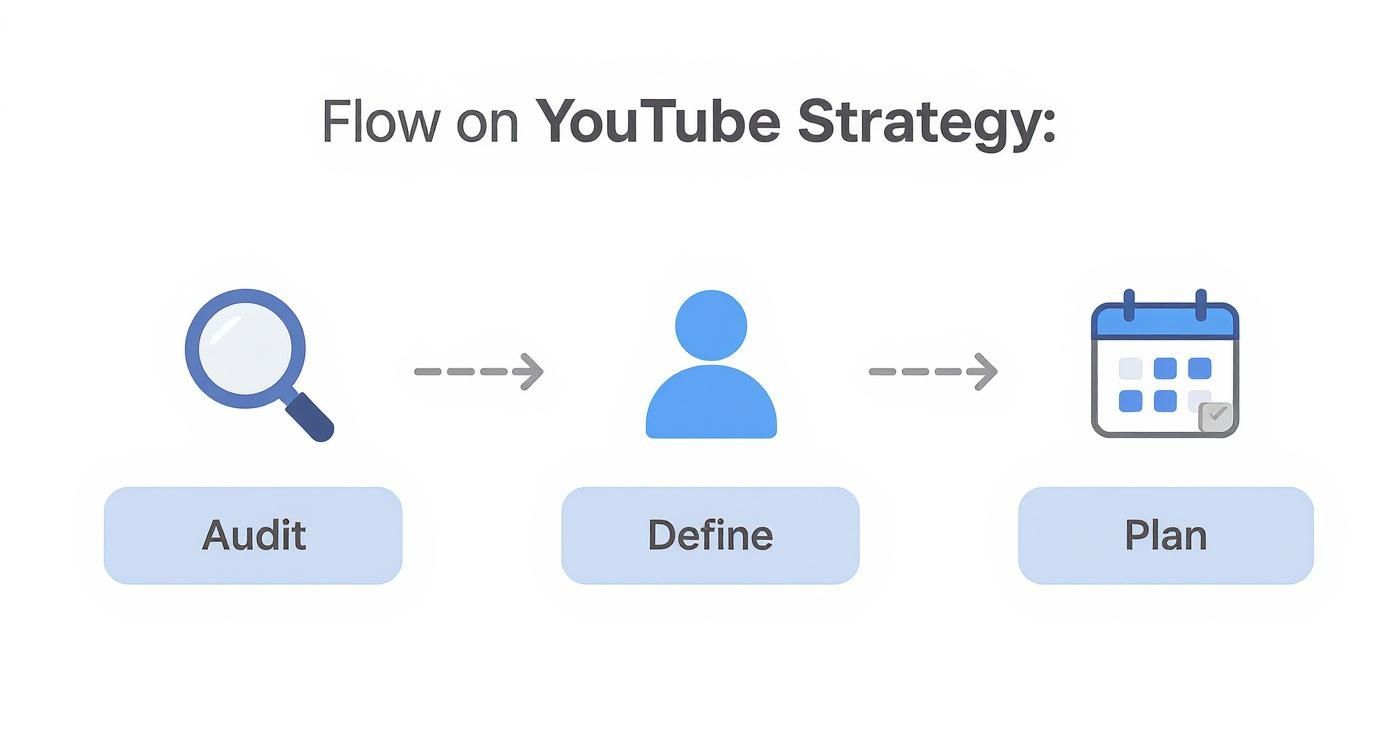
This roadmap breaks the strategy down into three simple stages: Audit, Define, and Plan. Nail these, and you're well on your way.
To put the 4,000-hour goal into perspective, let's break it down into smaller, more manageable chunks. Seeing the numbers this way makes the big goal feel much less daunting.
Watch Hour Milestones and Estimated Video Needs
| Milestone (Watch Hours) | Milestone (Minutes) | Full Views Needed (10-min Video) | Full Views Needed (20-min Video) |
|---|---|---|---|
| 1,000 | 60,000 | 6,000 | 3,000 |
| 2,000 | 120,000 | 12,000 | 6,000 |
| 3,000 | 180,000 | 18,000 | 9,000 |
| 4,000 | 240,000 | 24,000 | 12,000 |
This table assumes viewers watch 100% of each video, which is unrealistic. In reality, with a 50% average view duration, you'd need to double these view counts. The point is to visualize how video length and views contribute to your goal.
This makes it clear: a handful of well-made, longer videos can get you there much faster than dozens of short ones that people click away from.
Takeaway: If you want professional results, you can't treat your channel like a hobby. A solid foundation built on data, a deep understanding of your audience, and clear content pillars is the most reliable path to 4,000 watch hours.
Beyond just laying the groundwork, reaching your goal requires consistent growth over time. For a deeper look at building momentum, check out a practical guide on how to grow your YouTube channel. Of course, some creators prefer to skip the line altogether by purchasing a monetized YouTube channel, which is another route to consider.
Crafting Videos That Keep People Watching
Watch hours don't just happen by magic. They're a direct result of audience retention. It’s simple, really: the longer you can keep someone glued to your video, the faster you’ll hit your goal. This isn't about cheap tricks; it's about making genuinely good content that respects a viewer's time and holds their attention from start to finish.
The battle for that attention is won or lost in the very first few seconds. You’ve got maybe 15 seconds—if you're lucky—to convince someone your video is worth watching. If you kick things off with a long, rambling intro or a generic "Hey guys, welcome back," you've already lost them. Your hook needs to be sharp, immediate, and promise something valuable or spark some serious curiosity.
So, get straight to the point. Start with a burning question, a surprising fact, or even a quick teaser of the most exciting part of the video. The mission is to stop the scroll and make them think, "Okay, I have to see where this goes."
How to Structure Videos for Maximum Engagement
Once you've hooked them, you need a solid structure to keep them from clicking away. A video that wanders aimlessly is an open invitation for viewers to leave. Don't just throw a bunch of facts at the screen; tell a story with a clear beginning, middle, and end.
To keep things fresh and maintain momentum, you need to use pattern interrupts. These are just little, unexpected changes that break up the flow and jolt a viewer's brain back into focus, preventing them from zoning out.
Here are some of my go-to pattern interrupts:
- Change up the camera angle: Even a simple zoom-in or a slight shift in position can feel like a reset.
- Weave in B-roll footage: Show, don't just tell. When you're talking about something, cut away to a clip that actually shows it in action.
- Pop-up text and graphics: Use these to highlight a key takeaway, ask a question, or just inject a bit of humor.
- Use sound to your advantage: A well-timed sound effect or a switch in the background music can completely change the vibe and re-engage someone who was starting to drift.
When you start layering these elements together, you create a much more dynamic and professional-feeling video. That kind of intentional editing is what gets people to stick around longer, boosting your average view duration.
Long-Form vs. Shorts: What Actually Builds Watch Time?
You need a smart strategy when it comes to video formats. YouTube Shorts are incredible for getting discovered and pulling in new subscribers, but here's the catch: their views do not count toward the 4,000-hour monetization goal. For building up those precious watch hours, your bread and butter has to be traditional, long-form videos.
That doesn't mean you should ignore Shorts, though. Think of them as your promotional team. Use them to create short, punchy trailers that tease your longer videos and funnel viewers over to the content that actually moves the needle on your watch time.
My Two Cents: Treat your Shorts like movie trailers and your long-form videos like the main feature. One grabs the attention, the other delivers the experience that earns you the watch hours.
This approach works because it plays into different viewing habits. The numbers don't lie—user behavior is a massive factor. With US users spending an average of 35 minutes a day on YouTube and 63% of watch time happening on mobile, your content has to deliver. Nailing your long-form content is especially critical in niches with naturally longer watch times, like gaming (where the average is around 24.7 minutes). A solid gaming video can rack up hours far faster than content in shorter-form genres. If you're a data nerd, you can find more fascinating YouTube statistics and user trends on awisee.com.
Your Editing and On-Screen Energy Are Everything
Finally, let's talk about the final polish: your editing and your energy. The pace of your editing needs to fit the topic. A high-energy workout video? Quick cuts and upbeat music. A deep-dive historical documentary? A slower, more deliberate pace that lets people absorb the information.
Just as important is the energy you bring to the camera. Speak with clarity and let your passion shine through. You don't have to be loud and over-the-top, but genuine enthusiasm is contagious. People are far more likely to stick around if the person they're watching is clearly excited about the topic.
And a pro tip: be ruthless in your editing. Cut out all the "ums," "ahs," and long, awkward pauses. Keep it tight. Keep it moving. Your viewers' time is valuable—show them you respect it.
Optimizing Your Channel for Discovery and Binge-Watching
Making a great video is a huge accomplishment, but it's really only half the job. If your masterpiece is buried where no one can find it, all that hard work is for nothing. So, the next real step in hitting those 4,000 watch hours is mastering discoverability and figuring out how to turn a single view into a full-blown watching spree.
This is where we get into what people call YouTube SEO. It sounds a lot more technical than it really is. At its core, it's just about making it crystal clear to YouTube's algorithm what your video is about so it can serve it up to the right people—the ones who are already looking for what you’ve made.
Nail Your Titles and Thumbnails
Think of your title and thumbnail as your video's billboard. They have one job: to make a promise to a potential viewer. If they don't immediately spark curiosity or show that your video has the answer they're searching for, they'll just scroll right past.
Start by digging into the keywords your audience is actually using. What specific questions are they typing into the search bar? Instead of a vague title like "Baking a Cake," you’ll get much more traction with something like "Easy Chocolate Cake Recipe for Beginners (No Special Equipment!)." It's specific, helpful, and targets a clear need.
Your thumbnail, then, is your visual sales pitch. A high-quality, custom thumbnail is absolutely non-negotiable today.
Here's what I've seen work time and time again:
- Bright, Contrasting Colors: You need to stand out. Use colors that pop against YouTube's white, grey, and black interface.
- Expressive Faces: We're wired to connect with human emotion. A shot of you looking surprised, focused, or excited is magnetic.
- Minimal, Bold Text: Stick to a few powerful words (3-5 max) to add context. Make sure it's big enough to read on a tiny phone screen.
The combination of your title and thumbnail directly impacts your click-through rate (CTR), and that metric is a massive signal to YouTube. A high CTR tells the algorithm your video is hitting the mark, which encourages it to show your video to more people. That means more impressions and, you guessed it, more watch time.
Write Descriptions That Work for Robots and Humans
Your video description has to please two very different audiences: the YouTube algorithm and actual human beings. For the algorithm, weave your main keyword naturally into the first sentence or two. This is a simple but powerful way to help YouTube categorize your video instantly.
For your viewers, the description is a place to offer more value. Don't just stuff it with a list of keywords. Write a quick, compelling summary of the video, add links to any tools or resources you mentioned, and use timestamps to help people find exactly what they're looking for in longer videos. It’s a better experience for them and a bonus for your SEO.
Key Insight: A well-written description essentially gives the algorithm a script. It reads this text to understand the deeper context of your content, helping it recommend your video to a wider and more relevant audience.
Turn Single Views into Binge-Watching Sessions
Getting someone to watch one video is good. Getting them to watch five is how you really start stacking up watch hours. Your goal should be to create a seamless path that keeps people on your channel, and your best tools for this are playlists and end screens.
Start by grouping related videos into playlists that feel like a series. For instance, if you run a gardening channel, a playlist titled "Starting Your First Vegetable Garden" makes perfect sense. Once a viewer finishes one video, the next one in the series just starts playing automatically. It's the path of least resistance.
Then, at the very end of each video, use your end screens to point them to another relevant video on your channel. Don't just let the screen fade to black! Explicitly tell them where to go next. A simple verbal cue like, "If you liked this, you’ll love my video on the best soil for tomatoes, which you can click right here," works incredibly well.
For those looking to get a leg up, sometimes starting with an established foundation can help. Considering an aged YouTube channel can be a strategic move, as these often have a bit more trust with the algorithm right out of the gate.
By focusing on discoverability and creating clear pathways for binge-watching, you build a powerful flywheel. Better SEO leads to more views, and smart on-channel promotion turns those views into the serious watch time you need to reach your monetization goal.
Building a Consistent Upload Schedule That Works for You
You hear it all the time: "be consistent on YouTube." It's good advice, but it's also incomplete. Consistency isn't just about uploading videos on a set schedule; it’s about creating a rhythm you can actually stick with long-term without burning out. That's the real challenge.
The goal isn't to upload daily if that's going to lead to exhaustion. It's about setting an expectation with your audience and then meeting it. If they know you post a new video every Wednesday, they start to look forward to it. They build you into their routine. That's how you get repeat viewers, and repeat viewers are the lifeblood of watch time.
Escape the Content Treadmill with Batching
So, how do you stay consistent without turning content creation into a soul-crushing grind? The answer for most creators is content batching.
Instead of treating each video as a separate project—from idea to script, filming, and editing—you tackle each stage in bulk. Maybe you spend one full day filming four or five videos back-to-back. Then you dedicate a few evenings later that week to editing them all.
This method is a total game-changer:
- It creates a safety net. Life happens. A busy week at your day job or a sudden creative block won't throw your entire channel off track if you have videos already in the can.
- It's way more efficient. Getting your camera, lighting, and audio just right is a pain. Doing it once to film four videos is infinitely easier than doing it four separate times. You stay in the "filming zone" and get more done, faster.
- It lowers your stress levels. Imagine knowing your content is scheduled for the next month. That frees up so much mental energy to think about bigger-picture stuff, like promotion, collaborations, or your next batch of ideas.
A simple batching system could look like this: dedicate one weekend a month to production. Film everything on Saturday, edit on Sunday. Boom—your content for the whole month is ready to go.
Plan Ahead with a Simple Content Calendar
Once you start batching, you need a simple way to keep it all straight. A content calendar doesn't need to be fancy; a basic spreadsheet or a free Trello board works perfectly.
Just map out your video topics, the keywords you're targeting, and your planned publish dates a few weeks ahead. This bit of forethought helps you see the bigger picture. You can plan a mini-series, create videos that logically follow one another, and make sure you're covering all your main content pillars. Your channel starts to feel less like a random collection of videos and more like a structured library of value.
Don't just plan what you'll post; plan when you'll create. Scheduling your production days is just as important as scheduling your upload days. This is how you build a sustainable system.
Planning has never been more important. YouTube's user base is projected to hit 2.7 billion by 2025, a massive jump from 0.8 billion back in 2012. And with 500 hours of video uploaded every single minute, a predictable schedule is your best tool for standing out. While that sounds like a lot of competition, it also means the pool of potential watch time is bigger than ever. You can learn more about the platform's incredible growth by checking out these compelling YouTube statistics on oberlo.com.
Ultimately, the best schedule is the one you won’t quit. Take an honest look at your life—your job, your family, your energy levels—and choose a cadence that fits. Whether it’s once a week or twice a month, lock it in. Tell your audience what to expect in your channel banner or at the end of your videos. Then, simply deliver on that promise. That reliability is what builds a loyal community and gets you closer and closer to 4,000 watch hours.
Promoting Your Videos and Driving External Traffic
Hitting 'publish' on a new video is just the beginning, not the end. If you simply sit back and wait for the views to magically appear, you're setting yourself up for a very slow, frustrating climb to 4,000 watch hours. You have to be your own hype person.
Getting your video out there proactively is what creates that crucial initial momentum. This first wave of viewers tells the YouTube algorithm, "Hey, people are watching this," which can be the trigger for it to start showing your content to a much wider audience. This isn't about spamming your links everywhere; it's about smart, strategic sharing where your ideal viewers are already spending their time.

Repurpose Your Content for Other Platforms
Think of your main YouTube video as a treasure chest. Inside, there are dozens of smaller gems you can pull out and share on other platforms. The trick is to create content that feels native to each app—don't just drop a boring YouTube link and expect clicks.
- TikTok & Instagram Reels: Find the single most compelling 15-30 second snippet from your video. It could be a shocking statistic, a hilarious outtake, or a game-changing tip. Add some trending audio and bold text, and you’ve got a piece of content designed to hook scrollers.
- X (formerly Twitter) & Threads: Pull a powerful quote or a surprising statistic from your video and turn it into a text post. Ask a question related to your video's topic to get a conversation started. It’s all about creating intrigue.
- Facebook & LinkedIn: Here, you have a bit more room. Write a short post that tells a story or offers a quick mini-lesson from your video. Pair it with a strong image or even a 1-2 minute clip to catch people's attention as they scroll their feed.
Every one of these posts should serve as a teaser. You’re giving immediate value on that platform and then ending with a clear call to action like, "For the full deep dive, head to the link in my bio to watch the new video!"
Engage Authentically in Online Communities
Some of the most dedicated viewers you'll ever find are hanging out in niche online communities. I'm talking about Reddit, Facebook Groups, Discord servers, and old-school forums dedicated to your topic. The golden rule here? Don't be a drive-by link-dropper.
Pro Tip: I live by the 90/10 rule for community promotion. Spend 90% of your time just being a helpful, engaged member. Answer questions, offer advice, and participate in discussions. Only 10% of the time should you be promoting your own stuff.
Once you’ve built a reputation as a valuable member, you can share your videos when they are genuinely helpful. For instance, if someone in a gardening Subreddit asks for advice on dealing with aphids, you can write a detailed, helpful comment and then add, "I actually struggled with this a ton and made a whole video showing exactly how I solved it. You can check it out here if you want a visual guide." That’s being helpful, not spammy.
This approach brings in highly motivated viewers who are already searching for the exact solution you provide. For creators with a foothold on other platforms, this synergy is a game-changer. For example, some even acquire a monetized TikTok account to leverage a pre-built audience, directing them to their new YouTube channel for a massive head start.
Check Your Analytics and Adjust Your Game Plan
Just pumping out videos isn't enough. If you’re not looking at your analytics, you're essentially flying blind and hoping for the best. To actually hit that 4,000-hour mark, you need to stop guessing what your audience wants and start listening to what they're telling you with their clicks and views.
Your YouTube Analytics dashboard is your secret weapon. It’s where you’ll find the real story behind your channel's growth—or lack thereof. Forget about obsessing over subscriber counts for a minute; we need to focus on the data that directly translates to more watch time.
The Metrics That Actually Matter
Don't get lost in a sea of numbers. There are really only a few key metrics you need to live and breathe to understand what's working.
- Audience Retention: This is your best friend and harshest critic, all in one. The retention graph literally shows you the exact moment viewers get bored and leave. Those sudden dips are gold—they're free lessons on what to avoid in your next video.
- Average View Duration (AVD): Simply put, this is how long people stick around. A higher AVD is a huge green flag for the YouTube algorithm, signaling that your content is engaging and worth recommending to more people.
- Click-Through Rate (CTR): This tells you how many people saw your thumbnail on their screen and actually clicked on it. If your CTR is consistently below 2-3%, it’s a major sign that your titles and thumbnails just aren't cutting it.
How to Read Your Audience Retention Graph
Let’s make this real. Pull up the retention graph for one of your latest videos.
Do you see a massive nosedive in the first 30 seconds? That’s your hook failing. Maybe your intro was too long, or you didn't get to the point fast enough.
What about a big drop halfway through? Jump to that exact timestamp in your video. Were you rambling? Did the energy dip? Was the audio suddenly bad? Pinpointing these moments is the key to not making the same mistake twice.
Understanding how to measure content performance is crucial. It helps you figure out what your audience loves so you can double down on the good stuff and ditch what’s dragging you down.
This creates a powerful feedback loop. You upload, you analyze, you learn, and you apply those lessons to the next video. It’s this constant cycle of iteration that will make each video just a little bit better, systematically building the watch time you need.
Your Questions Answered: The Road to 4,000 Watch Hours
https://www.youtube.com/embed/IHDJkJpYC90
Even with the best plan in hand, you're bound to run into some specific questions on your journey to getting monetized. Let's tackle some of the most common ones that come up as creators push toward that 4,000 watch hour goal.
Do YouTube Shorts Count Toward The 4,000 Hours?
This is a huge point of confusion, so let's clear it up: no, they don't. Watch time from YouTube Shorts does not count toward the 4,000-hour requirement for the YouTube Partner Program (YPP).
Those hours have to come from your traditional, long-form videos and any public live streams you do. Shorts have their own separate lane for monetization. To qualify that way, you need 1,000 subscribers and 10 million valid public Shorts views in the last 90 days.
What Exactly Are "Public" Watch Hours?
It's a simple but critical detail many new creators overlook. For your watch time to count, it has to come from videos set to "Public" on your channel.
Any time spent watching videos that are:
- Set to Private
- Set to Unlisted
- Deleted from your channel
...will not be added to your monetization total. Only the views on your public content contribute to that magic 4,000-hour number. Keep this in mind if you ever think about cleaning up old content—deleting a video means its watch time disappears with it.
How Long Does It Realistically Take To Get 4,000 Hours?
There’s no magic number here. The timeline depends entirely on your niche, how good your videos are, and how consistently you upload. For most people starting from zero, hitting 4,000 watch hours takes anywhere from 6 to 12 months of consistent work.
Of course, some channels get there faster, especially if they already have an audience from another platform. Others might take a bit longer if they're in a super crowded space. It all boils down to your average view duration and how many videos you're putting out.
Don't let the timeline get you down. Just focus on making every video a little better than your last one. That's how you build momentum. High-retention content is the single best way to shorten the journey.
Can I Just Watch My Own Videos To Increase The Watch Time?
You can try, but it’s a waste of your time and a really bad idea. YouTube's algorithm is smart enough to spot this kind of thing.
Looping your own videos to pump up the numbers is a direct violation of YouTube's Fake Engagement Policy. The platform will almost certainly identify and remove any watch time that comes from your own account. It gives you zero real benefit and won't help your channel grow in any meaningful way.
Speeding up your path to monetization comes down to smart strategy and consistent effort. For those looking to skip the initial climb, MonetizedProfiles provides a unique option with fully approved accounts that are ready to earn from the start. You can see what's available at https://monetizedprofiles.com.


