


If you want to dodge copyright strikes on YouTube, the path is simple: either make everything from scratch or get the proper permissions for any content you borrow. Think music, video clips, or even images. A great habit to get into is using YouTube's built-in "Checks" tool before you hit publish. It's a lifesaver for catching potential problems early, so you can fix them before your video is live for the world to see.
Your Blueprint for a Strike-Free YouTube Channel
Getting a copyright strike can feel like a punch to the gut. It's even worse when your channel is your livelihood. Let's break down how to navigate YouTube's tricky copyright waters without getting sunk. First, you need to know the critical difference between a Content ID claim and a copyright strike, because they are not the same thing.
A Content ID claim is usually an automated flag. The worst that typically happens is the original owner runs ads on your video and takes the revenue. A copyright strike, on the other hand, is a formal takedown request, and it puts your entire channel on the line. YouTube's "three strikes" rule is no joke—if you rack up three strikes in 90 days, your channel, your videos, and all your hard work can be permanently deleted.
Understanding What's at Stake
YouTube's copyright system is every creator's nightmare. Each strike hangs over your head for 90 days, and hitting that magic number of three within the window is game over. To give you an idea of the scale, YouTube processed a staggering 976.2 million automated Content ID claims in the first half of 2023 alone. What's more telling is that only a tiny 0.4% of those were ever disputed, which shows just how aggressive the system is.
This is why you can't afford to be reactive. Your entire strategy has to be built on a foundation of proactive defense. It all starts with understanding intellectual property protection; once you get that, you can build a workflow that keeps you out of trouble.
The best defense is a proactive approach. Don't wait for a strike to learn the rules; build your content strategy around copyright compliance from day one. This mindset shift protects your immediate videos and the long-term health of your entire channel.
To stay clear of copyright headaches, here’s a quick-glance table summarizing the essentials.
Quick Guide to Avoiding Copyright Strikes
This table outlines the core actions you can take to protect your channel from copyright issues before they ever become a problem.
| Action | Why It's Critical | Best Practice |
|---|---|---|
| Audit All Content | Prevents accidental use of unlicensed music, clips, or images. | Before uploading, review every asset. If you didn't create it or buy a license for it, don't use it. |
| Secure & Document Licenses | Provides concrete proof you have the right to use the content if a claim arises. | Keep a dedicated folder with all license agreements, invoices, and purchase confirmations. Be organized! |
| Use YouTube's Checks | YouTube's own system scans your video for potential claims before publishing. | Always run the "Checks" feature during the upload process and address any flags it raises immediately. |
| Source Smartly | Using trusted libraries drastically reduces the risk of getting flagged. | Stick to well-known royalty-free music sites or licensed stock footage platforms. Avoid random Google images. |
Following these steps will build a strong defense for your channel, but there's a bit more to it.
Key Preventative Actions
To really bulletproof your channel, make these three areas part of your routine:
- Content Sourcing: This is your first line of defense. Only pull music, footage, and images from reputable sources where you have a crystal-clear license. This means using royalty-free libraries or assets you've explicitly purchased a commercial license for.
- Documentation: Don't just get the license—save it! Always keep a digital copy of your license agreements and proof of purchase. If a claim is filed against you by mistake, this paperwork is your golden ticket to winning the dispute.
- Pre-Upload Checks: I can't stress this enough—use YouTube's "Checks" tool. It's a free early-warning system built right into the upload process. It scans your video and tells you about potential copyright issues before you publish, giving you a chance to make edits.
For new creators or those running automated channels, the stakes can feel even higher. One smart move is to start with a clean slate by using an aged YouTube channel that already has a history in good standing. This lets you focus on creating safe content without the initial vulnerability of a brand-new channel. Think of these strategies as your pre-flight checklist for keeping your channel safe and profitable.
Building Your Videos with Copyright-Proof Materials
The single best way to dodge copyright strikes is to build your videos from the ground up with assets you have the clear, documented right to use. Think of it as building a house on a solid foundation instead of on sand. Every single element, from the main song down to a 2-second sound effect, needs to be accounted for.
This isn't just a suggestion—it's absolutely critical for faceless and automation channels. When your entire video is built from third-party materials, your whole business model hinges on sourcing and licensing content correctly. One mistake with a background track can bring the entire operation to a halt.
Unauthorized music is by far the fastest way to get your video flagged. YouTube's Content ID system is a relentless, automated machine that sniffs out copyrighted audio. In the first half of 2023 alone, it processed over 976 million copyright claims, the vast majority for music. The kicker? Creators only managed to successfully dispute 0.4% of them. Those numbers, highlighted in reports on YouTube's copyright enforcement on LenosTube, show that once you're flagged, the odds are not in your favor.
Your Go-To Sources for Safe Music
Music creates the vibe, but it's also the biggest copyright minefield. The good news is you have plenty of safe harbors to choose from.
- YouTube Audio Library: This should be your first stop. It’s a free collection of music and sound effects that YouTube has already pre-cleared for use, even in monetized videos. You can easily filter by genre, mood, or attribution requirements to find exactly what you need.
- Paid Subscription Services: For higher quality and more variety, services like Epidemic Sound, Artlist, and Storyblocks are fantastic. You pay a monthly or annual fee for access to huge catalogs, and they provide you with a clear commercial license. That license is your golden ticket if a claim ever pops up.
- Individual Artist Licenses: Found the perfect track on SoundCloud or an indie artist's site? You'll need to reach out to them directly. This involves negotiating and purchasing a license that specifically states you can use their work on monetized YouTube videos.
Royalty-Free vs. Creative Commons: Know The Difference
People throw these terms around as if they mean the same thing, but they're worlds apart. Getting this wrong can land you in hot water.
Royalty-free doesn’t mean it’s free to use. It just means you pay once (either a one-time fee or a subscription) to get the right to use the asset multiple times without paying royalties for every single view. This is how most professional stock media sites operate.
Creative Commons (CC) licenses, on the other hand, are designed to let creators share their work for free public use. But there are crucial strings attached.
A huge mistake I see creators make is grabbing any "Creative Commons" track and thinking they're safe. You have to read the fine print. A "Non-Commercial" (NC) license means you can't use it in a monetized video, period. A "No Derivatives" (ND) license means you can't edit it, which is often a non-starter for video production.
Proper Attribution Is Not Optional
Many free assets, including some from the YouTube Audio Library and almost all Creative Commons works, come with one big condition: attribution. You must give proper credit to the creator, usually in your video's description.
Forgetting to do this isn't a small oversight; it's a violation of the license terms. You can get a copyright strike for using a "free" asset incorrectly just as easily as for using a pop song.
Here’s how to credit someone properly. It’s simple, but it has to be done right.
- What to include: The track's title, the artist's name, a link back to the source, and the specific CC license with its own link.
- Example format: Music: "Inspiring Dreams" by A. Creator Source: https://examplemusic.com/inspiring-dreams License: CC BY 4.0 (https://creativecommons.org/licenses/by/4.0/)
Don't Forget Stock Footage and Images
Everything we just discussed about music applies equally to visuals. Never, ever just grab an image from a Google search or rip a clip from another YouTube video.
Stick to trusted sources for stock footage and photos. Sites like Pexels are great for free options, while platforms like Adobe Stock or Shutterstock offer massive professional libraries. For every single asset you download, read the license agreement to confirm it allows for commercial use on YouTube.
My best advice? Create a dedicated folder on your computer for all your license agreements. If you ever have to dispute a claim, having that documentation organized and ready to go is the ultimate proof that you've done your homework.
Navigating Fair Use and the Content ID System
So many creators get tripped up by copyright myths they’ve heard a dozen times. Things like adding "no copyright infringement intended" to your description, giving a shout-out to the original artist, or keeping a clip under ten seconds.
Let's be clear: none of these will save you from a copyright claim or a channel strike. They are not legal defenses.
The one real, but incredibly tricky, tool in your arsenal is Fair Use. This is a legal principle that says you can use copyrighted material without permission under very specific circumstances, like for commentary, criticism, news reporting, or parody. But it’s not a magic shield. Fair Use is a defense you might have to argue for, potentially in court, not a free pass to use whatever you want.
The Four Factors of Fair Use
Figuring out if your content falls under Fair Use isn't a simple checklist; it's a balancing act. The courts, and YouTube, look at four key factors together to make a judgment. No single one is a deal-breaker, but they all matter.
- Purpose and Character of the Use: This is usually the big one. Did you transform the original work? Adding new meaning or a fresh perspective is key. A movie review that breaks down a scene to explain a filmmaking technique is transformative. Just uploading your favorite funny clip from a movie? Not so much.
- Nature of the Copyrighted Work: You have more leeway when using factual content, like a segment from a news broadcast, than you do with highly creative works like a blockbuster film or a chart-topping song. The more creative and original the source material, the more protected it is.
- Amount and Substantiality of the Portion Used: This one seems straightforward—using less is better, right? Mostly. But it’s not just about the length. If you use the most crucial, memorable part of a work—the "heart" of it—that can weigh against you, even if it's only a few seconds long.
- Effect of the Use Upon the Potential Market: In simple terms, does your video stop the original creator from making money? If your video acts as a substitute for the real thing, preventing people from buying or streaming the original, that's a huge strike against Fair Use.
Getting a handle on these four factors is your first step to using third-party content without getting your channel into hot water.
Content ID: Your First Line of Defense
While Fair Use is a legal concept, Content ID is YouTube's automated reality check. Think of it as a massive digital fingerprinting system. It scans every single video uploaded against a database of content provided by rights holders. For most creators, this is where copyright issues pop up.
And YouTube's system is a machine. In the first half of 2023 alone, it processed a mind-boggling 976.2 million auto-detected claims. What's more, a tiny 0.4% of those claims were ever disputed. This shows you the sheer scale of the system and why relying on original content or proper licenses is the only sustainable path forward. You can dig into the full YouTube copyright claim statistics on Statista.com to see just how prevalent this is.
Luckily, YouTube gives you a way to see what its system sees before you hit publish.
The "Checks" step in the upload process is your secret weapon. I always recommend uploading your videos as "Unlisted" or "Private" first. This lets the Content ID system do its scan privately, giving you a chance to catch and fix any problems before your video goes live.
What the Content ID Check Is Telling You
Once the scan is done, the "Checks" page will give you the verdict. Here's how to read the results:
- No issues found: Perfect! This is what you're aiming for every time. You're good to go.
- Copyright claim found: Don't panic. This is not a strike. It just means Content ID found a match. The owner of that content can then decide to block the video, track it for analytics, or—the most common outcome—run ads on it and collect the revenue.
If you get a claim, YouTube gives you a few tools to deal with it right away:
- Trim out segment: Use the built-in editor to just snip out the flagged portion of the video.
- Replace song: If it's a music claim, you can easily swap it for a track from the YouTube Audio Library.
- Mute song: A simple but effective option to just silence the audio in the claimed section.
- Dispute: If you truly believe you have the right to use the material—maybe you have a license or a strong Fair Use argument—you can file a dispute.
Using the "Checks" feature turns a potential channel-threatening problem into a simple pre-flight check. It puts you back in the driver's seat, letting you resolve issues before they can ever affect your views, your monetization, or your channel's good standing.
Fair Use vs Copyright Infringement Scenarios
To make the idea of Fair Use a bit more concrete, it helps to look at real-world examples. It's often a blurry line, but seeing these scenarios side-by-side can help clarify where you might stand.
| Scenario | Likely Infringement | Potential Fair Use | Key Takeaway |
|---|---|---|---|
| Movie Clips | Uploading a full scene or "best of" compilation of funny moments from a film. | Using short, relevant clips in a video essay to critique the film's cinematography or acting. | The use must be transformative; you need to add your own commentary, analysis, or criticism. |
| Music in Vlogs | Playing a popular, copyrighted song in the background of your travel vlog for ambiance. | Including a 15-second clip of a song in a music review video to discuss its lyrical content. | Background music is almost never Fair Use. The use must be directly related to your critique or commentary. |
| Video Game Footage | Streaming an entire game's story-driven cutscenes without any commentary or input. | Creating a "let's play" video with your own voiceover, reactions, and strategic analysis throughout. | Your contribution has to add significant value and context; you can't just be a passive restreamer. |
| TV Show Reactions | Uploading a picture-in-picture video where you just watch an entire episode and occasionally laugh. | A video where you pause the show frequently to provide in-depth analysis, historical context, or parody. | Passive reaction isn't enough. Your input must be substantial and create a new work. |
Ultimately, these examples show that the more you add to the original work—your own voice, your critique, your unique perspective—the stronger your Fair Use argument becomes. Simply rebroadcasting someone else's content is a fast track to a copyright claim.
Your Action Plan When a Strike or Claim Hits
Even if you do everything right, that dreaded notification can still land in your inbox: a copyright claim or, worse, a strike. The first rule is don't panic. How you react depends entirely on what you're dealing with, because a Content ID claim and a copyright strike are two completely different animals.
A Content ID claim is just an automated flag from YouTube's system. It’s usually about monetization—the rights holder can decide to run ads on your video and pocket the revenue. It’s annoying, for sure, but it doesn't put your channel's good standing in jeopardy.
A copyright strike, on the other hand, is a formal, legal takedown request filed by a human. This is the serious one. It’s a direct hit on your channel's health.
Responding to a Content ID Claim
When Content ID flags your video, you’ve got a few options right inside YouTube Studio. Think of this not as a penalty but as an early warning, giving you a chance to fix things before they escalate.
Your choices are pretty straightforward:
- Trim out the segment: This is the easiest fix. YouTube's built-in editor lets you snip out the exact part of the video that got flagged. Problem solved.
- Replace the song: If a music track is the issue, you can swap it out with a track from the YouTube Audio Library without having to re-upload.
- Mute the song: Another quick fix is to just mute the audio for the flagged section. This works great if the background music isn't critical to the scene.
These tools are designed to clear up most automated claims fast. But what happens when the robot gets it wrong?
Disputing an Incorrect Claim
It happens all the time. The automated system flags a song you actually licensed or a clip that’s a clear-cut case of fair use. When this happens, you need to dispute the claim.
When you file a dispute, you have to explain why you have the right to use the content. This is where all that careful record-keeping you did earlier becomes your superpower. Your best weapon is a documented license.
I tell every creator I work with the same thing: keep a dedicated folder with every single license certificate and receipt. When you can provide a license ID or a copy of the agreement as proof, most incorrect claims get resolved almost instantly.
The claimant gets 30 days to respond. They can release the claim, uphold it, or—if they double down—issue a formal takedown notice. That’s when a simple claim can turn into a full-blown copyright strike.
Navigating a Full Copyright Strike
Getting a copyright strike is a gut-punch. Your video gets taken down, and a strike is officially recorded against your channel. The magic number here is three—if you get three strikes within a 90-day period, your channel is terminated.
Whatever you do, do not delete the video. Deleting it also deletes your ability to appeal.
You have two main ways to fight back:
- Request a Retraction: Your first and often best move is to contact the claimant directly. You’ll find their contact info in the strike notification. Be polite and professional. Explain the situation clearly—maybe you have a license they didn't know about, or perhaps it was just a simple misunderstanding. A retraction from the claimant is the cleanest and fastest way out of this.
- Submit a Counter-Notification: If you are 100% certain you have the legal right to use the content—you have a bulletproof license, the work is in the public domain, or you have a rock-solid Fair Use argument—you can file a counter-notification. This is a formal legal request telling YouTube to put your video back up.
This is where understanding Fair Use becomes absolutely critical. Are you transforming the original work, or just re-uploading it?
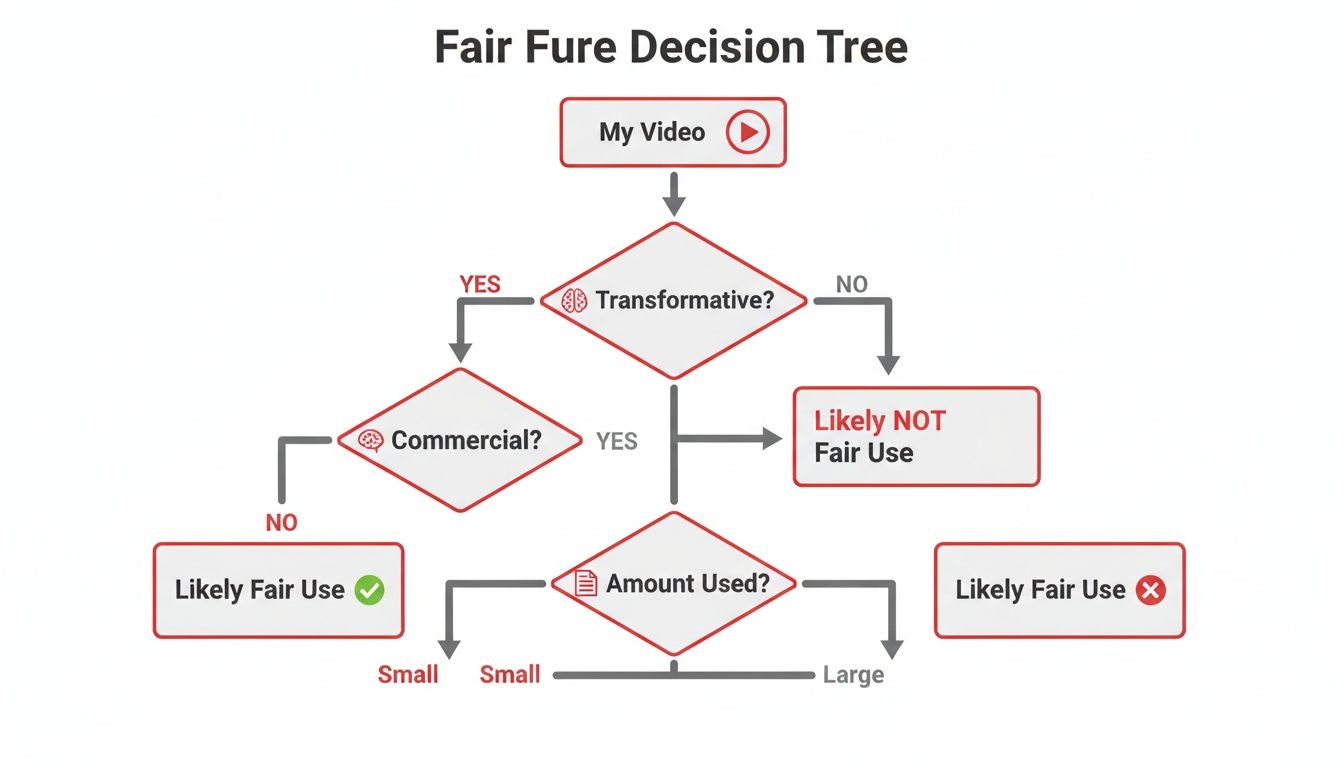
This flowchart really breaks down the core question of Fair Use: did you add new meaning or commentary, or did you just copy someone else's work?
Filing a counter-notification is a legal step. You are stating, under penalty of perjury, that you did nothing wrong. The claimant then has 10 business days to prove they are taking you to court to keep the video down. If they don’t, the strike is removed and your video is restored.
Whether you're dealing with a minor claim or a major strike, a calm, organized, and evidence-based approach will always be your best strategy for protecting your channel.
Protecting Your Monetization and Channel Health
A copyright strike isn't just a slap on the wrist that gets a video taken down. It's a direct shot at your wallet. It puts your access to the YouTube Partner Program (YPP), Super Chat, memberships, and every other revenue stream you've built in immediate danger. This isn't just about keeping your channel online; it's about protecting your income.
When you get that first strike, YouTube sends you to "Copyright School" to learn the rules. But more importantly, it starts a 90-day countdown. For those three months, your channel is on thin ice, and any other mistake will have much bigger consequences. This is a critical time for your channel's future.
Surviving the 90-Day Strike Period
That first strike instantly locks down some of your most important features. For a full week, you’re blocked from uploading new videos, going live, or even creating playlists. A second strike bumps that lockdown to two weeks. Even after the restrictions lift, the strike itself sticks to your record for the full 90 days.
This is a time for careful planning, not panic. The absolute worst thing you can do is quickly edit the flagged video and re-upload it. That’s a common rookie mistake that can turn one strike into a channel-ending disaster in a hurry. Instead, you need to switch gears from reacting to the problem to getting ahead of it.
Your focus should be on two things:
- Damage Control: Make sure no other videos on your channel are hiding the same kind of copyright landmines.
- Future-Proofing: Build a system so this never happens again.
The Power of Proactive Content Audits
A strike should be a massive wake-up call to go back and check everything you've ever posted. Old videos from years ago are not safe. If a rights holder suddenly adds their song or clip to the Content ID system, that forgotten video can trigger a brand new claim or strike. It’s a ticking time bomb.
This is where regular content audits become a non-negotiable part of your workflow, especially if you run multiple or automated channels. An audit is just a systematic review of your entire video library to find and fix potential copyright issues before they find you.
A proactive audit is your best insurance policy. It's far better to voluntarily unlist or remove a risky video yourself than to have it forcibly taken down by a copyright strike. One is a strategic business decision; the other is a step toward channel termination.
Start by making a simple spreadsheet of all your videos. Go through them one by one, looking closely at any third-party assets you used—music, footage, images, sound effects, you name it. If you can't find a clear license or proof of permission, that video is a liability. Your options are to unlist it, trim out the problem section, or just delete it. This is a vital step if you want to know how to avoid copyright strikes on youtube for good.
Automating Your Channel Protection
For channels that are constantly publishing, doing these audits by hand can feel impossible. To really protect your channel and its income, it's worth looking into content monitoring services. These platforms can help track where your content is being used and watch for potential issues, giving you an extra layer of security. To see what these tools are capable of, you can explore the features of content monitoring services and figure out how automation can fit into your strategy.
Ultimately, you need to treat copyright compliance like any other core part of your business. For creators looking to scale, this is non-negotiable. Building these safety workflows from day one is essential, which is why many creators decide to start with a solid foundation. Investing in a fully monetized YouTube channel lets you put these best practices into place immediately, skipping the initial grind. You can focus your energy on creating safe, profitable content within a secure framework from the get-go.
At the end of the day, protecting your monetization isn't about dealing with strikes—it's about building a system where they never happen in the first place.
YouTube Copyright FAQs: Your Questions Answered
Let's cut through the confusion. Copyright on YouTube can feel incredibly complex, but understanding a few key principles can save your channel from a world of hurt. Here are the straight-up answers to the questions I hear from creators all the time.
Is It Okay If I Just Give Credit to the Owner?
Nope. This is probably the biggest and most dangerous myth on YouTube.
Slapping "no copyright infringement intended" or "music by [Artist Name]" in your description does absolutely nothing to protect you legally. Think of it this way: you can't borrow someone's car just by leaving a note saying you'll bring it back. You need their permission first. The same goes for content.
Unless you have a specific license or direct permission from the copyright holder, giving credit is meaningless. The owner can still hit you with a claim or a strike.
What’s the Real Difference Between a Claim and a Strike?
It's crucial to know the difference here, because one is a headache and the other is a potential channel-killer.
- A Content ID Claim is an automated flag. YouTube's system finds a match, and the owner can choose to monetize your video, track its analytics, or block it. It’s annoying, but it doesn't put your channel in bad standing.
- A Copyright Strike is a formal, legal takedown request. This is serious. It's a penalty against your channel, and racking up three strikes within 90 days gets your channel permanently deleted.
A single strike also freezes some of your account privileges, like live streaming, for a week. So, while you can live with claims, you have to actively avoid strikes.
Can I Use a Few Seconds of a Song or a Movie?
The length of the clip doesn't matter nearly as much as how you use it. People often throw around the term "Fair Use," but it's not a free pass to use short clips.
Your use has to be transformative—meaning you’ve added something new, like commentary, criticism, or parody. For example, using a 10-second movie clip as part of an in-depth review could be considered Fair Use. But just dropping that same clip into a "best fight scenes" compilation is a clear infringement.
Key Takeaway: Fair Use is a legal argument you might have to make in court. It is not an automatic right. A short clip does not equal a safe clip.
What Happens When a Copyright Strike Expires?
A copyright strike vanishes from your record after 90 days. Once that clock runs out, your channel is back in good standing (as long as you don't have other strikes), and any temporary restrictions are lifted.
But here’s the important part: the video that got the strike stays down. It won't be automatically put back up. The only way to get it back is if the person who issued the takedown retracts it, or if you win a formal counter-notification appeal.
Each strike has its own 90-day timer. For more deep dives into managing your channel and content strategy, we have tons of guides on our MonetizedProfiles blog.
Ready to build a secure, income-generating channel without the initial grind? MonetizedProfiles provides fully monetized YouTube accounts that let you start earning from day one. Skip the uncertainty and focus on what you do best—creating great content. https://monetizedprofiles.com


