


So, you want to get a real handle on how much money a YouTube channel is making? Whether you're digging into your own channel's finances or trying to size up the competition, knowing where to look and what the numbers actually mean is a huge advantage.
The most reliable way to see your earnings is right inside YouTube Studio. That's your ground truth. If you're trying to figure out what another channel earns, you'll be doing some detective work with third-party tools and a bit of educated guesswork.
Let's break down exactly how to do both.
Why Tracking YouTube Revenue Is a Game-Changer
For any creator serious about growth, understanding your channel's financial health is non-negotiable. It’s not just about seeing a dollar figure at the end of the month; it's about making smarter decisions that actually grow your channel and your income.
Many creators get fixated on vanity metrics like subscriber counts. But the real story is in the financial data. When you dig into your analytics, you can see which videos are your cash cows, how valuable your audience is to advertisers, and start forecasting your income with some real confidence. This is how you set achievable goals and turn a hobby into a sustainable business.
What You'll Learn in This Guide
This guide is your complete walkthrough. I’m not just going to show you where to click; I’ll explain the why behind the numbers so you can use them to your advantage.
Here's what we'll cover:
- Finding Your Financials: A step-by-step tour of YouTube Studio to find your official, finalized earnings.
- Decoding Key Metrics: Simple explanations for terms like RPM and CPM that tell you how much you really earn per 1,000 views.
- Estimating Other Channels' Earnings: Practical ways to make a solid guess about what other creators in your niche are pulling in.
- Getting Paid: A quick look at how the money gets from YouTube to your bank account via Google AdSense.
At the end of the day, checking your YouTube earnings is the first step in treating your channel like a real business. It helps you move from wishful thinking to building a predictable income.
To give your earnings a boost right away, think about when you post. Finding the best time to upload YouTube videos can make a huge difference in initial views and engagement, which directly juices your ad revenue from day one.
And remember, ad revenue is just one piece of the puzzle. The smartest creators diversify their income with things like affiliate marketing, brand deals, and merch. You can get some great ideas by seeing how others are doing it on platforms like https://monetizedprofiles.com/, which showcases successful creators and their strategies.
This guide will give you the tools not just to check your earnings, but to actively grow them.
Checking Your Own Earnings in YouTube Studio
If you're in the YouTube Partner Program, YouTube Studio is your financial command center. Forget third-party tools or guesswork; this is the one place you'll find the official, unfiltered truth about how your channel is performing.
Getting to your money data is simple. Once you're logged into YouTube Studio, find the Analytics tab on the left-hand menu. From there, just click on Revenue at the top. This is the dashboard where you'll be spending most of your time tracking your income.
Your Primary Financial Dashboard
The first thing you’ll see is the Estimated revenue card. Think of this graph as your daily and monthly financial pulse. It’s always moving, showing you the natural ebb and flow of your income based on viewership, ad seasonality, and how your latest videos are performing.
Don't panic when you see the daily numbers jump up and down—that's completely normal for every creator. You might see a huge spike after a video gets a surprise surge in views or a dip during a slow week. The real magic is in watching the trends over time, not obsessing over a single day's numbers.
To get a better picture, use the date range selector in the top-right corner. This little feature is incredibly powerful. You can set it to see how you did during the holiday season (Q4), when ad spending is typically at its peak, or to analyze the performance of a new content series you just launched.
Here’s a glimpse of what the Revenue tab looks like.

This dashboard gives you an instant snapshot of your channel's financial health, laying out your estimated revenue, RPM, and which videos are pulling in the most cash.
Breaking Down Your Income Streams
One of the best things about the Revenue tab is how it breaks down every dollar you earn. YouTube doesn't just throw all your money into one big pot; it shows you exactly where it’s coming from.
You’ll see a detailed breakdown for each of your monetization features:
- Watch page ads: The classic ads you see on your regular, long-form videos.
- Shorts Feed ads: Money earned from ads that viewers see between videos in the Shorts Feed.
- Memberships: The recurring monthly income from fans who have joined your channel membership program.
- Supers: This includes Super Chat, Super Stickers, and Super Thanks—all the ways viewers can support you during livestreams and on your video uploads.
This detailed view is your secret weapon. It helps you understand what's truly clicking with your audience. For instance, if you notice Memberships are only bringing in a tiny fraction of your income, it might be a sign to create more compelling, exclusive perks to encourage more people to join.
Key Takeaway: Digging into your different revenue streams is essential for growth. It tells you what your audience truly values and where you should focus your energy to make more money.
Pinpointing Your Top Earning Content
Ever wonder which of your videos are the real heavy hitters? YouTube Studio has you covered. Just scroll down in the Revenue tab until you find the Top earning content card. This report lays it all out, showing you which videos have generated the most revenue during the time period you've selected.
This information is pure gold. When you know the common threads between your top-earning videos—whether it’s the topic, the format, or even the length—you can start making more content that attracts high-value audiences and advertisers. If you see a video on a niche topic with a surprisingly high RPM, that’s a massive clue to double down on that theme.
Building a real income on YouTube is a marathon, not a sprint. It takes time and a lot of consistency. One creator shared their journey, revealing that in their first year, their ad revenue was just $75. After a dip to $6,749 in their second year, they kept at it, and by their fifth year, they were earning an impressive $11,712.97 annually just from ads. You can see their full story and numbers in this creator's financial recap video on YouTube.
It just goes to show that if you stick with it and use the data inside YouTube Studio to make smart decisions, you can build something truly substantial over time.
Decoding Key Revenue Metrics Like RPM and CPM
Seeing your total estimated revenue is a great start, but if you really want to understand and grow your income, you have to dig into the metrics behind that number. When you check your YouTube channel earnings, two of the most important figures you'll run into are RPM and CPM. They sound similar, but they tell very different stories about how your channel is actually making money.
Here’s the easiest way to think about it: CPM is about what the advertiser pays. RPM is about what you get paid. Getting this distinction right is the first step toward making smarter content decisions.
Understanding CPM (Cost Per Mille)
CPM stands for Cost Per Mille—"mille" is just Latin for a thousand. This number shows how much advertisers are willing to pay for 1,000 ad impressions on your videos. It’s basically a measure of how much demand there is from advertisers to get in front of your specific audience.
A high CPM is a good sign. It means advertisers see your viewers as a valuable group and are willing to pay a premium to reach them. This is almost entirely driven by your niche and audience demographics.
For instance:
- Finance Channels: These often pull in some of the highest CPMs. Why? Because the advertisers (banks, investment firms, etc.) know the audience is already thinking about high-value products and services.
- Gaming Channels: These might have a lower CPM. The audience is often much broader and younger, and the products being advertised—like games or accessories—are usually lower-cost items.
In short, CPM is the raw price tag advertisers put on your ad space before YouTube takes its cut.
Why RPM Is Your Most Important Metric
Now for the metric that really matters to your bank account: RPM, or Revenue Per Mille. This shows your total revenue (from ads, Memberships, Super Chats, everything) per 1,000 video views, but after YouTube has taken its share. This is the actual money you earn for every thousand views.
Your RPM gives you a true, unfiltered look at your channel's monetization health. It accounts for everything—videos that didn't run ads, viewers who skipped ads, and revenue from non-ad sources. It’s the most realistic picture of your earning power.
Key Insight: While CPM shows what advertisers pay, RPM shows what you actually earn. A high CPM is great, but a high RPM is what pays the bills. A channel with a lower CPM but a super-engaged audience that watches ads all the way through could easily end up with a higher RPM.
Factors That Drive Your RPM and CPM
So, what makes these numbers go up or down? Several key factors are at play. YouTube's massive multi-billion dollar ad revenue is what powers the whole creator economy, and understanding these drivers is how you get a bigger piece of the pie. A typical RPM can range anywhere from $5 to $15 per 1,000 views. This means a channel pulling in 100,000 views a month might earn between $1,000–$3,000 from AdSense.
Certain markets, like the US, see higher averages, sometimes around $10.26, especially in profitable niches. You can dig into more YouTube revenue statistics in this detailed video breakdown.
Here are the biggest things that influence your rates:
- Audience Geography: This is huge. Advertisers will pay way more to reach viewers in countries with high purchasing power, like the United States, United Kingdom, and Canada.
- Video Niche: As we saw earlier, topics like personal finance, technology, and business will always command higher ad rates than broad entertainment or comedy.
- Seasonality: Ad spending isn't consistent year-round. It usually spikes in the fourth quarter (October-December) thanks to holiday shopping. You'll probably see your best RPMs during this time.
- Video Length: If your videos are over eight minutes long, you become eligible for mid-roll ads. Placing a few of these in a longer video can give its RPM a serious boost.
Knowing these factors lets you make strategic choices about your content to attract more valuable audiences. For more on how other creators are optimizing their content for higher earnings, check out the case studies and tips on our MonetizedProfiles blog.
How to Estimate What Another YouTube Channel Earns
Let's be honest—we've all wondered what other creators are making. While you can't get a peek inside their private YouTube Studio, you can definitely make an educated guess. It's not a perfect science, but if you understand the basic relationship between views and revenue, you can get surprisingly close.
The easiest way is to do a quick back-of-the-napkin calculation. If you can find a channel's average monthly views and pair that with a realistic RPM for their niche, you can get a solid estimate of their ad revenue. It just takes a little bit of digging.
The Simple Math for Estimating Revenue
The formula itself is incredibly straightforward: (Total Monthly Views / 1,000) * Estimated RPM = Estimated Monthly Ad Revenue. The real trick is figuring out what numbers to plug in.
First, you need the channel's average monthly view count. Forget the "total views" number on their profile—that's a vanity metric. What you want is their recent performance. A good rule of thumb is to look at their last 10-15 videos, add up the views, and calculate the average. This tells you what a typical new video is pulling in right now.
Next comes the RPM, and this is where a little industry knowledge goes a long way. A channel's niche is the single biggest factor determining its ad rate.
- High-RPM Niches ($8 - $20+): Think finance, tech, business, and real estate. These topics attract advertisers with deep pockets.
- Mid-RPM Niches ($4 - $8): Lifestyle, education, and commentary channels usually fall into this middle range.
- Low-RPM Niches ($1 - $4): Gaming, vlogs, and general entertainment content often have lower RPMs because the audience is younger and the ads are less targeted.
Let’s run a quick example. Imagine a tech channel that gets around 1,000,000 views a month. If we use a conservative RPM of $12, the math looks like this: (1,000,000 / 1,000) * $12 = $12,000 in estimated monthly ad revenue.
Using Third-Party Tools for a Quick Look
If you'd rather not do the math yourself, third-party platforms like Social Blade can give you an instant estimate. These sites scrape public data to project a channel's performance and provide a potential earnings range.
Just pop in a channel's name, and you'll get a full dashboard of their stats.
A word of caution here: take these numbers with a grain of salt. The earnings ranges are often massive because the tool applies a generic RPM spectrum (something like $0.25 to $4.00). This is where your own expertise comes in. If you know it's a finance channel, you can assume they're closer to the high end of that estimate. For a gaming channel, they'll be firmly at the bottom.
Remember: AdSense Is Just One Piece of the Puzzle
It’s crucial to remember that these estimates only cover one income stream: AdSense revenue. For most successful creators, that's just the tip of the iceberg. Think of ad revenue as the foundation—the real money often comes from elsewhere.
These methods give you a solid baseline for ad-based income, but they don't see the full picture. Brand deals, affiliate marketing, merch, and online courses can easily double or triple a creator's total earnings.
The path to a six-figure income on YouTube is all about scaling viewership and building a loyal community. For a mid-tier creator, hitting one million subscribers can push their monthly take-home well past $10,000, usually driven by RPMs between $5–$15, depending on their niche. Even a brand-new creator with 1,000 subscribers might pull in $30–$300 a month, which can grow to $1,000–$3,000 once they're consistently hitting 100,000 monthly views. For more on this, you can explore these 2025 YouTube statistics for a deeper breakdown.
For creators just starting out, the road to monetization can feel long. Some decide to get a head start. To see how you can begin earning right away, you might be interested in our guide on the benefits of using an aged YouTube channel that is already approved for the YouTube Partner Program.
Getting Your YouTube Money: From Studio to Bank Account
It's one thing to see those numbers climb in YouTube Studio, but it's another feeling entirely to see that money actually hit your bank account. That final, crucial step is handled by Google AdSense, the platform that processes all the payments. Getting a handle on their monthly cycle is key.
The whole process runs like clockwork each month. Your estimated earnings from last month get locked in and finalized sometime between the 7th and 12th of the current month. Once that happens, you'll see the official amount pop up in your AdSense balance.
The One-Time AdSense Setup
Before AdSense can send you a dime, you have to prove you are who you say you are. This is a one-time setup process you’ll complete inside your AdSense account, not YouTube. Think of it as your financial onboarding.
You’ll need to knock out a few things:
- Confirm Your Personal Info: Make sure your legal name and address are spot-on.
- Submit Tax Forms: You absolutely have to fill out the required tax paperwork (like the W-9 if you're in the U.S.). No form, no money—your payments will be on hold until it's done.
- Verify Your Identity: This usually means uploading a clear photo of a government ID, like your driver's license or passport.
- Do the PIN Verification: Once your earnings hit a small amount (around $10), Google will physically mail a postcard to your address. This card has a Personal Identification Number (PIN) you must enter into AdSense to prove you have a valid mailing address.
This quick visual breaks down how those views you're getting actually turn into revenue.
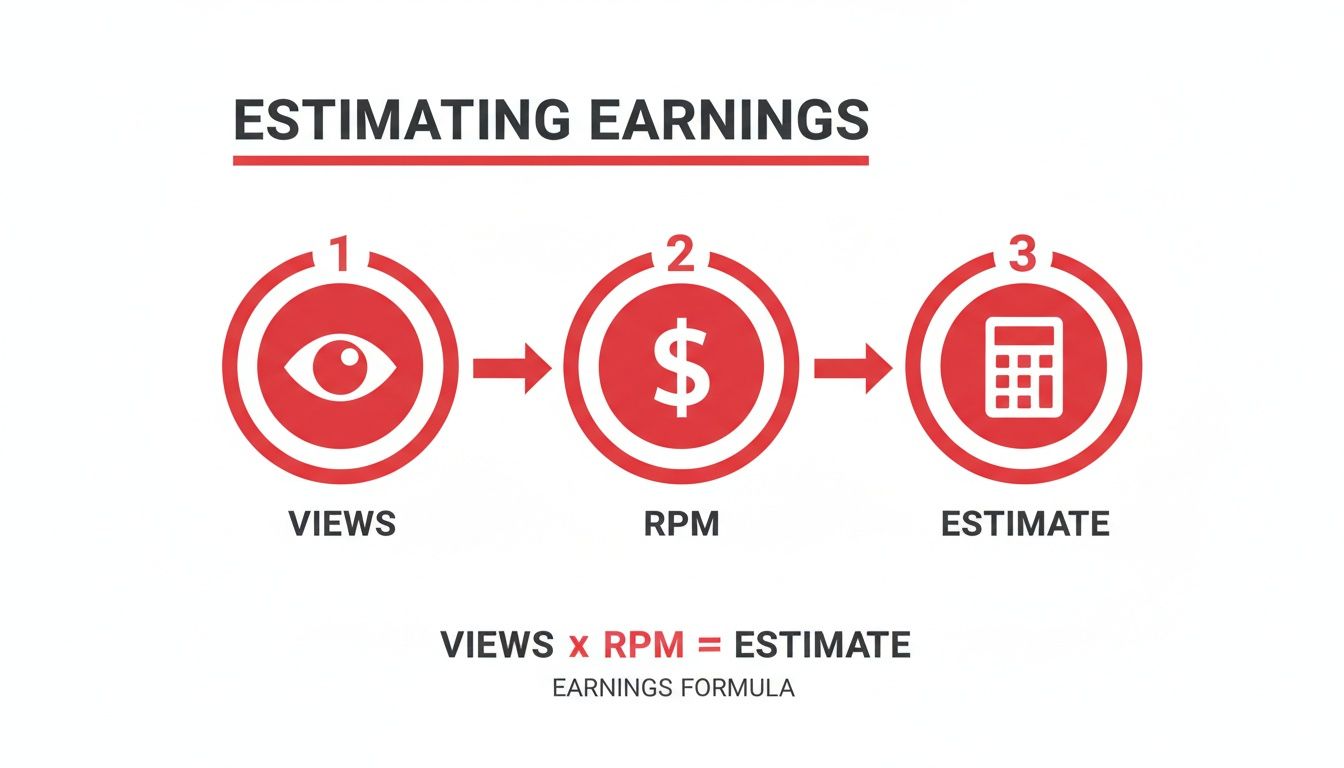
As the infographic shows, it really boils down to your total views multiplied by your channel's specific RPM to get your estimated earnings.
Hitting the Payout Threshold
With all your info verified, there’s just one final milestone before that first payment: the payment threshold. You need at least $100 (or your local equivalent) in your finalized AdSense balance to trigger a payout.
If you have less than $100, don't worry. Your balance just rolls over to the next month and keeps accumulating. Once you finally cross that $100 mark, and as long as there are no holds on your account, AdSense will issue your payment between the 21st and 26th of that month.
To make this monthly flow crystal clear, here’s a timeline of how a typical YouTube payment cycle works.
YouTube Payment Timeline
| Timeframe | Action | Platform | Key Details |
|---|---|---|---|
| Month 1 (e.g., June) | You earn revenue from ads on your videos. | YouTube Studio | This is your estimated revenue. It's not final yet. |
| Month 2 (July 7-12) | Your earnings from June are finalized. | YouTube Analytics | The final, official number for June is calculated. |
| Month 2 (July 12-15) | Finalized earnings are transferred. | AdSense | Your finalized June earnings appear in your AdSense balance. |
| Month 2 (By July 20) | Payment threshold is checked. | AdSense | AdSense confirms your balance is over the $100 threshold. |
| Month 2 (July 21-26) | Payment is issued. | AdSense | The money is sent to your bank account or chosen payment method. |
| End of Month 2 / Start of Month 3 | You receive your money. | Your Bank | Depending on your bank, the funds can take a few days to appear. |
This table shows how the earnings from one month are typically paid out toward the end of the following month.
Important Takeaway: The whole journey—from earning your first dollar to getting that first payout—can easily take a few months. Between the verification steps and hitting the $100 threshold, a little patience goes a long way.
Solving Common Payment Problems
What happens if the end of the month rolls around and your money is nowhere to be seen? Nine times out of ten, it’s because of a payment hold in your AdSense account.
The most common culprits are:
- Missing Tax Info: This is the big one. If you haven't submitted your tax forms, everything stops.
- Incomplete PIN Verification: You forgot to enter that PIN from the postcard Google mailed you.
- No Payment Method Selected: You have to tell Google where to send the money! Make sure you’ve set up a bank account for direct deposit.
The good news is that AdSense makes this easy to spot. Just log in and look for a big red notification bar at the top of the page. It will tell you exactly what the hold is for and give you a link to fix it. Deal with it quickly, and you'll get your money back on track.
Frequently Asked Questions About YouTube Earnings
Diving into the money side of YouTube can feel a bit confusing at first. Let's clear up some of the most common questions creators have when they start tracking their channel's performance.
One of the first things you'll see is that your estimated revenue in YouTube Studio bounces around every single day. This is perfectly normal. It's happening because of daily shifts in ad prices (CPM), where your viewers are watching from, and even the time of year. Just think of it as a running tally that only gets locked in at the end of the month.
Why Is My AdSense Balance Different Than YouTube Studio?
This is probably the number one question I hear. It’s easy to get confused when you see one number in YouTube Studio and a completely different one in your Google AdSense account.
The key is to remember that YouTube Studio gives you estimated revenue as it happens. AdSense, on the other hand, only shows you finalized earnings once everything is processed and confirmed.
For example, all the money you earned in June will be finalized and sent over to your AdSense account sometime between the 7th and 12th of July. This is why AdSense always looks like it's a month behind what you're seeing in Studio.
Key Takeaway: Don't worry if the numbers don't match up. Studio is your day-to-day estimate, while AdSense is the official, finalized monthly total after all the numbers are crunched.
Another thing new creators often ask is whether they get paid for likes or subscribers. The simple answer is no, not directly. Your income on YouTube primarily comes from a few key sources:
- Ad Revenue: This is based on how many people see and interact with the ads on your videos.
- YouTube Monetization Features: Things like Channel Memberships, Super Chats, and Super Thanks allow your audience to support you directly.
- Off-Platform Income: A massive part of a creator's income comes from brand sponsorships and affiliate marketing, none of which shows up in your YouTube Analytics.
So, while likes and subscribers don't put money directly in your pocket, they are crucial for building an audience. A bigger, more engaged audience means more views, and more views mean more opportunities to earn.
Ready to skip the long road to monetization? MonetizedProfiles offers YouTube channels that are already approved for the Partner Program, so you can start earning from day one. Check out our available channels at https://monetizedprofiles.com.


